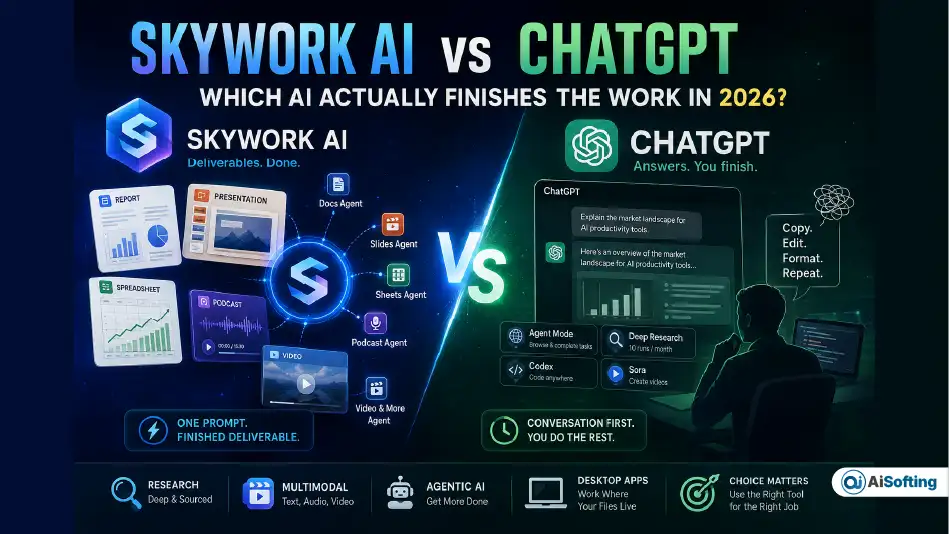
Ask ten people what “using AI” means and most will describe the same thing: opening a chat window, typing a question, and reading an answer. That’s ChatGPT’s world, and it’s still the one most of us live in. But a newer category of tool — Skywork AI being the clearest example — is quietly betting that the chat window itself is the bottleneck. Instead of handing you an answer, it hands you the finished document, slide deck, or spreadsheet.
That difference sounds small until you’ve actually tried to turn a ChatGPT answer into something you can send to a client. Then it stops being small.
This comparison isn’t another feature checklist copied from a pricing page. It digs into what each tool actually costs per task, who’s really building Skywork behind the scenes, and why that second question matters more than most reviews let on. If you’re deciding between Skywork AI vs ChatGPT for real work — not just curiosity — here’s what actually matters.
Quick Comparison: Skywork AI vs ChatGPT at a Glance
| Skywork AI | ChatGPT | |
|---|---|---|
| Core design | AI workspace that outputs finished docs, slides, sheets, podcasts, and video | Conversational assistant with agent and coding features layered on |
| Company | Built by Kunlun Tech with Singularity AI; operates as Skywork.ai, HQ in Singapore | OpenAI, San Francisco, USA |
| Flagship model tier | Proprietary multimodal model + DeepResearch engine | GPT-5.6 (Sol, Terra, Luna tiers) |
| Free plan | Yes, daily credits (amount has changed repeatedly since 2025) | Yes, ads shown in the US, GPT-5.6 Luna, ~10 messages/5 hrs |
| Entry paid plan | ~$19.99/month (~7,000 credits) or ~$149.99/year | $20/month (Plus) |
| Best for | One-shot polished deliverables: reports, decks, sheets, podcasts | Iterative conversation, coding (Codex), day-to-day Q&A, browsing |
| Desktop app | Skywork Desktop (Windows, launched Feb 2026) | Codex-focused desktop and mobile apps |
What Is Skywork AI, Exactly?
Skywork AI launched globally in May 2025 as what its maker called the world’s first AI “Office Agent” — a platform built around what it calls Super Agents, each specialized for one output type: documents, slides, spreadsheets, podcasts, and web pages, with a general agent handling video, images, and music on top. The idea is that you describe an outcome once, and a specialized agent — not a generic chatbot — produces it.
The engine behind this is DeepResearch, which Skywork says can scan hundreds of web sources per task and attach citations in APA, MLA, Chicago, or IEEE style directly to the output. At launch, Skywork’s own materials claimed the #1 spot on the GAIA benchmark (a widely used test of real-world agentic reasoning), ahead of OpenAI’s Deep Research and Manus — a claim worth treating as a vendor benchmark rather than an independently audited one, since third-party numbers on GAIA have shifted depending on who’s testing and when.
In February 2026, Skywork extended this beyond the browser with Skywork Desktop, a Windows-native agent that reads and organizes files directly on your machine instead of requiring uploads to the cloud — a detail most comparison articles published before that date simply don’t cover yet.
What Is ChatGPT, Exactly?
ChatGPT is OpenAI’s flagship product, and as of August 2026 it runs on the GPT-5.6 model family, which OpenAI now splits into three durable capability tiers rather than simple version numbers: Sol (the flagship, built for hard reasoning and long agentic runs), Terra (a lighter, faster workhorse), and Luna (the new default for Free and Go users as of early August 2026).
Beyond chat, ChatGPT now includes Agent Mode (which browses the web and completes multi-step tasks with your approval at each step), Deep Research (multi-step web investigations, capped at 10 runs a month on Plus), Codex for software development, and Sora for video generation. Free-tier users in the US have seen contextual ads in responses since February 2026, a genuinely new development in how OpenAI monetizes casual use.
Skywork AI vs ChatGPT: The Core Philosophical Difference
This is the part most comparisons gloss over. ChatGPT is conversation-first: you get an answer, you refine it, you copy it somewhere else. Skywork AI is deliverable-first: you describe a goal, and the agent assembles a formatted, exportable file — often with sourced data and visuals already in place.
Neither stays fully in its lane anymore. ChatGPT’s Agent Mode and Canvas push it toward finished outputs, and Skywork still lets you chat conversationally with its research agent. But the default posture is different, and that difference decides which tool feels natural for a given task. If you’re mapping out agent-based workflows more broadly, it’s worth understanding what agentic AI actually covers before assuming either tool is “the” agentic AI solution — both are one implementation of a much bigger category.
Feature-by-Feature Comparison
Research Depth
Skywork’s DeepResearch is built to be thorough by default — it’s designed to read broadly, structure findings, and cite sources before it writes a word. ChatGPT’s Deep Research does something similar but is metered tightly: Plus subscribers get 10 runs a month, and each session can take anywhere from 5 to 30 minutes as it works through dozens of sources, per OpenAI’s own documentation.
Documents, Slides, and Spreadsheets
This is Skywork’s home turf. Its “Office Trio” of Docs, Slides, and Sheets agents is built specifically to output polished, presentation-ready files with embedded charts and sourced statistics. Independent testers comparing the two head-to-head on a five-slide investor deck found ChatGPT’s Agent Mode still working after 20–25 minutes without finishing, while Skywork delivered a formatted deck in a fraction of that time — though editing polish and how well either output matches your brand still varies task by task.
Video, Audio, and Multimodal Output
Skywork’s SkyReels feature generates short video drafts, and its podcast agent produces two-speaker, topic-researched audio that several reviewers have called surprisingly strong for a first attempt at the format. ChatGPT leans on Sora for video generation but has no dedicated podcast or multi-speaker audio agent built in.
Agentic Task Execution and Desktop Presence
ChatGPT’s Agent Mode browses, fills forms, and checks in with you at each step — genuinely useful for research and repetitive web tasks. Codex, meanwhile, has become OpenAI’s answer for developers, including a mobile app (launched May 2026) that lets you review and approve coding tasks from your phone.
Skywork took a different route with Skywork Desktop: a local, file-native agent that reads everything on a Windows machine — documents, spreadsheets, images, PDFs — under one semantic layer, without needing to upload it to the cloud first. For anyone whose work already lives in a folder structure rather than a chat history, that’s a meaningfully different starting point.
Pricing Comparison: What You Actually Pay
ChatGPT Pricing in 2026
- Free — $0, GPT-5.6 Luna, ads in the US, ~10 messages per 5-hour window, ~16K token context
- Go — $8/month, higher message caps, no Deep Research or Agent Mode
- Plus — $20/month, GPT-5.6 Sol, 10 Deep Research runs/month, Agent Mode, Sora, Codex, Canvas
- Pro ($100) — 5x Plus limits, 5x Codex usage
- Pro ($200) — 20x Plus limits, 1M-token context, unlimited Sora
ChatGPT’s structure is flat and predictable: pick a tier, know your limits.
Skywork AI Pricing — and Why It’s Genuinely Hard to Pin Down
Here’s something worth saying plainly, because most articles don’t: Skywork’s own pricing figures have changed several times across its own materials. Free-tier credit allowances have been listed as 2,500 credits on signup plus 1,000 daily bonus credits in some official pages, and 500 daily credits (dropping to 500 weekly after the first month) in others. Paid tiers have been quoted at $14.99, $16.99, and $19.99 a month across different Skywork-published sources within the same year, generally converging around $19.99/month for roughly 7,000 credits, or $149.99/year (about $12.50/month).
What’s consistent is the model itself: everything is metered in credits, and there’s no published fixed exchange rate between “one credit” and “one deliverable.” A quick chat reply costs far less than a full DeepResearch report with slides attached — which is logical, but it also means your real monthly cost depends entirely on how heavy your tasks are, and it’s genuinely difficult to budget for in advance without running your own tasks first.
The Real Cost-Per-Deliverable Math
Because Skywork doesn’t publish a per-task rate card, the most honest way to compare cost is to think in deliverables, not dollars. A single in-depth DeepResearch report with slides can burn through a meaningful share of a free daily allowance in one sitting — which is why light users can coast on the free tier for casual work, but anyone producing more than one or two serious deliverables a week tends to land on Pro within the first month.
ChatGPT Plus, by contrast, is a flat $20 regardless of how many chat-based drafts you produce — the real constraint isn’t cost per task, it’s the 10-run monthly cap on Deep Research specifically. If your work is mostly conversational drafting and editing, that flat fee goes a long way. If your work is “give me five finished reports a week,” Skywork’s credit model may actually work out cheaper — but only real usage data from your own account will tell you that, since the public numbers keep moving.
Data Privacy, Governance, and Where Your Work Actually Lives
This is the piece almost no comparison article touches, and it matters more than a feature list for anyone handling client, financial, or regulated data. ChatGPT is built and operated by OpenAI, a US company, with Enterprise and Edu agreements governed under US data-handling frameworks. Skywork is developed by Kunlun Tech, a Chinese technology company, in partnership with Singularity AI, and operates commercially as Skywork.ai with headquarters in Singapore.
That’s not a reason to avoid either tool — plenty of global teams use both without issue. But if your organization has data-residency requirements, client confidentiality obligations, or sits in a regulated industry like finance, healthcare, law, or government contracting, this is a genuine due-diligence item, not a footnote. Before routing sensitive material through either platform, check the current data processing agreement, hosting location, and training-data policy directly with the vendor — not the marketing page, the actual DPA. Skywork does state that uploaded content and query data aren’t used for model training, but “not used for training” and “meets our compliance framework” are two different questions your legal or IT team should answer separately.
Which One Should You Actually Use?
- Fast, iterative conversation, coding, or day-to-day Q&A → ChatGPT, especially with Codex for developers
- A single polished report, deck, or spreadsheet from one prompt → Skywork AI
- Web research with step-by-step human checkpoints → ChatGPT’s Agent Mode
- Recurring, file-heavy work already living on a Windows machine → Skywork Desktop
- Regulated or client-sensitive data of any kind → Confirm the vendor’s current DPA and hosting terms before committing to either
If your business is trying to figure out where AI fits into daily operations more broadly rather than picking one tool, it’s worth stepping back and looking at how to automate workflows without losing the human touch first — the tool choice matters less than knowing which tasks are actually worth automating.
Common Mistakes People Make When Choosing Between Them
Assuming credits work like a monthly quota. Skywork’s free daily credits typically don’t roll over, so unused credits vanish rather than stacking up the way an unused ChatGPT message allowance effectively does within its reset window.
Judging one tool by the other’s strengths. Comparing Skywork’s document output to a raw ChatGPT chat response isn’t a fair test — compare it to what ChatGPT produces through Canvas or Agent Mode instead, since that’s the closer equivalent.
Committing to an annual plan before testing a real task. Given how often Skywork’s own pricing pages have changed, run your actual recurring deliverable — not a demo prompt — before paying for a year upfront.
Ignoring data residency until after sensitive files are already uploaded. Have this conversation with IT or legal before onboarding a team, not after.
Best Practices and Tips for Getting the Most Out of Either Tool
- Try the hybrid workflow. Brainstorm and refine the brief in ChatGPT, where iteration is fast and cheap, then hand the finished brief to Skywork to produce the formatted deliverable. Several teams report this beats forcing either tool to do both jobs.
- Track your credit burn for a week before deciding between monthly and annual Skywork billing — the public pricing pages aren’t reliable enough to plan around blindly.
- Build a brand or template kit in Skywork once, upfront. Reusing it across projects cuts both credit use and editing time significantly.
- Use ChatGPT’s Deep Research runs deliberately. With only 10 a month on Plus, save them for genuinely open-ended research rather than questions you could resolve with a normal chat.
- If you’re already thinking about how your brand or content shows up inside AI answers generally, it’s worth understanding how tools track visibility across ChatGPT, Gemini, and AI search — a separate but increasingly related concern for anyone publishing content today.
Personal Experience: What Actually Happened When I Tested Both
I put both tools against the same brief: a competitive market snapshot for a client pitch, due in about three hours, that needed to end up as a slide deck with sourced statistics.
I started in ChatGPT Plus, using it to brainstorm the angle and pull together a rough outline through normal conversation — genuinely the fastest part of the whole process. Fifteen minutes of back-and-forth got me a structure I was happy with. But when I pushed it toward a finished, presentation-ready deck through Agent Mode, it stalled. It kept researching longer than expected, and by the 20-minute mark I still didn’t have slides I could open in PowerPoint without rebuilding half of them.
I took that same outline into Skywork’s Slides agent. It came back with a formatted, six-slide deck in under ten minutes, complete with a small citations panel under each data point. It wasn’t perfect — two of the sourced statistics needed a manual double-check, and the default color theme didn’t match the client’s branding — but it was a genuinely usable starting point, not a wall of unformatted text.
What surprised me more than the speed was the credit anxiety. Watching a number tick down while a task runs changes how you use a tool. I found myself trimming prompts and hesitating before re-running a report, in a way I never do with ChatGPT’s flat monthly fee. That’s not a criticism of Skywork’s output — it’s a real behavioral difference worth knowing before you commit a team to it. My actual lesson from that afternoon: I don’t use one tool anymore. Ideas and iteration happen in ChatGPT; the client-facing deliverable gets built in Skywork. Picking a single winner missed the point — the two tools are solving different halves of the same problem.
Frequently Asked Questions
Is Skywork AI better than ChatGPT?
Neither is universally better — they’re built for different jobs. Skywork AI tends to win when the goal is a finished, formatted deliverable like a report or slide deck. ChatGPT tends to win for fast conversation, coding through Codex, and open-ended brainstorming.
Is Skywork AI free to use?
Yes, Skywork offers a free tier with daily credits, though the exact allowance has changed across Skywork’s own published materials, so it’s worth checking the current amount directly on skywork.ai before relying on it for planning.
Who owns or makes Skywork AI?
Skywork AI is developed by Kunlun Tech in partnership with Singularity AI, and operates commercially as Skywork.ai, headquartered in Singapore.
Can Skywork AI replace ChatGPT completely?
For most people, no — Skywork isn’t built for fast, casual conversation or coding the way ChatGPT is. It’s better understood as a complement for deliverable-heavy work rather than a full replacement.
Does Skywork AI have a desktop app?
Yes. Skywork Desktop launched globally for Windows in February 2026, letting the agent read and organize local files directly on your machine without a cloud upload first.
Is Skywork AI safe to use with business or client data?
Skywork states that uploaded content isn’t used to train its models, but “safe” for regulated or sensitive data depends on your organization’s specific compliance requirements. Review the current data processing agreement and hosting terms before uploading anything confidential.
What’s the real difference between Skywork AI and ChatGPT’s Agent Mode?
ChatGPT’s Agent Mode browses the web and completes tasks with your approval at checkpoints along the way, staying closer to a supervised assistant. Skywork’s Super Agents are built to go straight to a finished, formatted output — a report, deck, or spreadsheet — with less step-by-step interaction required.
Can I use Skywork AI and ChatGPT together?
Yes, and many people effectively already do. A common workflow is using ChatGPT for research, drafting, and iteration, then handing the finished brief to Skywork to generate the polished, exportable deliverable.
Conclusion: The Real Takeaway
The Skywork AI vs ChatGPT question isn’t really about which chatbot is smarter — both are built on genuinely capable models. It’s about what you need at the end of the session: an answer you’ll shape yourself, or a file you can send as-is. ChatGPT still wins on flexibility, coding, and predictable flat pricing. Skywork wins when the job is a formatted deliverable and you’re willing to manage a credit meter to get there faster.
Actionable next steps:
- Run your actual recurring task — not a demo — on both free tiers before paying for either
- If your work is mostly conversational or code-heavy, start with ChatGPT Plus
- If you regularly need finished reports, decks, or sheets, test Skywork’s Slides or Docs agent specifically
- Before uploading anything sensitive to either platform, confirm the current data processing terms with your IT or legal team
- Consider the hybrid approach — brainstorm in one, deliver in the other — rather than forcing a single tool to do both jobs
For more hands-on AI tool breakdowns like this one, browse the Artificial Intelligence section for ongoing reviews and comparisons.