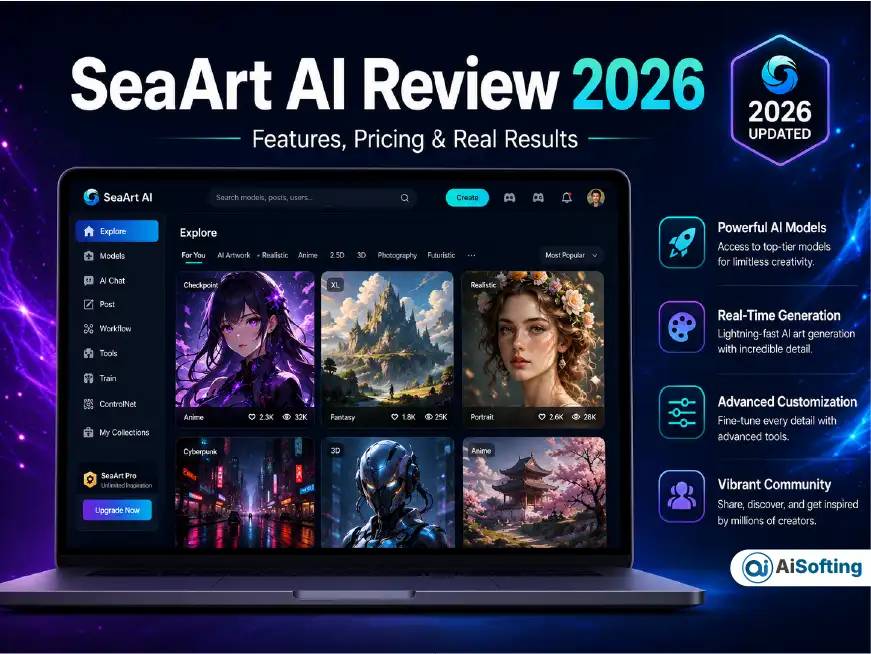
If you’ve spent any time browsing AI art communities lately, you’ve probably run into the name SeaArt AI at least once. It shows up in Discord servers, Reddit threads about anime-style generation, and “best free AI image generator” roundups everywhere. But most of those articles read like they were written from a press release, not from someone who actually burned through their daily credits trying to get a usable image.
I’ve spent real hours inside SeaArt AI — testing the free tier, poking at LoRA training, running face swaps, and reading through the fine print most people skip. This article covers what actually matters: what SeaArt AI is, how it really works day to day, where it beats competitors like Midjourney and Leonardo AI, and where it quietly falls short — including a copyright and licensing angle that almost nobody else is talking about clearly.
What Is SeaArt AI?
SeaArt AI is a cloud-based, all-in-one AI creative platform built by SUNRISEAI PTE. LTD., a company based in Singapore. Rather than doing one thing well, SeaArt tries to be a full creative hub — image generation, video generation, face swapping, LoRA training, background removal, upscaling, and even AI character chat, all under one roof.
Instead of building every model in-house, SeaArt takes an aggregator approach: it plugs in dozens of third-party and community models — including Stable Diffusion variants, FLUX, Seedance, GPT Image, Kling, and WAN — and lets users pick from a massive menu rather than being locked into one house style. This is arguably SeaArt’s biggest structural advantage over closed platforms like Midjourney, which controls its entire pipeline end to end.
Core Features at a Glance
- Text-to-Image & Image-to-Image — Standard prompt-based generation, with negative prompts, style references, and adjustable prompt adherence.
- LoRA Training — Train a custom lightweight model using as few as 20–30 reference images, well below the 100+ images many competing platforms require.
- ComfyUI in the Cloud — Advanced node-based workflows without needing a local GPU rig.
- Face Swap — Swap faces across images and short videos using a reference face shot.
- Video Generation — Access to models like Kling and WAN for image-to-video and text-to-video clips.
- AI Character Chat (Cyberpub) — Create and talk to AI personas with memory, separate from the art-generation side of the platform.
- Community Marketplace — A public gallery where creators publish, remix, and even monetize their own trained models.
The Energy System: How SeaArt AI Pricing Actually Works
This is where a lot of reviews get vague, so let’s be precise. SeaArt doesn’t charge per image the way some tools do — it runs on an energy economy. Every generation, video render, and even every AI character chat message consumes energy from a daily or monthly pool.
- Free tier: around 130 energy per day, refreshed daily, enough for casual testing but not for serious volume work.
- Paid tiers: roughly €12–€52 per month depending on plan, unlocking anywhere from 1,800 to 12,000 energy per day, watermark-free exports, and faster generation queues.
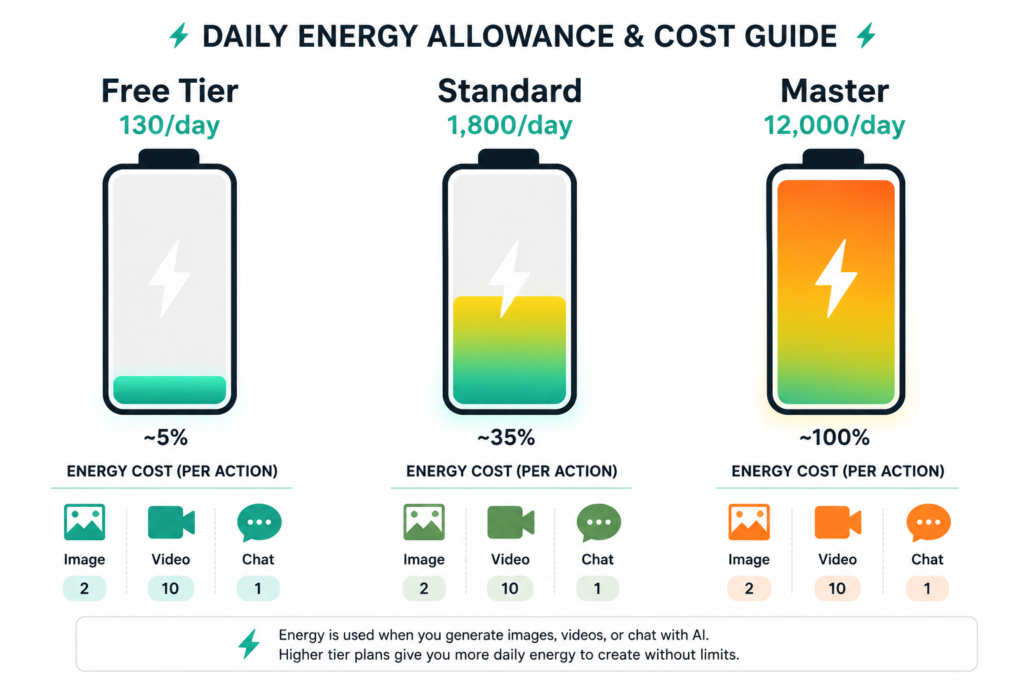
The practical implication most articles skip: heavy video generation and high-resolution renders drain your daily energy far faster than a simple 512px image. If your goal is bulk video content, the free tier will feel restrictive within minutes, not hours. If you mainly want stylized still images, the free daily refresh is genuinely generous compared to many competitors that gate almost everything behind a paywall.
SeaArt AI vs Midjourney vs Leonardo AI
| Factor | SeaArt AI | Midjourney | Leonardo AI |
|---|---|---|---|
| Model variety | Huge (700,000+ community + official models) | Single proprietary model family | Curated, moderate variety |
| LoRA training | Yes, low image requirement | No native support | Limited |
| Video generation | Yes (Kling, WAN) | No | Limited |
| Photorealism | Good, not best-in-class | Industry-leading | Strong |
| Best for | Anime, stylized art, volume, experimentation | Photorealistic, artistic polish | Consistent character/product work |
If raw photorealistic polish is your priority, Midjourney still edges ahead. If you want the widest variety of styles, character consistency tools, and video in one subscription, SeaArt is hard to beat on value.
This “aggregator over single-model” approach isn’t unique to image generation, either. We saw a similar pattern play out on the API side in our Kie AI review, where bundling access to multiple underlying models under one platform came with its own trade-offs between cost savings and reliability.
The Copyright Angle Nobody Explains Clearly
Here’s the part most SeaArt AI articles either skip entirely or get slightly wrong, and it’s genuinely important if you plan to use outputs commercially.
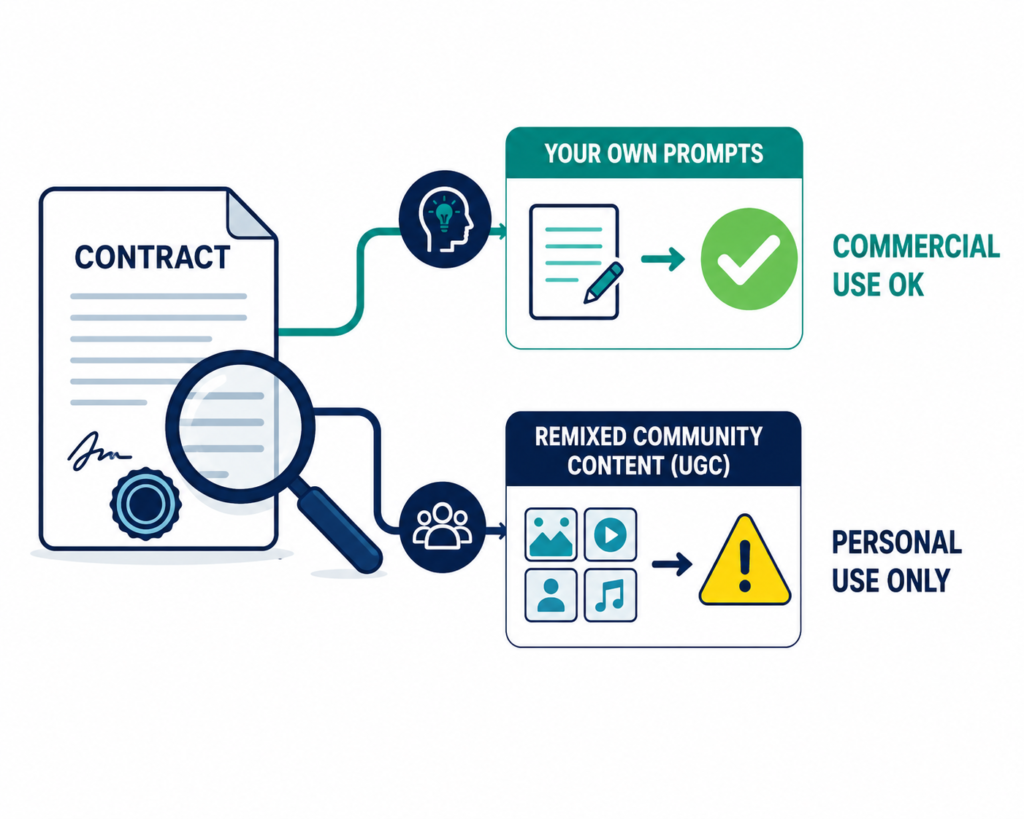
According to SeaArt’s own FAQ documentation, the intellectual property rights to content you personally generate belong to you, and the platform doesn’t prohibit commercial use of your own work. But that comes with a real catch: if you build on someone else’s published work as a base, style reference, or LoRA training input, you’re required to get authorization from the original owner, and SeaArt explicitly states it takes no responsibility for risks tied to commercial use.
This matters more on SeaArt than on closed platforms because of its community-driven structure. Thousands of models and styles on SeaArt were trained by other users, sometimes on datasets of uncertain origin. When you generate an image using a community-uploaded LoRA or model, you’re not just relying on SeaArt’s terms — you’re also inheriting whatever legal ambiguity exists around how that specific model was trained.
There’s a second layer too, buried in SeaArt’s Terms of Service: content downloaded or remixed from other users (labeled “User Generated Content” or UGC) is restricted to personal, non-commercial use unless the original creator explicitly grants broader rights. In practice, that means:
- Content you generate from scratch with your own prompts → generally fine for commercial use, at your own risk.
- Content you download, remix, or build on top of from another SeaArt user’s public post → personal use only, by default.
Almost no other SeaArt review draws this distinction clearly, and it’s the single most important thing to understand before using SeaArt output in client work, merchandise, or paid content.
Common Mistakes People Make on SeaArt AI
- Burning energy on trial-and-error prompts. Write a tighter prompt first, then iterate — don’t spray-and-pray with your daily allowance.
- Assuming every model is commercially safe. Community LoRAs vary wildly in training-data quality and licensing clarity.
- Ignoring the watermark on free-tier exports. If you plan to publish anywhere professional, budget for a paid tier.
- Skipping ControlNet for pose-critical work. Many new users default to plain text prompts and get frustrated with inconsistent character poses, when ControlNet solves this directly.
- Not reading the model card before training a LoRA. Reference image quality and consistency matter far more than quantity.
Tips and Best Practices
- Use negative prompts aggressively — SeaArt supports them well, and they cut down on wasted energy from bad generations.
- For character consistency across a project, train a small LoRA early rather than re-prompting from scratch every time.
- Reserve ComfyUI workflows for repeatable production pipelines, not one-off experiments — it has a learning curve that isn’t worth it for casual use.
- If you’re testing the platform, do image generation on the free tier first before committing energy to video, since video renders consume credits much faster.
Personal Experience: What Surprised Me About SeaArt AI
I went into SeaArt AI expecting another Stable Diffusion wrapper with a fresh coat of paint. What actually surprised me was how differently it behaves depending on what you’re trying to do.
For anime and stylized character work, it genuinely outperformed my expectations — better than several paid tools I’ve tried for consistent character faces across multiple poses. The LoRA training process took me under an hour with 25 reference photos, and the resulting model held facial consistency noticeably better than a similar attempt I made previously on a different platform using twice as many images.
Where I ran into friction was video. I generated a 5-second clip using one of the video models, and it quietly consumed nearly a third of my daily energy in one shot. That’s not a dealbreaker, but it’s the kind of detail that isn’t obvious from the marketing page, and it changed how I planned my testing for the rest of the day.
The other thing that stood out: the community model marketplace is a double-edged sword. It’s fantastic for variety — you’ll find a style for almost anything — but I also came across a handful of models with vague or missing attribution about their training data. I stuck to well-reviewed, clearly documented models for anything I intended to reuse, and I’d recommend the same caution, especially if commercial use is on the table.
My honest takeaway after using it seriously for a couple of weeks: SeaArt AI earns its reputation as a genuinely versatile, budget-friendly platform, but it rewards users who read the fine print and manage their energy budget deliberately — not people expecting an unlimited, no-questions-asked creative firehose.
Frequently Asked Questions
Is SeaArt AI free to use?
Yes. SeaArt AI offers a free tier with a daily energy allowance (roughly 130 energy per day) for image generation, LoRA testing, and other core features. Paid plans remove watermarks and increase daily limits.
Is SeaArt AI safe to use?
The platform itself is generally considered safe for account use, though like most community-driven AI platforms, users should be cautious about which third-party models they use for commercial projects due to unclear training-data provenance on some community uploads.
Can I sell images I make on SeaArt AI?
You generally own the IP rights to content you personally generate and can use it commercially, but you’re responsible for confirming rights when your generation is based on someone else’s work, model, or style. Community-remixed content (UGC) defaults to personal, non-commercial use unless the original creator grants broader permission.
How is SeaArt AI different from Midjourney?
SeaArt offers a far broader model library, LoRA training, and native video generation, while Midjourney focuses on a single, tightly controlled model line known for polished, photorealistic output. SeaArt wins on variety and value; Midjourney often wins on raw image polish.
Does SeaArt AI have a mobile app?
Yes, SeaArt AI is available on iOS and Android in addition to the browser version, though advanced features like ComfyUI and full LoRA workflows are best experienced on desktop.
What is Cyberpub on SeaArt AI?
Cyberpub is SeaArt’s AI character chat feature, letting users create and interact with custom AI personas that retain memory across conversations. It runs on the same energy system as image and video generation.
How much does SeaArt AI Pro cost?
Paid plans generally range from around €12 to over €50 per month depending on the tier, with higher tiers unlocking significantly larger daily energy pools and faster processing.
Can I train my own AI model on SeaArt?
Yes. SeaArt supports LoRA training with as few as 20–30 reference images, which is lower than many competing platforms that require 100 or more images for similar results.
Is SeaArt AI good for beginners?
The core text-to-image and template-based tools are beginner-friendly. Advanced features like ComfyUI have a steeper learning curve and are better suited to more experienced users.
Conclusion: Should You Use SeaArt AI?
SeaArt AI has genuinely earned its spot among the more talked-about AI art platforms of 2026, not through hype, but through sheer feature density: image generation, video, LoRA training, face swap, and character chat, all inside one subscription. It’s an especially strong pick if you want stylistic variety, want to train your own custom model without a huge reference library, or simply want more creative range per dollar than Midjourney or Leonardo AI typically offer.
The trade-offs are real, though. The energy system rewards planning over impulsive generating, video eats your daily budget fast, and the community-model ecosystem means you need to do a little homework before using certain styles commercially.
Actionable takeaways:
- Start on the free tier and test image generation before committing to a paid plan.
- Budget your energy — video and high-res renders cost far more than standard images.
- Stick to well-documented community models if commercial use matters to you.
- Train a LoRA early if character consistency is central to your project.
- Read the platform’s Terms of Service before publishing remixed community content commercially.
Used deliberately, SeaArt AI is one of the most versatile AI creative platforms available right now — just go in with your eyes open about how the energy economy and community licensing actually work.
If you’re weighing SeaArt against other niche AI tools before committing a subscription budget, our breakdown of Suno vs Udio follows a similar side-by-side approach for the AI music space, and is worth a read if you’re building out a broader AI creative toolkit rather than picking just one platform.