Fifty free credits a day sounds generous until you do the math. At the rate Scenario uses in its own help center example, about 5 credits per image, that is roughly 10 images a day, with some models and tools off limits.
Scenario AI (scenario.com) is a browser-based and API-driven platform from Scenario Inc. It generates images, video, 3D and audio, and it can train custom models on your own art so new assets match your style. As of November 2026 there is a free plan, paid plans start at $15 a month ($10 on annual billing), and custom model training starts on the $45 Pro plan ($30 annual). This guide covers what you will actually pay, where the limits sit, and what the terms mean for ownership and privacy.
Which “Scenario AI” do you mean?
This guide covers scenario.com. The name is shared by several unrelated products, which is why search results get messy.
| Name you may see | What it is | Same as scenario.com? |
|---|---|---|
| Scenario (scenario.com) | Creative AI platform for game, marketing and media assets, run by Scenario Inc. | Yes, this article |
| scenario.gg | Older domain for the same product, still used in many directories and in the company’s social handle | Yes, but use scenario.com |
| Scenario by LangWatch | Open-source framework for testing AI agents with simulated users | No |
| “AI scenario planning” tools | Finance and strategy software that models what-if forecasts | No |
| Leonardo.Ai | Separate AI art platform for game assets, acquired by Canva in 2024 | No |
One misconception is worth clearing up. Some directory pages place “acquired by Canva” next to Scenario’s listing. That refers to Leonardo.Ai, which Canva bought in 2024, according to TechCrunch. No announcement of Canva acquiring Scenario turned up during research.
Is Scenario worth it? The short verdict
Scenario is worth it if you already have a defined art style and need a lot of assets that match it. It is overkill if you want a handful of one-off images.
| Best fit | Studios and solo developers with an existing art direction; marketing teams that need on-brand volume |
| Weak fit | Casual users who want a few quick pictures; anyone who needs a flat, predictable monthly bill |
| Cheapest plan with custom model training | Pro, $45 monthly or $30 on annual billing |
| Commercial use | Paid plans; Free outputs are limited to personal and evaluation use |
| Biggest catch | Credits expire monthly, and training can cost thousands of credits |
Nothing here is a score. The verdict rests on published plan limits, terms and documentation, not on a hands-on trial.
How much does Scenario AI cost?
Scenario charges a subscription that includes a monthly pool of compute units (CUs), the credits that pay for every generation, edit and training run. According to Scenario’s official pricing help page as of November 2026:
| Plan | Monthly price | Annual billing (per month) | Included CUs | Storage | What stands out |
|---|---|---|---|---|---|
| Free | $0 | n/a | 50 per day | not listed | 1 seat, 1 project, no commercial use, no API |
| Starter | $15 | $10 | 1,500 | 50 GB | API access, background removal, vectorizing, pixelating |
| Pro | $45 | $30 | 5,000 | 500 GB | Custom model training, Canvas, Relax mode, 10% compute discount |
| Max | $75 | $50 | 10,000 | 1 TB plus 1 TB per seat | Multi-user workspaces, seats from $30 a month, 20% compute discount |
| Enterprise | from $125 per user | custom | custom | 10 TB plus 1 TB per extra seat | SSO and SOC 2 add-ons, 30% compute discount, pay-as-you-go option |
Annual billing saves 33% on every plan. Enterprise is described differently across Scenario’s own pages, one citing a per-user starting price and another a custom quote, so treat it as a sales conversation.
What the money buys in practice
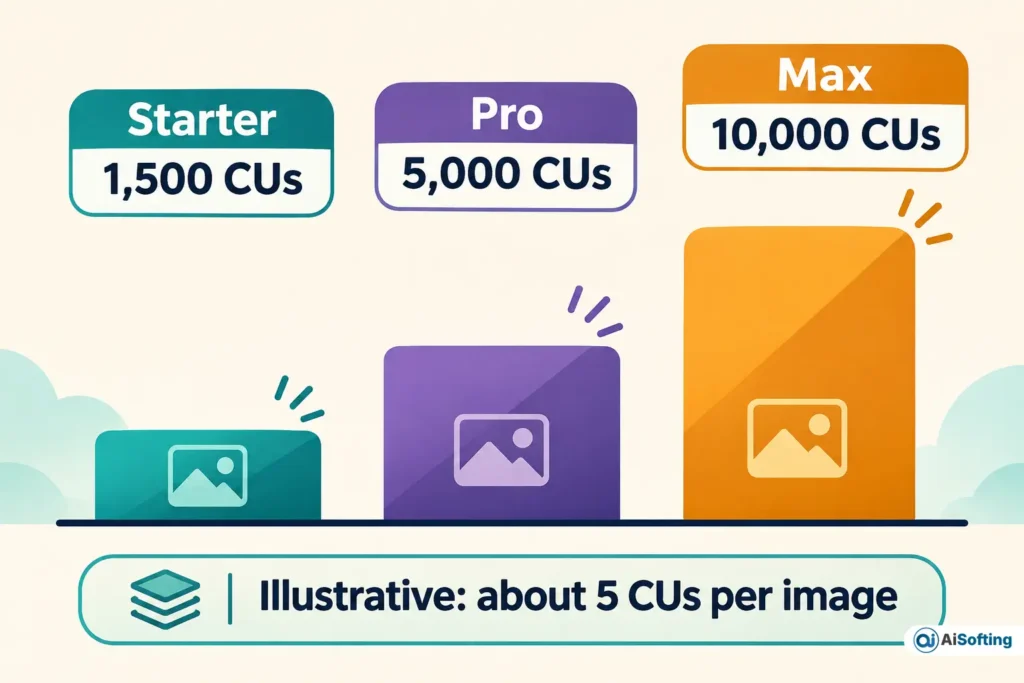
The official help center gives two example costs: a Flux image might use about 5 CUs, and an upscale about 15. A separate help article puts image generation at roughly 2 to 15 CUs depending on the model. The table below applies that range to each plan. These are illustrative, since real costs vary by model.
| Plan | Cost per year, monthly billing | Cost per year, annual billing | Saved | Images at 2 CUs | Images at 5 CUs | Images at 15 CUs |
|---|---|---|---|---|---|---|
| Starter | $180 | $120 | $60 | 750 | 300 | 100 |
| Pro | $540 | $360 | $180 | 2,500 | 1,000 | 333 |
| Max | $900 | $600 | $300 | 5,000 | 2,000 | 666 |
At 5 CUs per image, annual billing works out to about 3 cents per image on Starter and Pro and 2.5 cents on Max, before the Pro and Max compute discounts.
I could not find official per-job CU costs for video or 3D. Scenario’s homepage says workflow apps show the cost before you run them, and the training screen shows the cost on the Start Training button.
Is Scenario AI free?
Yes, with real limits. The Free plan gives 50 CUs per day, resetting at 00:00 UTC, with no credit card required.
It also means one seat, one project, up to two images per generation, and one generation at a time. Some models carry a crown badge and need a paid plan. Background removal, vectorizing, texture generation, reframing, pixelating and uploading your own models need Starter or higher. Canvas and model training need Pro. API keys do not work on Free.
What most people miss: 50 credits a day adds up to 1,500 over 30 days, the same number Starter includes. The difference is that Free credits vanish each night, so only a daily habit collects them all. Free also excludes commercial use and Relax mode, and you cannot buy extra credits on it. On the Free plan, data is kept for 30 days before it is staged for deletion.
How does custom model training work?
Training is the feature that sets Scenario apart. You upload reference images, and Scenario trains a LoRA (a small add-on model) so new images follow that style or character. It needs a Pro, Max or Enterprise plan.
- Choose the plan and gather images. The minimum is 5 images with a shortest side of at least 700 pixels. Scenario recommends 10 to 15 consistent, varied images at 1024×1024 or higher for beginners.
- Pick a base model. Open Train, then New Model. Flux 2 is the default for new style models, with Dev for hero work, Klein 9B for production and Klein 4B for fast iteration. Z-Image and Qwen Image 2512 are the other current families.
- Fix the captions. For style models, describe what is in each image, not the style itself. Auto-captions tend to be generic, so edit them.
- Fill in four test prompts. All four are required, and they should cover very different subjects.
- Check the cost, then train. Defaults are learning rate 5e-5, rank 64, batch size 1, 20 repeats and 20 epochs. Training typically takes 30 minutes to 2 hours.
- Compare epochs. The last epoch is the default, but earlier ones are often better.
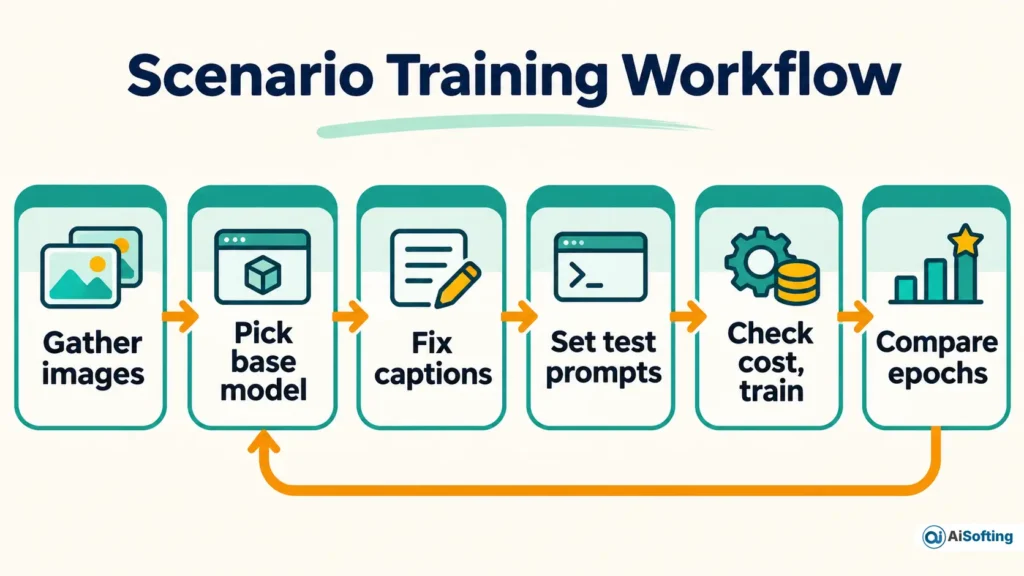
Image caps depend on your plan: 25 on Pro, 50 on Max and 100 on Enterprise. Some third-party pages describe training on “5 to 100” or “10 to 50+” images without mentioning that Pro stops at 25.
Training also costs credits. The current help article says it “varies widely” from a few hundred to several thousand CUs, depending on the base model, dataset size and epochs. An older version of that same article said 100 to 500, and some blog posts still repeat that figure. At the top of the range, one run could use a large share of a Pro month’s 5,000 CUs, so read the cost on the Start Training button first.
| Symptom | Likely cause | Fix |
|---|---|---|
| Training will not start | Plan below Pro, fewer than 5 images at 700 px or more, or an empty test prompt | Upgrade, use Enhance 2x on small images, fill all four test prompts |
| Outputs mix several looks | Dataset combines styles | Train styles separately |
| Outputs repeat training compositions | Overfitting | Choose an earlier epoch and remove near-duplicates |
| Style barely shows | Underfitting | Try a later epoch or add more varied subjects |
| Style tied to specific words | Captions described the style | Rewrite captions to describe content only |
Can you use Scenario assets commercially?
On a paid plan, yes, with caveats. Scenario’s FAQ says generations from its public foundation models, platform models and tools are cleared for commercial use, and Free outputs are for personal and evaluation use only.
Its Terms (version 2.1.1, last updated July 16, 2026) say you own your generated assets and may sell or license them. They also say Scenario does not guarantee that any output is unique, original or non-infringing, and makes no representation about copyright protection. You also agree to indemnify Scenario against claims tied to your content and your generated assets. If you train a custom model, you are solely responsible for having the rights to your training images.
What US creators should know. Owning an asset under a vendor’s contract is not the same as holding a copyright. In a report issued January 29, 2025, the U.S. Copyright Office concluded that prompts alone do not give users enough control to count as authors of AI output. It said human-made inputs, and human modification or arrangement of outputs, can qualify case by case. On March 2, 2026, the Supreme Court declined to hear Thaler v. Perlmutter, leaving the human-authorship requirement in place.
For a game, that means purely AI-generated sprites may carry no copyright, so copying them could be hard to stop. Keep records of your hand edits and original inputs.
Steam. Valve’s Steamworks Content Survey asks developers to disclose AI-generated content in two buckets: pre-generated (made during development and shipped) and live-generated (created while the game runs). Valve has revised its wording since 2024, so check the current survey before you submit.
Is your art private and safe?
Mostly, but the answer depends on your plan. Scenario says everything you generate or upload is private by default, visible only to members of the project, and that custom models are private to your organization. Its data is stored on AWS in the United States, and it states SOC 2 Type II certification and participation in the EU-U.S. Data Privacy Framework. These are vendor claims.
Three details are easy to miss:
- Self-serve plans and training. The footer says “No data reuse,” but the Terms say self-serve users’ content and anonymized insights may be used to improve the services and Scenario’s AI, though never sold or shared with other customers. The full no-training guarantee applies to Enterprise customers with a signed agreement.
- Third-party models. When you generate with a model from a provider such as OpenAI or Google, your prompt and input images go to that provider. Only Enterprise organizations can restrict generation to models whose providers are contractually barred from retaining or training on inputs.
- No trash can. A deleted image, video or 3D model cannot be restored. Download what you want to keep first.
Other terms worth knowing: users must be 16 or older, fees are generally non-refundable, plans auto-renew, add-on credits are non-refundable, and Scenario gives 30 days’ notice of price increases. Seats cannot be shared. Sexually explicit content and unconsented deepfakes of real people are prohibited.
What changed recently?
Scenario has moved from a “game asset generator” to a broader creative platform, and its documentation has changed with it. Dates below are when the pages were read, unless a date is shown.
| When | Change |
|---|---|
| Jul 16, 2026 | Terms updated to version 2.1.1, with separate language for self-serve and Enterprise data use, plus rules on the credit “cooldown” |
| As of Nov 2026 | SDXL and Flux.1 Dev are legacy. Existing models still generate, but new training should use Flux 2, Qwen Image or Z-Image. Merging and Compose work only on Flux 1 models |
| As of Nov 2026 | Bria and Krea were removed from the training picker |
| As of Nov 2026 | API access is on every paid plan from Starter up. An earlier version of the same help article said Pro and above |
| As of Nov 2026 | Training cost is “a few hundred to several thousand CUs.” Earlier text said 100 to 500 |
| As of Nov 2026 | Homepage lists 750+ models from 50+ providers. Third-party pages still cite 500, 550, 600 or 650 |
| As of Nov 2026 | The official FAQ lists the web platform and API. Older help pages mention iOS and Android apps and say 3D is unsupported, which is outdated since the FAQ now confirms 3D generation |
The Scenario Blender plugin is labeled experimental on the homepage.
Common mistakes
- Buying Starter to train a model. Training starts at Pro.
- Treating “unlimited after credits” as a promise. On Pro and above, running out starts Relax mode in the web app, where jobs run with a wait. The Terms call a similar cooldown a courtesy that Scenario may change or remove, and they prohibit scripting around it.
- Mixing styles in one dataset. Train them separately.
- Describing the style in captions. Describe the content.
- Using Free outputs in a shipped product. Free is for personal and evaluation use.
- Migrating old models without a plan. Moving to Flux 2 means losing merge and Compose.
- Assuming credits carry over. They do not, except purchased add-on credits, which last one year.
Which plan fits you? A quick check
This table is an illustrative decision aid built from the verified limits above.
| Your situation | Look at | Why |
|---|---|---|
| Curious, a few images a week | Free | 50 CUs daily, no card, not for commercial use |
| Need commercial images and tools like background removal or API, no custom model | Starter | Lowest paid tier with those tools |
| Need your own style or character | Pro | First plan with training |
| Several artists sharing credits | Max | Multi-user workspaces, seats from $30 a month |
| Need SSO, spend caps or a no-training contract | Enterprise | Contract-level data terms |
Who should use it, and who should skip it
Use Scenario if you have a defined art bible, ship content regularly, and can spend time curating datasets and comparing epochs. It also suits teams that want models, workflows and an API in one place, including Scenario’s MCP server and Unity plugin.
Skip it if you only need occasional images, want a flat bill, or have no original art to train on. Scenario learns from your art, so if you do not have any, a human-made starting set from custom graphic design services may come first. Marketing teams comparing tools can also look at AI banner maker tools for business. For a consumer-style art generator, see our SeaArt AI review. It also helps to know what generative AI is actually good for before you pay for volume.
Myth vs fact
| Myth | Fact |
|---|---|
| Canva owns Scenario | Canva acquired Leonardo.Ai in 2024; no Scenario acquisition was found |
| My uploads never train anything | Self-serve Terms allow use to improve the services and AI; Enterprise contracts add a no-training guarantee |
| Anything I generate is mine to copyright | Scenario assigns you its rights, but US law still requires human authorship |
| Credits roll over | They do not |
How to check this yourself
- Open the pricing page and toggle Monthly and Annual to confirm today’s prices.
- In the app, read the credit cost on the Start Training button before launching.
- Use Settings, Organization, Compute planner to estimate monthly use.
- Open a model’s card to see its provider and license terms.
- Read Sections 4.5 and 4.6 of the Terms before relying on the output commercially.
FAQs
Is Scenario AI free to use?
Yes, the Free plan gives 50 CUs per day with no credit card. It excludes commercial use, the API, Canvas, training and several tools.
Can I train a model on the Starter plan?
No. Training and Canvas need Pro or higher. Starter does include API access.
Do unused credits roll over?
No. Plan credits renew monthly and expire. Purchased add-on credits last one year.
Does Scenario have a mobile app?
Scenario’s current FAQ lists only the web platform and the API. Older directory pages mention iOS and Android apps, so confirm in your own app store before assuming one exists.
Who owns what I generate?
Under the Terms you own your generated assets and custom models. That does not guarantee copyright protection, which in the US depends on human authorship.
Is it safe for client work?
Scenario states SOC 2 Type II certification, private-by-default content and a US data location. For strict confidentiality, the Enterprise terms are the ones that add a contractual no-training promise.
Can I export my trained model?
The FAQ says yes, from the model page. The Terms say you may not extract or download the underlying model weights. Ask support before you rely on portability.
Conclusion
Scenario is a serious production tool, not a casual image toy. Its strength is custom training on a defined style, and its costs are credits that expire and training runs that can be expensive.
- Budget for Pro if you want your own models.
- Check the CU cost before every training run.
- Treat AI-only output as possibly unprotectable in the US, and keep proof of human input.
- Keep sensitive client material on terms that match your needs.
Next step: open the pricing page, use the free credits for a week on a real brief, and read the cost on the Start Training button before you commit to Pro.
Related: AI slop and content fatigue in 2026
Disclaimer
This article is for informational purposes only. It is not affiliated with, sponsored by or endorsed by Scenario or any brand mentioned. Prices, features and policies may change. Information last verified on November 1, 2026. This is not legal advice, so consult a qualified professional about copyright and licensing. AI output can be inaccurate.