Otter’s free plan gives you 300 transcription minutes a month, but it cuts each conversation off at 30 minutes. That means a standard hour-long meeting already exceeds the free limit.
This guide covers what Otter AI does in November 2026, what each plan costs, where the limits and privacy risks are, and who should skip it.
Short answer: Otter AI is a meeting notetaker that transcribes, summarizes and extracts action items. It has a free plan, and Pro costs $16.99 a month or $8.33 a month billed annually. It suits people with mostly sub-90-minute calls. The main risk is not accuracy but consent: Otter is the defendant in a pending privacy class action.
Otter AI at a glance (as of November 2026)
| Question | Answer, per Otter’s own pages |
|---|---|
| Free plan? | Yes. 300 minutes a month, 30 minutes per conversation, 3 lifetime file imports |
| Paid plans (US) | Pro $16.99/month or $8.33/month billed annually; Business $30 or $19.99 per user; Enterprise is custom |
| Biggest hidden limit | Pro caps meetings at 90 minutes and a workspace at 5 billed users |
| Privacy catch | The privacy policy (effective June 16, 2026) allows training Otter’s AI on de-identified recordings and transcripts |
| Legal status | A proposed privacy class action is pending; no court has ruled that Otter broke the law |
Verdict: Try the free plan on short calls first. Pay only after you’ve checked the length cap, who will be on your calls, and your state’s recording rules. I’m not giving a numeric score because I did not run a hands-on accuracy test.
Is Otter AI free?
Yes. The Basic plan is free with no time limit, but it is a taster. In our check of Otter’s pricing page on November 3, 2026, Basic included:
- 300 monthly transcription minutes (no rollover)
- 30 minutes maximum per conversation
- 3 lifetime audio or video file imports
- 25 most recent conversations in your history
- 20 AI Chat questions a month, 3 per conversation
- 5 custom vocabulary terms
- Exports as mp3 and txt only
300 minutes is five hours a month. In a 22-working-day month that averages about 14 minutes a day (illustrative arithmetic).
What most people miss: the “3 lifetime” import limit never resets. If you plan to upload recorded interviews or lectures, the free plan is nearly useless for that, while Pro allows 10 imports a month.
How much does Otter AI cost?
Otter AI Pro is $16.99 per user a month, or $8.33 a month billed annually. Business is $30 monthly or $19.99 per user billed annually. Enterprise has no public price.
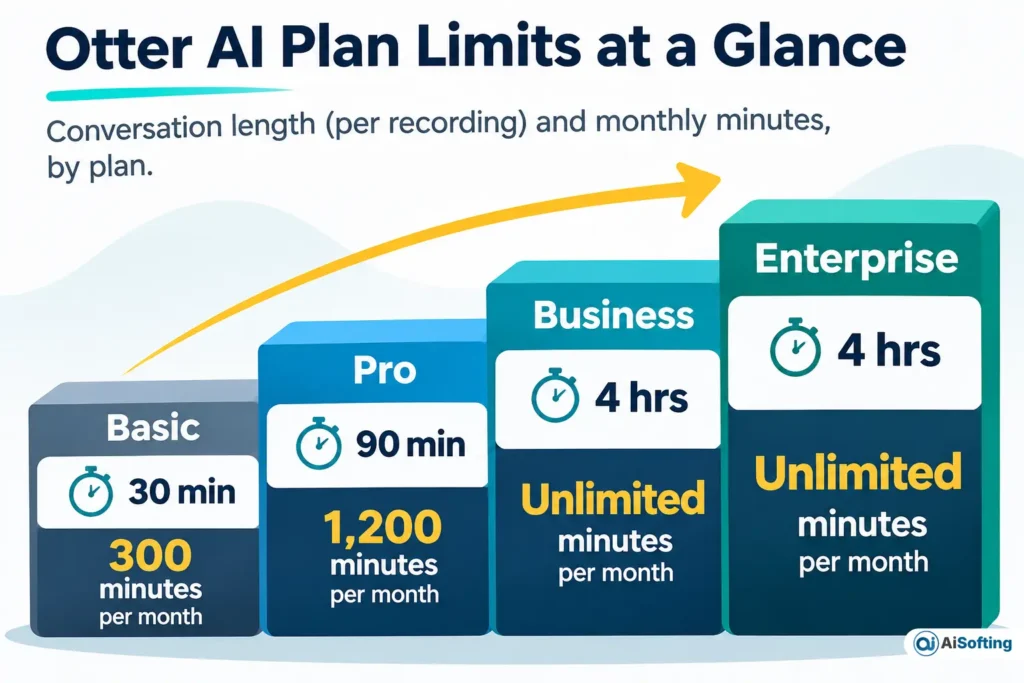
| Basic | Pro | Business | Enterprise | |
|---|---|---|---|---|
| Monthly price | Free | $16.99 | $30 | Contact sales |
| Annual billing (per month) | Free | $8.33 | $19.99 | Contact sales |
| Meeting transcription minutes | 300 | 1,200 | Unlimited | Unlimited |
| Imported-file minutes | 300 (shared pool) | 1,200 (shared pool) | 6,000 | 6,000 |
| Max length per conversation | 30 min | 90 min | 4 hours | 4 hours |
| File imports | 3 lifetime | 10 per month | Unlimited | Unlimited |
| Concurrent meetings | 1 | 2 | 3 | 3 |
| Max workspace | 5 | 5 billed users | 25 billed users | Unlimited |
| AI Chat queries per user | 20 | 50 | 200 | 200 |
| Exports | mp3, txt | mp3, txt, pdf, docx, srt | Same, plus bulk | Same, plus bulk |
Source: Otter’s pricing page, read November 3, 2026. Prices in USD, before tax.
The cost math
These are illustrative calculations from list prices.
| Scenario | Math | Yearly cost |
|---|---|---|
| One person, Pro, annual billing | $8.33 × 12 | $99.96 |
| One person, Pro, monthly billing | $16.99 × 12 | $203.88 (annual saves $103.92, about 51%) |
| Team of 5, Pro, annual | $99.96 × 5 | $499.80 |
| Team of 5, Business, annual | $19.99 × 12 × 5 | $1,199.40 (+$699.60 vs Pro) |
| Team of 5, Business, monthly | $30 × 12 × 5 | $1,800 |
| Student or teacher with a .edu address, Pro annual | $79.99 billed yearly | $79.99 (about $6.67 a month) |
If you use all 1,200 Pro minutes (20 hours), that works out to about $0.42 per transcribed hour on annual billing and $0.85 on monthly billing. Heavy users get decent value. Light users pay for capacity they never touch.
Hidden costs and traps
- Otter’s own pages disagree. The homepage lists “Unlimited meetings” under Basic and “6000 monthly transcription minutes” under Business. The pricing page says Basic is capped at 300 minutes and Business has unlimited meeting minutes, with 6,000 as the imported-file limit. Trust the detailed comparison table on the pricing page, and screenshot it before you buy.
- Some discounts are not for you. The pricing page shows an $8.49 Pro monthly price and a $4.17 annual price, but the footnote says they require an India-issued credit card. US buyers should budget $16.99 and $8.33.
- Promotions change. When we read the page, Business showed a $24 monthly price tied to a “20% off for 3 months+” offer. Don’t plan around promotions.
- The 5-seat wall. Pro allows up to 5 billed users and Business 25. Your 26th teammate pushes you to Enterprise, where pricing is by quote.
- Minutes don’t roll over, and the pricing page marks them as a shared pool across transcription types.
- Buying inside the iPhone app is priced the same in the US listing: $99.99 a year for Pro and $239.99 a year for Business. Prices differ in other countries’ storefronts.
Is Otter AI safe to use?
Otter is secure in the ordinary sense, but its privacy trade-offs are real and you should know them before you invite it to a call. The security side is solid. Otter says it holds a SOC 2 Type II report, and its pricing page lists TLS encryption, AES-256 encryption for real-time content and two-factor authentication, with an authenticator app on every plan.
The privacy side is more complicated.
- AI training. The privacy policy lists “training our proprietary AI technology on de-identified audio recordings and on transcriptions” as a purpose. It notes that transcriptions may contain personal information, and gives “consent or legitimate interests” as the legal basis. The policy describes general rights (object, erase, withdraw consent) and a privacy email address. It does not describe a dedicated training on/off switch for regular users, so ask Otter before assuming you can opt out.
- Voice data. Otter collects speaker identification information so it can label speakers in later transcripts.
- Ad tracking. The policy says some data disclosures to advertising and analytics partners may count as a “sale” or targeted advertising under some US state laws. It provides a “Do Not Sell or Share” link in the website footer.
- HIPAA. The pricing page lists HIPAA compliance as an Enterprise add-on, not a feature of Basic, Pro or Business. If you handle patient information, see our AI medical scribe review for tools built for clinical use.
The lawsuit, in plain terms
In August 2025, a plaintiff named Justin Brewer sued Otter.ai in federal court in Northern California. He alleged that Otter Notetaker recorded people who don’t use Otter, without their consent, and used conversations to train its AI. Related cases were later combined into In re Otter.AI Privacy Litigation. Otter denies the allegations.
According to reporting and docket summaries, in August 2026 the judge let the federal wiretap claim, the California privacy claim and Illinois biometric privacy claims continue, and dismissed others. As of late October 2026, reports describe the case as in discovery, with no class certified and no settlement.
What this does and doesn’t mean: letting claims proceed only means the complaint was detailed enough to continue. No court has decided that Otter broke the law. Still, it shows where the risk sits: the people on your call who never agreed to Otter.
Do you have to tell people you’re recording?
Often, yes. According to the Reporters Committee for Freedom of the Press, federal law needs only one participant’s consent, but about 11 states primarily require all parties to consent. California and Illinois are commonly cited examples. When a call crosses state lines, the safest approach is to follow the stricter rule. Otter’s own privacy policy also tells users to get permission from others before sharing recordings that contain their personal information. A notetaker appearing in the participant list doesn’t replace telling people. Say it out loud at the start.
How do you set up and control Otter AI?
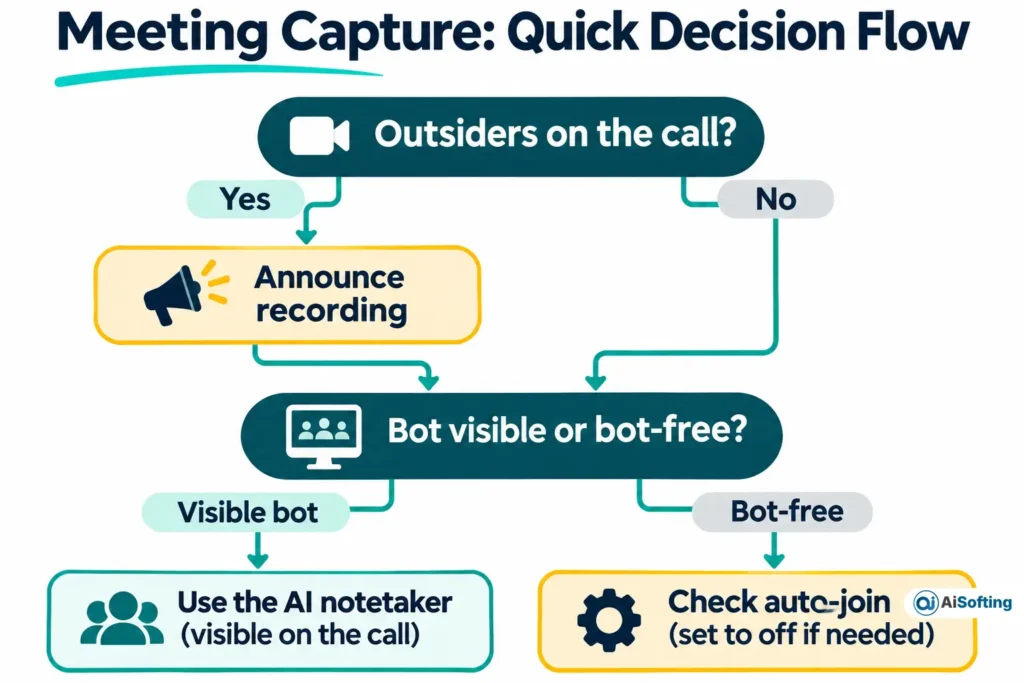
Set it to join only the meetings you choose, and decide up front whether it appears as a bot or records quietly from your device.
- Sign up for Basic and connect your Google or Microsoft calendar. Connecting the calendar is what lets Otter find meeting links.
- Open Account Settings, then Meetings, and change auto-join to “Meetings I manually select.” Otherwise Otter can join every calendar event that has a meeting link.
- Review upcoming events. Individual meetings you toggled earlier keep their own setting.
- Check auto-share. University IT guidance describing Otter’s settings shows a separate toggle for sharing conversations automatically with calendar guests. Turn it off if you don’t want transcripts going to everyone on an invite.
- Choose a capture method. Otter lists a desktop app for Mac and Windows and a Chrome extension that record without a bot joining the call. The bot approach, where the Notetaker appears as a named participant, is the one Otter’s CEO told Fast Company many companies prefer because everyone gets clear notice.
- Tell the room. Do this whichever method you use.
Troubleshooting common problems
| Symptom | Likely cause | Fix |
|---|---|---|
| Transcript limited on a long call | Basic caps each conversation at 30 minutes; Pro at 90 | Upgrade, or split the session |
| Otter keeps joining after you stopped using it | Calendar still connected with auto-join on | Set auto-join to manual or disconnect the calendar |
| Can’t import a file | Basic allows 3 lifetime imports | Upgrade, or transcribe by recording live |
| Can’t add a sixth teammate on Pro | Pro workspace caps at 5 billed users | Move to Business |
| Ran out of minutes mid-month | Limits don’t roll over | Wait for reset or upgrade |
What changed at Otter in 2026?
Otter has moved from a transcription tool toward a meeting-knowledge platform, and the feature set is shifting fast.
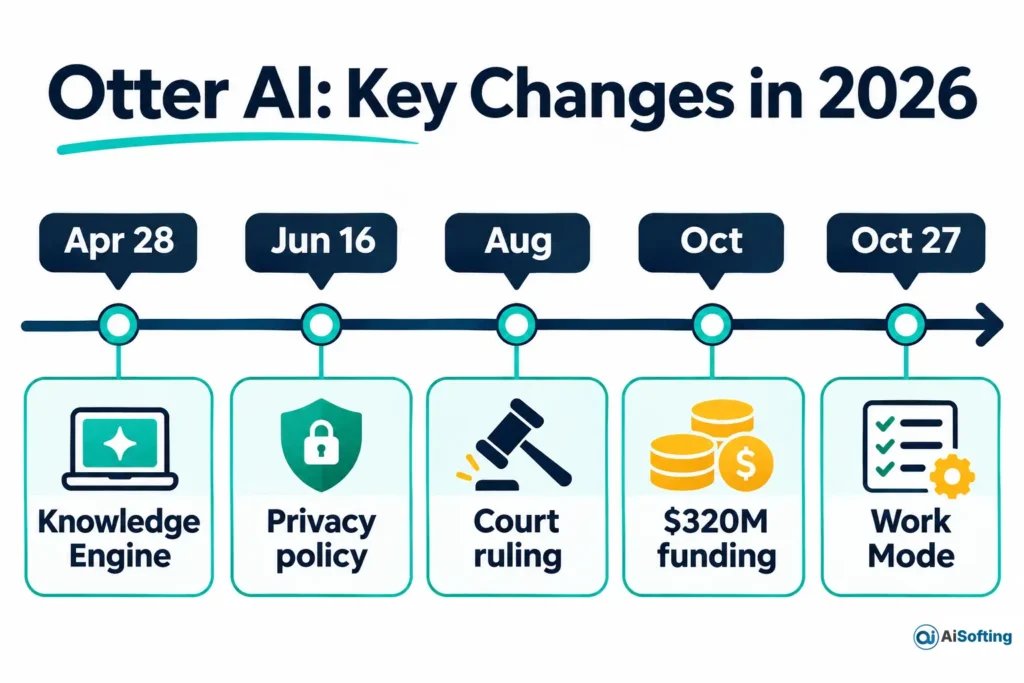
| Date | Change | Source type |
|---|---|---|
| April 28, 2026 | “Conversational Knowledge Engine” launch: AI Chat connectors to Gmail, Google Drive, Notion, Jira and Salesforce; an expanded MCP server so tools such as ChatGPT and Claude can read your meeting history; a rebuilt AI Chat that is private by default; Otter for Desktop (Mac and Windows) | Otter press release |
| June 16, 2026 | Current privacy policy takes effect | Otter privacy policy |
| August 2026 | Court allows core privacy claims to proceed | News reports and docket summaries |
| October 2026 | Otter announces $320 million in growth financing from General Catalyst’s Customer Value Fund | Otter press release |
| October 27, 2026 | Work Mode (pre-meeting briefs and post-call drafts) available to paid users; Live Assist (private in-meeting prompts) available to enterprise customers, with a wider rollout to paid users promised “over the next few weeks” | Otter press release |
The user count Otter cites grew from more than 35 million in April to more than 40 million in October 2026. Those are the company’s figures, not independently audited.
Otter’s names, decoded
Otter uses several names for overlapping things, which confuses searches and help articles.
| Name you’ll see | What it is |
|---|---|
| OtterPilot | The older name for the auto-joining notetaker; still used in Otter’s June 2026 privacy policy |
| Otter Notetaker | The newer help-center name for the bot that joins as a visible participant |
| Meeting Agent | Otter’s 2026 marketing term for its voice-activated, in-meeting agent |
| Otter for Desktop | Mac and Windows app that records without a bot |
| Chrome extension | Browser recording that Otter’s listing says can capture Google Meet with no bot |
| Otter Transcribe Voice Notes | The iPhone app’s store name |
Who should use Otter AI, and who should skip it?
Use Otter if most of your calls run under 90 minutes, you work in English, Spanish, French, German, Japanese or Chinese, and you want searchable summaries and action items. Skip it, or choose a bot-free method, if you record clients, candidates or patients in all-party-consent states and can’t guarantee everyone is informed.
On languages, the pricing page lists six, but one App Store listing I read names only four. Check the language you need.
A simple fit test (illustrative)
This is an original checklist built from the verified limits above.
| Question | If yes | Plan or action |
|---|---|---|
| Is your longest call under 30 minutes and total use under 5 hours a month? | Light use | Basic |
| Do calls run up to 90 minutes, with under 20 hours a month, for up to 5 people? | Regular use | Pro |
| Do you need 4-hour sessions, 3 simultaneous meetings or admin controls? | Heavy or team use | Business (up to 25 users) |
| More than 25 people, SSO, or protected health information? | Organization-wide | Enterprise (quote required) |
| Will outsiders be on the call? | Consent risk | Announce recording; consider bot-free capture |
Common mistakes
- Buying Pro for 2-hour workshops. Pro stops at 90 minutes per conversation.
- Leaving auto-join on after you’ve changed jobs or stopped using Otter.
- Letting summaries auto-send to everyone on a calendar invite.
- Assuming SOC 2 means your recordings are never used for training. SOC 2 is a security audit, not a promise about data use.
- Trusting a transcript for legal or financial decisions without reading it. Otter’s pages I read give no published accuracy figure, so test it on your own audio. For broader context, our guide on what generative AI is actually good for covers where AI output needs checking.
Otter AI vs other ways to capture meetings
I did not verify competitor prices, so this table compares capture methods rather than brands.
| Method | Good for | Watch for |
|---|---|---|
| Otter Notetaker (visible bot) | Clear notice to everyone in the call | Auto-join settings; the lawsuit’s focus on notice |
| Otter desktop app or Chrome extension | No bot in the participant list | You are the one responsible for telling people |
| Another AI notetaker | Different summaries or pricing | Run the same consent and training checks |
| Your meeting platform’s built-in transcript | Fewer vendors | Features and limits vary by plan |
| Editing-first audio tools | Podcasts and video | See our Descript pricing review |
For release news across this category, see our AI productivity tools updates.
Myth vs fact
| Myth | Fact |
|---|---|
| Otter’s free plan is a short trial | Otter’s pricing page labels Basic “free forever,” with caps |
| Business is unlimited in every way | Imported files are capped at 6,000 minutes per user |
| A bot always joins | Otter lists bot-free desktop and Chrome capture |
| The lawsuit proves Otter broke the law | No court has ruled that; Otter denies the claims |
| Otter is HIPAA-ready on every plan | HIPAA compliance is listed as an Enterprise add-on |
How to check this yourself
- Open Otter’s pricing page and read the full comparison table, not just the plan cards.
- Record one real call and compare the length against the cap for your plan.
- Read the transcript for names, numbers and jargon before sharing.
- Open Account Settings, then Meetings, and confirm your auto-join and sharing choices.
- Read the privacy policy’s AI-training line and decide whether it fits your clients.
FAQs
Is Otter AI free?
Yes. Basic is free with 300 minutes a month and a 30-minute cap per conversation. It also limits you to 3 lifetime file imports.
How much does Otter AI cost per month?
Pro is $16.99 monthly or $8.33 per month billed annually. Business is $30 monthly or $19.99 per user billed annually. Enterprise is custom.
Does Otter AI join meetings by itself?
It can, once you connect a calendar and allow auto-join. Change the setting to “Meetings I manually select” to stop that.
Does Otter AI train on my meetings?
Otter’s privacy policy says it trains its proprietary AI on de-identified audio recordings and transcriptions. The policy doesn’t describe a dedicated opt-out switch, so contact Otter if this matters to you.
Is Otter AI HIPAA compliant?
Otter’s pricing page lists HIPAA compliance as an add-on on the Enterprise plan. Don’t put patient information into Basic, Pro or Business accounts.
Can ChatGPT or Claude use my Otter notes?
Otter says its MCP server lets external AI tools access your meeting history, and the pricing page lists MCP server integration on Basic and above.
Can Otter record without a bot?
Otter’s homepage describes bot-free recording through the desktop app and Chrome extension.
How accurate is Otter AI?
Otter’s pages I read don’t publish a percentage. Audio quality, accents and crosstalk affect results, so check any transcript you rely on.
Conclusion
Otter AI is a capable, widely used notetaker whose real limits sit in the fine print: 30 minutes on Basic, 90 on Pro, a 5-seat Pro workspace, and no rollover of minutes. The bigger decision is consent and data use, because Otter’s policy allows training on de-identified recordings and a privacy class action is pending.
Your next step: open Otter’s pricing page, match your longest meeting and team size to a plan, then set auto-join to manual before your first recorded call.
Related: Read AI review 2026
Disclaimer: This article is for informational purposes only and is not affiliated with, sponsored by or endorsed by Otter.ai or any brand mentioned. Prices, features and policies may change, so confirm them on the provider’s site before buying. Information last verified on November 3, 2026. Recording laws vary by state and this is not legal advice. AI output can be inaccurate, so check transcripts and summaries before relying on them.