Ask ten people what generative AI is “good for” and you’ll get ten different lists — writing emails, making pictures of cats in space suits, coding, homework help. Most of those lists were outdated the moment they were written, because the honest answer isn’t a fixed list at all. It’s a moving line, and for the first time there’s enough real usage data and independent research to draw that line with actual precision instead of guessing.
This article skips the generic “10 ways to use ChatGPT” format you’ve probably already read three times this year. Instead, it leans on two things most articles on this topic ignore completely: actual usage data pulled from millions of real conversations, and independent research measuring exactly how much AI can be trusted to work on its own before a human needs to step in. Along the way, you’ll get a practical framework you can apply to literally any task on your desk today, a rundown of where things go wrong, and an honest look at what changed in my own workflow after two years of using these tools daily.
By the end, you won’t just have a list of “generative AI use cases.” You’ll have a repeatable way to decide, for any task sitting in front of you right now, whether generative AI is a genuine time-saver or a trap disguised as one.
What “Generative AI” Actually Means (Quick Grounding)
Generative AI refers to AI systems — like Claude, ChatGPT, and Gemini — that produce new content (text, images, code, audio, video) in response to a prompt, rather than just retrieving or classifying existing information, as IBM’s overview explains. That’s the textbook definition, and it’s worth sitting with for a second, because it’s exactly why generative AI behaves so differently from the software most people grew up using. A search engine retrieves. A spreadsheet calculates. Generative AI constructs something new, token by token or pixel by pixel, based on patterns learned from enormous amounts of training data — which is also precisely why it can be brilliant one moment and confidently wrong the next.
This matters for the “what is it good for” question, because retrieval-based tools fail loudly (a broken link, a zero-results search), while generative tools fail quietly. They hand you a fluent, well-formatted, completely plausible answer that happens to be wrong. Keep that distinction in mind — it’s the thread running through almost everything below.
A Quick Note on How We Got Here
Generative AI isn’t new — image-generating GANs and early language models existed for years before most people noticed. What changed the public conversation was ChatGPT’s late-2022 release, which made the technology accessible through a simple chat window instead of a research paper. Since then, the pace has been relentless: multimodal models that handle text, images, and code in a single conversation; agentic tools that can browse, run code, and use software on their own; and, as you’ll see below, a measurable and accelerating jump in how much unsupervised work these systems can be trusted with.
The Real Answer: It’s Not a Fixed List — It’s a Time Horizon
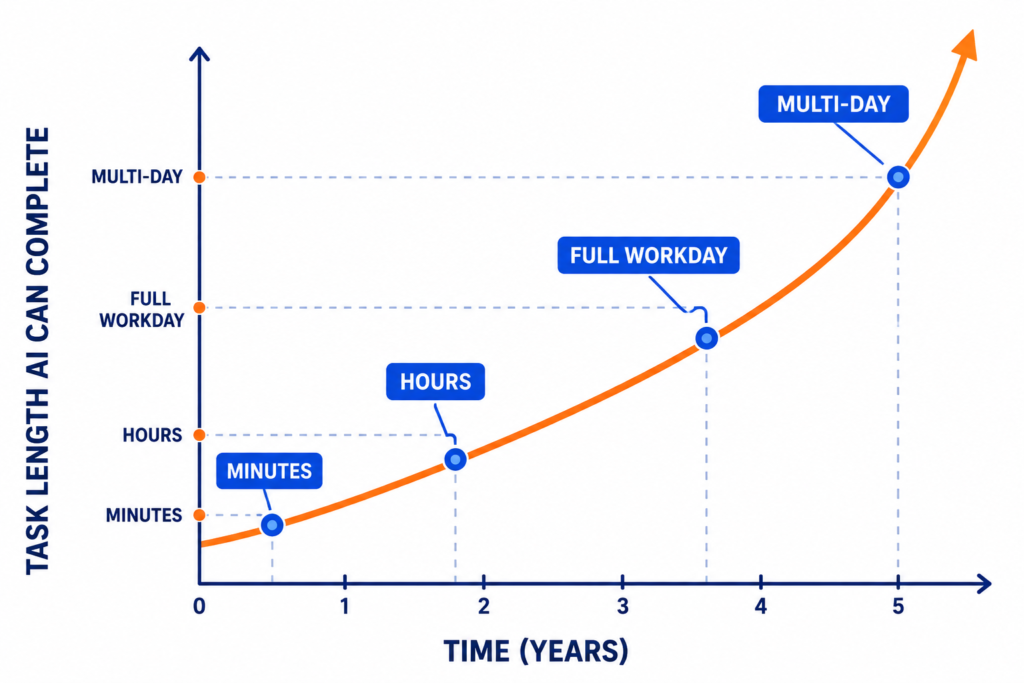
Here’s the part most “what is generative AI good for” articles miss entirely: capability isn’t binary, and it isn’t a static list of categories either. Researchers at the independent nonprofit METR track this using a metric called “time horizon” — essentially, how long a task can be, measured in how much time it would take a skilled human, while an AI model still completes it correctly about half the time on its own. That horizon has been doubling roughly every seven months for six years straight, according to METR’s research.
The Doubling Curve, and Why It’s Speeding Up
In practice, this means a model in 2023 could reliably handle a task that takes a human a few minutes. By late 2025, models were reliably clearing tasks that take human professionals close to a full workday. More strikingly, that doubling rate isn’t constant — it accelerated from roughly every seven months down to roughly every four months during 2024–2025, which, if it holds, points toward AI systems handling month-long, multi-step projects with minimal supervision within the next couple of years.
To make this concrete, here’s roughly how the curve has played out in practice:
| Task example | Rough human time | Reliably handled by AI |
|---|---|---|
| Fix a typo, rewrite a sentence | Seconds to minutes | Since the earliest chatbots |
| Debug a small, well-documented function | ~30–60 minutes | Reliable since roughly 2023 |
| Draft a technical report from source material | Several hours | Reliable since roughly 2024–2025 |
| Reimplement a large, unfamiliar codebase module | Multiple days | Emerging, inconsistent as of 2026 |
| Run a multi-week research or product project | Weeks | Not yet reliable without heavy supervision |
That table isn’t a permanent scoreboard — it’s a snapshot of a line that keeps moving up and to the right. Which is exactly why “what tasks is generative AI good for” needs a different kind of answer than a static list.
What This Means for You, Practically
This is the piece that turns “what is AI good for” from a trivia question into a planning tool. Instead of asking “can AI write a blog post,” ask: “how long, unsupervised, does this task realistically take, and does that fall inside the AI’s current reliable window?” A five-minute rewrite is safely inside the window. A three-week product launch strategy that depends on evolving stakeholder input is not — yet. This reframing is the single most useful mental model for deciding what to delegate right now, and it will keep working as the window keeps expanding, which means you won’t need to relearn “what AI is good for” from scratch every time a new model ships.
Who’s Actually Using Generative AI, and For What Kind of Work
Most articles describe generative AI use cases in the abstract. The more interesting question is what the data shows about the level of work being handed to these tools — because it’s higher-skilled than most people assume. According to Anthropic’s economic research, the average task people bring to Claude requires roughly the equivalent of an associate’s degree worth of education (about 14.4 years), compared to about 13.2 years for the average task across the broader economy — meaning real-world usage already skews toward more complex, higher-judgment work than casual “write my grocery list” examples suggest, based on Anthropic’s Economic Index.
Adoption also isn’t evenly distributed. Usage correlates strongly with a country’s GDP per capita — wealthier economies with more existing technical infrastructure tend to adopt generative AI for augmentation-style work, while lower-income regions lean more heavily on it for education and coursework support. That’s a meaningful, underreported wrinkle in the “AI will transform every job everywhere equally” narrative: right now, the productivity upside is concentrated where the technical foundation to use it well already exists.
The Tasks Generative AI Is Genuinely Good At Right Now
With that framework in mind, here’s where generative AI reliably earns its keep today, based on both the time-horizon research and real-world usage patterns.
Writing and Content Drafting
First drafts, rewrites, tone adjustments, and summarizing long documents are where generative AI shines brightest, because verifying the output is fast even when producing it from scratch would take a while. This is also reflected in how people actually use these tools: explanations and written guidance alone account for a large share of daily conversations, and documents and reports make up another sizable chunk, according to Anthropic’s own analysis of real usage — explanations show up in about 17% of conversations, documents and reports in about 15%, and guidance in about 11%. If you’re producing first drafts for blog content, our team’s SEO content approach at Aisofting treats AI drafts as the starting line, not the finish line — a distinction that matters more than most guides admit.
Within writing, the sweet spot narrows further: outlines, meeting summaries, email replies, product descriptions, and repurposing one piece of content into five formats are all short-horizon, fast-to-verify tasks. Long-form investigative pieces that depend on original reporting or exclusive interviews are not — the model has nothing to draw from that a human hasn’t already gathered.
Coding and Debugging
Code is, by a wide margin, the single biggest real-world use case. Computer and mathematical tasks account for roughly 34% of Claude.ai conversations and about 46% of enterprise API usage, with “modifying software to correct errors” alone making up around 6% of total activity, based on Anthropic’s Economic Index data. Bug fixes, boilerplate generation, refactoring, and writing tests are all short-horizon, easily-verified tasks — exactly the profile where current models do best.
It’s worth being specific about where coding help breaks down, too: large, unfamiliar legacy systems, tightly coupled architecture with hidden dependencies, and anything touching production infrastructure without a staging environment are all places where the “generation is fast, verification is slow” pattern flips against you — more on that in the mistakes section below.
Research Synthesis and Explanation
Pulling together scattered information into a clear explanation, comparing options, or breaking down a complex topic is a strong fit, again because checking the summary against the sources is far quicker than building the summary from zero. This is especially useful for onboarding into an unfamiliar subject fast — condensing a dozen articles or a dense report into a workable mental model in minutes rather than hours.
Data and Spreadsheet Work
Cleaning messy data, writing formulas, spotting patterns, and building first-pass models are tasks where AI compresses hours into minutes, provided someone checks the output before it drives a real decision. Generative AI is particularly good at explaining why a formula works or why a dataset looks the way it does, which is often more valuable than the formula itself for someone building their own spreadsheet literacy over time.
Creative and Narrative Work
Brainstorming plot ideas, developing characters, or drafting scene outlines is another area seeing rapid growth, particularly with purpose-built narrative tools. If you’re curious how far this has come, our DreamGen AI review breaks down how modern story-focused AI handles multi-character consistency in ways general chatbots still struggle with.
Design and Visual Drafting
Generating quick visual concepts, mockups, and marketing assets has become genuinely useful for non-designers who need something presentable fast. Tools like Canva have leaned hard into this — see our breakdown of what Canva actually does if you’re deciding between a template-based tool and a full custom graphic design service for brand-critical work.
Video and Multimedia Production
AI-assisted video editing, dubbing, and avatar-based content have matured quickly for short-form use cases. Our VidQu AI review covers where these tools genuinely save time and where longer-form projects still need manual work.
Workflow Automation
Routing tickets, triggering follow-ups, and connecting apps together is a growing category, especially for small teams without dedicated ops staff. Our guide to AI automation tools walks through where automation platforms pay for themselves fastest.
Translation and Localization
Translating marketing copy, support documentation, or product descriptions into another language is one of the quietest but most consistently reliable generative AI use cases, largely because the source text already exists — the model is adapting, not inventing. The caveat: idiom, humor, and culturally specific references still need a native-speaking human pass before anything ships publicly.
Customer Support and Internal Q&A
Drafting first-response replies, summarizing support tickets, and answering repetitive internal questions (policy lookups, HR FAQs, onboarding basics) are strong fits because the answer already exists somewhere in a knowledge base — the AI’s job is retrieval and rephrasing, not invention.
Build vs. Buy: When a General AI Tool Beats a Specialized One
One question the “what is generative AI good for” conversation almost never addresses directly: should you use a general-purpose chatbot, or a tool built specifically for the task? The honest answer depends on how repeatable and specialized the task is.
- General-purpose AI (Claude, ChatGPT, Gemini) wins for one-off tasks, exploratory work, and anything that needs flexible reasoning across a mix of subjects — a single conversation that moves from drafting an email to reviewing a spreadsheet formula to explaining a legal term.
- Specialized tools win once a task becomes repeatable and benefits from purpose-built structure. A general chatbot can write fiction, but a tool like DreamGen is built specifically to hold complex multi-character world-building consistent across dozens of scenes — something general models still lose track of over long sessions. Similarly, Canva’s templates outperform a general AI image generator for on-brand, print-ready design work, and dedicated automation platforms like the ones covered in our automation tools guide handle reliability and error-handling far better than a chatbot improvising a workflow from scratch.
The rule of thumb: if you’re doing a task once, use the general tool in front of you. If you’re doing it every week, it’s worth the switching cost to find the tool built for it.
The Verification Test: A Simple Framework to Judge Any Task
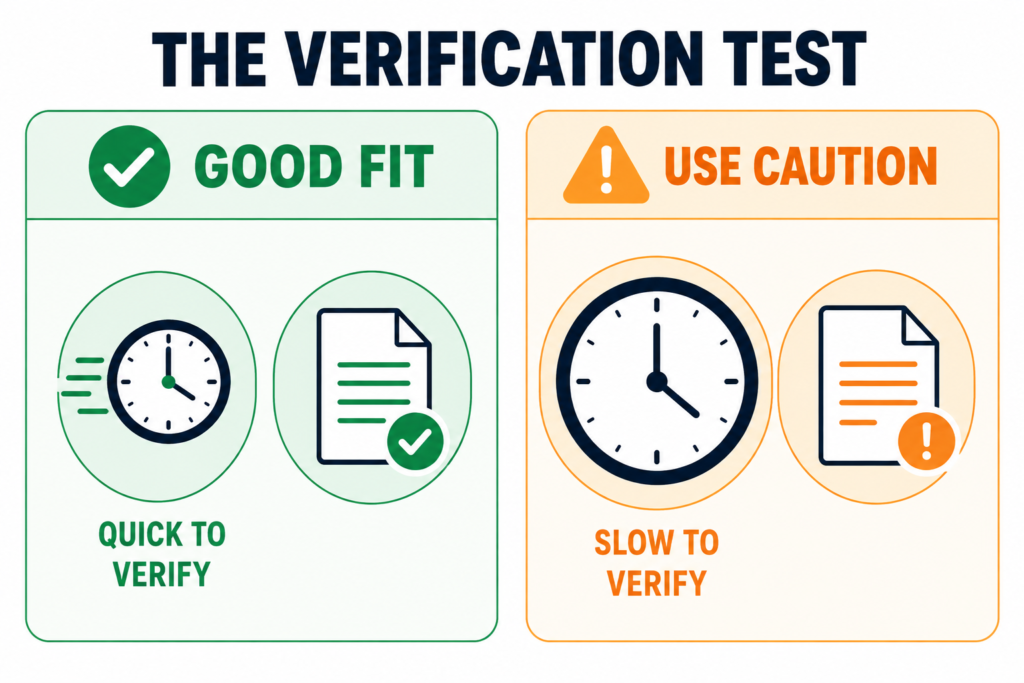
Here’s a practical filter you won’t find in most listicles: before assigning a task to generative AI, ask how long it takes you to check the answer compared to how long it would take you to do the task yourself.
- If verification is fast and doing it yourself is slow (writing a first draft, generating boilerplate code, summarizing a report) — great fit.
- If verification takes almost as long as doing the task yourself (auditing a legal contract, validating a complex financial model, reviewing unfamiliar production code) — proceed carefully, and budget real time for that review.
This single question does more to predict a good outcome than any generic “AI is good at creative tasks” claim, because it accounts for your specific expertise, not a generic user’s. A senior developer and a junior developer will get very different value out of the same AI-generated code fix, because their verification speed is completely different — the senior developer can spot a broken assumption in seconds, while the junior developer might need to run the whole test suite to be sure.
A quick way to apply it: before you hit “generate,” ask yourself what it would take to catch a wrong answer. If the honest answer is “I’d notice immediately,” delegate freely. If the honest answer is “I’m not totally sure I’d catch it,” that’s your signal to slow down, not speed up.
Tasks Generative AI Still Struggles With
Long, Shifting, Multi-Week Projects
Anything that spans weeks, changes direction based on new information, and requires remembering earlier decisions in context is still outside the reliable window described earlier — though that window is expanding fast.
Judgment That Carries Real Accountability
Final hiring decisions, medical diagnoses, or legal sign-offs need a human who owns the outcome. AI can inform these calls; it shouldn’t make them alone.
High-Stakes Precision Without a Check
Financial figures, medical dosages, and legal citations need verification every time, because generative models can sound completely confident while being wrong.
Truly Novel Problems With No Precedent
Generative AI is fundamentally a pattern-matching system trained on existing data. Genuinely unprecedented problems — a brand-new scientific hypothesis, a strategy nobody has tried before, an edge case that’s never been documented — sit outside what pattern-matching can reliably produce. AI can help you explore the space around a novel idea, but it can’t originate what it has never seen a version of.
Anything Requiring Physical Presence or Real-World Interaction
It’s an obvious point but worth stating plainly: generative AI can plan a physical process, but it can’t execute one. Inspecting a job site, running a physical test, or reading a room during a live negotiation still requires a human in the loop.
Common Mistakes People Make When Assigning AI Tasks
- Overtrusting AI inside unfamiliar codebases. A controlled study by METR found something genuinely surprising: experienced open-source developers using AI tools on their own repositories actually took 19% longer than developers working without AI — despite believing they’d sped up. Familiarity with your own system beats a confident-sounding suggestion.
- Treating a drafting tool like an autonomous replacement. Most real usage still leans toward collaboration rather than full handoff — recent data shows augmented, human-in-the-loop use running slightly ahead of fully automated use, at roughly 52% versus 45%.
- Skipping verification because the output sounds confident. Fluency is not accuracy. Always check facts, figures, and citations independently.
- Giving vague prompts with no constraints. Word counts, audience, tone, and format all need to be specified — AI can’t read your intent.
- Treating older AI-generated content as a source of truth. It’s easy to feed a previous AI output back into a new prompt as “reference material,” quietly compounding any earlier error. Go back to the original source when in doubt, not the AI’s summary of it.
- Ignoring data sensitivity. Pasting confidential client data, unreleased financials, or personal information into a general AI tool without checking your organization’s data policy is a common and avoidable mistake, especially on free-tier tools.
Best Practices for Getting Real Value
- Match the task to the time-horizon framework above before you start.
- Give AI the full context it needs (audience, goal, constraints) up front.
- Treat the first output as a draft, not a deliverable.
- Keep a human checkpoint on anything with financial, legal, or safety consequences.
- Track which prompts and workflows actually save you time — and reuse them.
- Build a small internal library of prompts that reliably worked, instead of reinventing the wheel every session.
- When a task becomes repeatable, evaluate whether a specialized tool would outperform your general chatbot (see the build-vs-buy section above).
- Review AI-generated work the same way you’d review a capable but unfamiliar new hire’s first week — helpful, fast, but not yet fully trusted with the keys.
Personal Experience: What Actually Changed for Me
I’ve used generative AI daily for client content and internal workflows for the past two years, and my honest take has shifted twice. Early on, I treated it like a search engine with better grammar — I’d take the first output almost as-is, and it showed. Readers could tell, and a couple of early drafts needed a full rewrite after a client flagged inconsistent facts buried in otherwise polished-sounding paragraphs. That was an early, humbling lesson: fluent writing and accurate writing are not the same thing, and generative AI is exceptionally good at the former regardless of whether it has achieved the latter.
The turning point was switching to the verification-test mindset described above. For tasks where I could check the output in under a minute — headline variations, meta descriptions, first-pass outlines, restructuring a clunky paragraph — AI became genuinely indispensable, cutting drafting time by more than half on a typical content sprint. For tasks where checking took nearly as long as doing it myself, like technical accuracy in a niche B2B piece or a client’s proprietary process, I learned to use AI for structure and rely on my own research for the substance. That split — AI for scaffolding, human for substance — has held up remarkably well across dozens of projects since.
The other lesson, echoed almost exactly by that METR developer study above, is that confidence is not competence. I’ve watched AI suggest a code fix that looked completely reasonable and broke a dependency I hadn’t mentioned, simply because it didn’t have the full picture of the codebase. Since then, my rule is simple: the more unfamiliar or high-stakes the task, the shorter the leash I give it. I’ve also noticed the inverse holds true — on tasks I know cold, like restructuring an article outline or drafting a first-pass email sequence, I’ve stopped double-checking every line, because a year of consistent results earned that trust incrementally, not all at once.
One workflow change that made a real difference on the content side: instead of asking for a finished article in one shot, I now ask for an outline first, review it, then generate section by section. It roughly doubles the number of prompts per article, but it catches structural problems — a missing angle, a weak argument, a factual gap — before they’re baked into 1,500 words of otherwise-polished prose. It’s a small process tweak, but it’s the single change that improved output quality the most.
Frequently Asked Questions
What is generative AI best used for?
Short, well-defined tasks where checking the output is fast — drafting, summarizing, coding boilerplate, brainstorming, and first-pass design or data work.
Can generative AI replace human jobs entirely?
Not entirely, and not yet, for most roles. Current data shows AI is used more often to assist people through tasks than to fully replace them, though that balance shifts by task and industry.
Is generative AI reliable for coding?
It’s strong for common bugs, boilerplate, and well-documented patterns, but it can slow down experienced developers on unfamiliar codebases if trusted without review — always test and check unfamiliar changes.
What are the biggest limitations of generative AI right now?
Long, multi-week projects with shifting context, tasks requiring true accountability, anything needing guaranteed factual precision without a human check, and genuinely novel problems with no precedent to draw from.
How do I know if a task is a good fit for AI?
Use the verification test: if checking the AI’s answer is much faster than doing the task yourself, it’s a good fit. If verification takes nearly as long, proceed with caution.
Does generative AI get better at longer tasks over time?
Yes — independent research shows the length of tasks AI can reliably complete has been doubling roughly every seven months for years, and that pace recently accelerated to roughly every four months.
Is generative AI good for creative writing and design?
Yes, particularly for brainstorming, drafting, and generating first-pass visual or narrative concepts — though brand-critical or highly consistent creative work still benefits from human oversight or specialized tools.
What’s the difference between “augmentation” and “automation” in AI use?
Augmentation means AI assists a human who stays in control of the task; automation means AI completes the task with little to no human involvement. Most real-world usage today still leans toward augmentation.
Does generative AI “hallucinate,” and how often does it matter?
Yes — it can generate fluent, plausible-sounding information that’s factually wrong, especially on niche or fast-changing topics. It matters most on tasks with high verification cost, which is exactly why the verification test above is worth applying every time.
Should a small business start with a general AI tool or a specialized one?
Start general — a tool like Claude or ChatGPT covers most early, exploratory needs. Move to a specialized tool only once a specific task becomes repeatable enough that the switching cost pays for itself, as outlined in the build-vs-buy section above.
Conclusion: Actionable Takeaways
Generative AI isn’t good or bad at fixed categories of work — it’s good at tasks that fit inside a specific, steadily expanding window of reliability, and that window is best measured by how long a task takes and how fast you can check the result. Before your next AI-assisted task, run it through the verification test, match the scope to what current models can reliably handle, keep a human checkpoint on anything with real consequences attached, and decide honestly whether a general tool or a specialized one is the better fit for the job.
Do this next:
- Pick one recurring task on your plate this week.
- Apply the verification test — would checking the AI’s output take a fraction of the time doing it yourself would?
- If yes, delegate it and track how much time it actually saves.
- If no, keep it human for now, and revisit in six months — the window is moving faster than most people realize.
That one habit will tell you more about what generative AI is good for than any listicle ever could.