Introduction
A few months ago, if you’d asked ChatGPT to help you find the cheapest wireless earbuds under $100, you’d have gotten a decent list — and then you’d have opened five browser tabs to actually check prices, coupons, and shipping. That gap between “AI gives you an answer” and “AI actually helps you buy the thing” is exactly what Honey AI is built to close.
If you’ve searched “get Honey AI” because you keep seeing the name pop up next to ChatGPT, Gemini, or Perplexity, you’re not imagining things. PayPal’s Honey — the browser extension millions of people already use for coupon codes — has expanded into AI-powered shopping, connecting directly to the chatbots people now use to research purchases. In this guide, I’ll walk through what Honey AI actually is, how to set it up, what it’s genuinely good at, where it falls short, and the mistakes I see shoppers make when they first try it.
What Is Honey AI, Exactly?
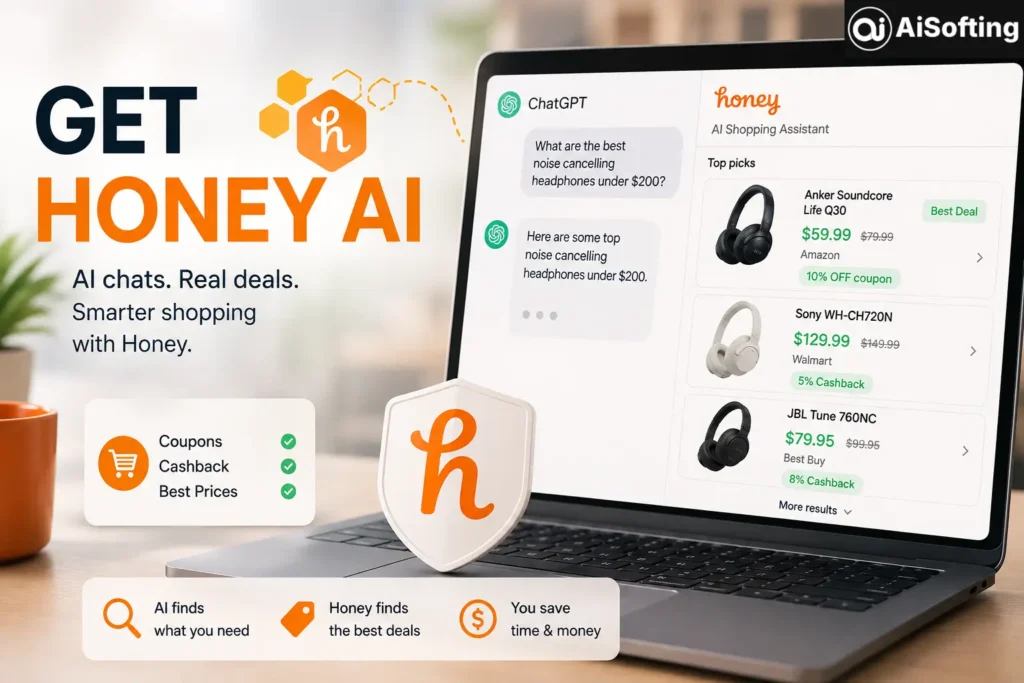
Honey AI isn’t a separate app you download. It’s the AI-shopping layer built into the existing PayPal Honey browser extension — the same tool known for auto-applying coupon codes at checkout. PayPal announced the expansion after partnering with Google on agentic commerce, and the idea is simple: when you ask an AI chatbot a shopping question, Honey displays links to the products the chatbot recommends, along with real-time pricing, merchant options, and offers.
So instead of the AI giving you a generic answer and leaving you to do the price-hunting yourself, Honey sits in the background and fills in the practical details — current price, which retailer has it, and whether a coupon or cashback offer applies. It’s also designed to catch blind spots: Honey’s system can identify when the AI’s own recommendations may have left out major retailers and surface those additional options to the consumer.
Why PayPal Built It This Way
Rather than trying to strike separate partnerships with every AI company on the planet, PayPal took the more efficient route. As one industry analysis put it, relying on the Honey browser extension rather than striking individual partnerships with each major AI platform is a far more expedient pathway to broaden Honey’s reach across AI-based shopping. Crucially, the checkout itself still happens on the retailer’s site, with the user in control — Honey isn’t buying things autonomously on your behalf.
How to Get Honey AI Set Up
Getting started is more “flip a switch” than “learn new software,” which is refreshing in a space full of overcomplicated AI tools.
Step 1: Install the Honey Extension
Honey works across the browsers most people already use. According to PayPal’s own support documentation, the Honey extension works on major browsers, including Chrome, Safari, Firefox, Opera, and Edge. You can grab it from your browser’s extension store — for Chrome, that’s the Chrome Web Store listing for “Honey: Automated Coupons & Rewards.”
Step 2: Link Your Honey Account to Your AI Chat Habits
Once installed, Honey works passively in the background while you browse or chat with an AI assistant. When your conversation turns into product research — say you ask an AI for laptop recommendations under a certain budget — Honey can surface pricing and deal information tied to those suggestions without you needing to switch tabs.
Step 3: Use It On Mobile Too
Shopping research doesn’t stop at your desktop. You can also use the Honey app on iOS and Android to access deals and rewards when shopping from your phone.
Step 4: Check Retailer Coverage Before You Rely On It
Not every store is covered equally. While PayPal Honey supports many retailers, the availability of coupons and rewards can vary by store, and the Honey icon will light up if there are deals available for that specific store. Treat that little icon as your cue — if it’s not lit, don’t assume there’s nothing to find; it just means Honey doesn’t have an active offer there yet.
Real-World Use Cases
- Comparison shopping mid-conversation: You’re chatting with an AI about the best budget espresso machines. Instead of leaving the chat to search prices, Honey can surface real-time offers right there.
- Catching missed retailers: An AI might recommend a product only available at one store, when three others carry it cheaper. Honey’s job is to flag that gap.
- Combining AI research with actual savings: The AI narrows down what to buy; Honey narrows down where to buy it for less.
This pattern reflects a bigger shift in how people shop. Google’s own moves toward agentic, AI-assisted shopping with retail partners are part of the same trend — search and AI chat are increasingly becoming the starting point for purchases, not just a research stop along the way.
Benefits of Using Honey AI
- Less tab-switching — pricing and deal data show up where you’re already asking questions.
- Broader retailer visibility — it can highlight options an AI chatbot didn’t mention.
- Familiar mechanics — if you already trust Honey for coupons, the AI layer is just an extension of that habit, not a new tool to learn.
- User stays in control — nothing gets purchased automatically; you still complete checkout yourself.
- Cross-device availability — desktop browser extension plus mobile app coverage.
Common Mistakes People Make
- Assuming every AI chatbot integrates identically. Coverage and depth vary by platform, and rollout has been staged rather than universal — don’t assume day-one perfection everywhere.
- Ignoring the affiliate model. Honey earns commissions from merchants, and shares part of that back with users as rewards — worth understanding so you know how the “free” deal-finding is funded.
- Not double-checking prices at checkout. Real-time pricing tools are helpful, but prices shift fast; always glance at the final total before you pay.
- Overlooking privacy settings. Like most shopping extensions, Honey tracks browsing activity related to deals and purchases — it’s worth reviewing what data permissions you’re comfortable granting.
Best Practices for Getting the Most Out of Honey AI
- Keep the extension updated so you get the latest retailer and AI-integration coverage.
- Use it as a second opinion, not your only source — cross-check unusually good deals.
- Pair AI product research with Honey’s price-history features (where available) to judge if a “deal” is actually a discount.
- If you’re an active affiliate marketer or content creator, stay informed about how commission-sharing works, since this has been a point of public scrutiny for the platform.
Personal Experience
I started using the Honey extension years before the AI features existed — mostly for the coupon auto-apply trick at checkout, like most people. When the AI-chat integration rolled out, I was honestly skeptical. My first real test was asking an AI chatbot for a mid-range mechanical keyboard recommendation while Honey was active in the background.
What actually impressed me wasn’t flashy — it was practical. The AI gave me three keyboard options, and Honey quietly surfaced that one of them was available for noticeably less at a retailer the AI hadn’t mentioned at all. That’s a small thing, but it saved me about fifteen minutes of manual price-checking, which is the whole point.
That said, I ran into the “not every store is covered” issue almost immediately with a smaller boutique retailer — the Honey icon just never lit up. Lesson learned: I now treat Honey as a fast first pass, not a guarantee. I still glance at two or three retailer sites directly for anything over $150, especially electronics, because deal coverage still has gaps. I also noticed that on mobile, the experience feels a step behind desktop — deal detection was slower to trigger in the app during my testing. If you’re a heavy mobile shopper, keep that expectation in check.
The other thing I’d tell a friend: read up on how Honey’s affiliate commissions work before assuming every “deal” surfaced is the objectively best one on the internet. It’s still a business model built on merchant partnerships, and that’s worth knowing going in, especially given the public legal scrutiny the company has faced over how those commissions get shared.
FAQs
1. Is Honey AI a separate download from regular Honey? No. Honey AI is a feature set added to the existing PayPal Honey browser extension and app, not a standalone product you install separately.
2. Which AI chatbots does Honey currently work with? PayPal has been expanding integration with major AI chat platforms as part of its agentic commerce push, though coverage and rollout pace vary by platform, so it’s worth checking current support before assuming full compatibility everywhere.
3. Does Honey AI cost anything to use? Honey itself is free for shoppers. The company earns revenue through merchant affiliate commissions and shares part of that back with users as rewards.
4. Can Honey AI actually complete a purchase for me automatically? No — checkout still happens on the retailer’s own website with you in control. Honey surfaces pricing, deals, and merchant options, but it doesn’t buy things autonomously on your behalf.
5. Why isn’t Honey showing deals for a store I’m shopping at? Retailer coverage varies. If the Honey icon isn’t lit up in your browser toolbar, that store likely doesn’t have an active offer in Honey’s system yet, not necessarily that no deals exist at all.
6. Is there ongoing controversy around PayPal Honey? Yes — Honey has faced class action litigation related to how affiliate commissions are handled, and it’s an active legal situation. It’s reasonable to stay informed on developments if you’re a frequent user or an affiliate creator.
Conclusion
Honey AI is less a brand-new invention and more a natural next step for a tool that already had a foothold in millions of browsers. By plugging real-time pricing and deal data directly into AI chat conversations, it addresses a genuinely annoying gap in how people currently shop with AI assistants. It’s not flawless — retailer coverage is uneven, mobile lags behind desktop, and the affiliate-commission model is worth understanding — but as a way to skip a few rounds of manual tab-switching, it earns its place in a shopping-focused browser setup.
Actionable takeaways:
- Install Honey on your primary browser and check that it’s active before starting AI-assisted product research.
- Don’t treat every Honey-surfaced deal as final — verify pricing at checkout.
- Understand the affiliate-commission model behind the “free” service.
- Use Honey as a fast first pass, especially for higher-cost purchases, and still spot-check two or three retailers directly.
If you’re evaluating tools like this as part of a broader strategy to make your own site more visible to AI-driven search and shopping assistants, it helps to have your technical foundation in order — see how professional SEO strategy can prepare a site for AI-era discovery, and how a well-built web development foundation supports that visibility.
For further reading on the shift toward AI-assisted shopping, see TechCrunch’s coverage of the Honey-ChatGPT integration, PayPal’s own guide to using Honey, and EMARKETER’s analysis of Honey’s AI shopping strategy.
Disclaimer: This article is for general informational purposes only and does not constitute financial, legal, or professional advice. Product features, availability, and company policies mentioned here (including PayPal Honey and related AI integrations) may change over time — always verify current details on the official PayPal/Honey website. This content is not affiliated with or endorsed by PayPal, and any ongoing litigation mentioned reflects publicly reported information at the time of writing.