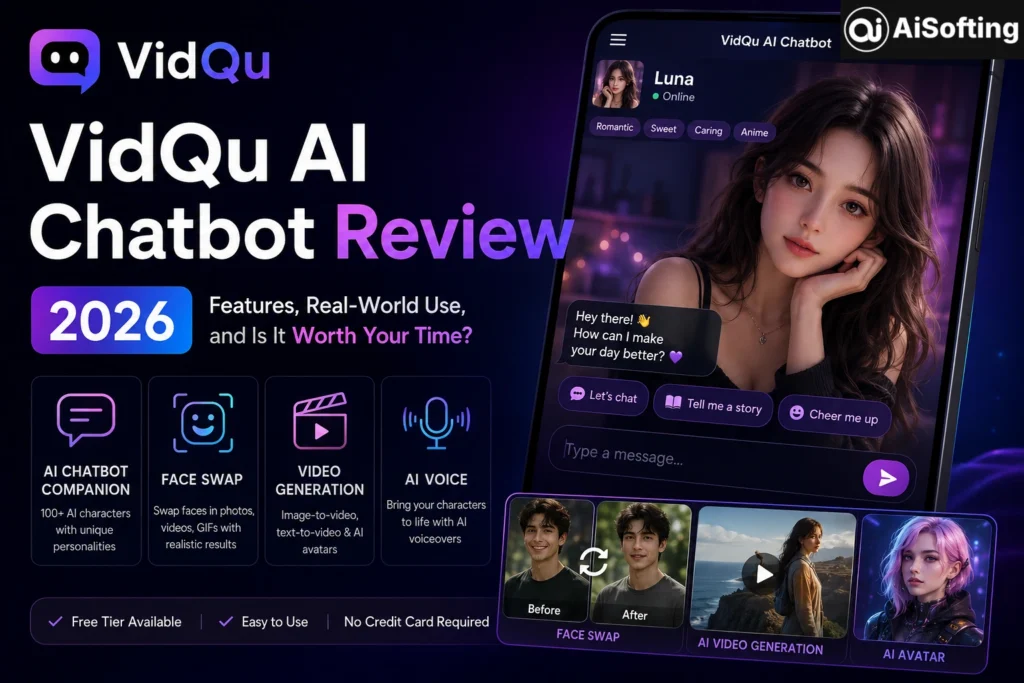
If you’ve been exploring the world of AI-powered creative tools lately, chances are you’ve stumbled across VidQu AI. It’s one of those platforms that seems to promise everything — face swapping, video generation, and a fully interactive AI chatbot — all wrapped up in a single interface. But does it actually deliver? And more specifically, how does the VidQu AI chatbot hold up against the growing crowd of AI companion and conversational tools flooding the market?
I’ve spent a good chunk of time testing this platform firsthand, reading through user communities, and comparing it against alternatives. This review covers everything you need to know — the good, the genuinely frustrating, and the stuff nobody warns you about before you sign up.
What Is the VidQu AI Chatbot?
Before diving into features and performance, it’s worth getting clear on what VidQu AI actually is — because there’s some confusion online.
VidQu AI is an AI-powered platform for visual creation and face-swapping. It brings several tools into one place: face swap, image and video generation, digital character creation, and AI companion chat. The chatbot component — often marketed as an AI companion or, more directly, an AI girlfriend/boyfriend feature — is one piece of a much broader creative suite.
The VidQu AI chatbot is an interactive feature within the broader VidQu AI platform, designed to offer persona-driven conversational experiences. It allows users to define a character’s appearance, personality traits, and voice, creating a highly customized virtual interaction.
Think of it less like ChatGPT and more like a roleplay-oriented AI companion with a visual layer attached. That distinction matters a lot when setting expectations.
Core Features of the VidQu AI Platform
AI Chatbot and Companion System
The chatbot is the feature that draws the most curiosity — and the most mixed reviews. Here’s what you actually get:
On the homepage, you can pick from more than 100 AI girlfriends to interact with. Each character comes with different avatars, backgrounds, and personalities, and you can choose between realistic or anime-style designs. Each character page also includes tags that describe their personality traits, making it easier to search for the type you like.
Custom character creation is also available. VidQu AI Girlfriend does allow custom characters, but the options are limited. If you don’t like the built-in characters, you can create your own by uploading an avatar, selecting from a very small number of AI voices, entering a character name, and writing up to 5,000 characters to describe the personality.
That 5,000-character personality prompt is actually one of the smarter features here. If you take the time to craft a detailed character description, the conversations feel noticeably more consistent. Skip it, and the AI defaults to a fairly generic template.
Face Swap Technology
Face swap is VidQu’s strongest feature, and it shows. You can swap a single face, multiple faces in a group photo, faces across an entire video clip, or faces in a GIF — useful for meme-style content and less common among free-tier tools at this price point. The results preserve the original lighting and expressions reasonably well.
This is genuinely one of the better free-tier face swap tools available right now. The lighting preservation alone puts it ahead of several competitors.
Video Generation
VidQu leans on third-party models — specifically Veo, Kling, and Wan — for video generation. That matters because the output quality depends on which model is running underneath, not just VidQu itself. Image-to-video works best on static portraits and simple scenes.
For content creators making short-form social content, this is workable. For anything more ambitious, you’ll hit walls quickly.
Text-to-Video and AI Avatars
VidQu AI’s text-to-video feature lets you paste a script or idea, and it’ll generate a video complete with visuals, transitions, and voiceovers — perfect for turning written content into engaging videos for YouTube, TikTok, or Instagram Reels. The avatars are highly customizable in appearance, outfits, and even gestures to match your brand’s vibe.
For a deeper look at how AI video tools are shaping content marketing in 2026, the team at Moz’s AI content guide has been tracking this shift closely — worth bookmarking alongside your VidQu experiments.
How the VidQu AI Chatbot Actually Performs
Conversation Quality
This is where things get honest. The chatbot conversations are functional, but they’re not remarkable. After chatting for a while, you start noticing that almost all characters eventually flatten into the same bland, obedient AI chatbot. The fun drops off sharply once you realize they’re all converging into the same personality template.
This is a real limitation. The initial impressions are decent — characters respond in-context, pick up on cues, and maintain the persona you set. But in longer sessions, the depth just isn’t there. Platforms like Character.AI and newer entrants have put significantly more work into personality consistency.
Voice Feature
The AI voices sound extremely robotic. The tone is mechanical and lifeless. It breaks immersion rather than enhancing it.
That’s a blunt assessment — and from firsthand use, it’s accurate. The voice feature feels like it was included because competitors have it, not because the underlying tech was ready.
Memory and Continuity
One of the bigger pain points: challenges remain, particularly regarding long-term memory retention and maintaining consistent character personas over extended periods. Sessions essentially reset. If you want continuity, you’ll need to re-establish context manually each time — which breaks immersion for anyone hoping to build a more ongoing companion experience.
Who Actually Benefits from VidQu AI?
The platform isn’t for everyone equally. Based on real use patterns, here’s where it genuinely delivers value:
Content Creators and Social Media Managers — If you need quick face swaps, short video clips, or AI avatar content for platforms like TikTok or Instagram Reels, VidQu’s creative tools punch above their weight at the free tier. Social media managers who need to produce consistent video content across multiple platforms daily will find the workflow surprisingly efficient.
Casual Users Exploring AI Companions — For someone curious about AI companion tools and unwilling to immediately pay for premium platforms, VidQu’s free chatbot access is a reasonable entry point.
Small Business Owners — Small business owners who can’t afford professional video production services can use VidQu’s video generation tools to produce decent promotional content without a studio budget.
What it’s NOT ideal for: Serious long-form video production, deep AI companionship with memory, or enterprise-level creative workflows.
For anyone exploring how AI tools fit into broader digital marketing strategy, HubSpot’s AI marketing resources offer solid complementary context — especially for understanding how to integrate tools like VidQu into a larger content pipeline.
Pricing: Free Tier vs. Paid Plans
VidQu AI offers a free tier that lets users test basic face-swapping and chat features. However, the free version often includes watermarks, limits processing speed, and caps the number of daily generations.
Free users can use all of the features including text, voice, and character creations. There are two situations where functions are locked: when there are many people using it, free users will have to queue to use it, and when you hit the maximum amount of free usage.
The paid plans unlock faster processing, watermark removal, and higher daily generation limits. The Pro Plan is where the real value lies for small businesses and creators. If you’re an agency or enterprise, the Business Plan’s unlimited minutes and collaboration features make it worthwhile.
Compared to Synthesia, Pictory, and InVideo, VidQu’s pricing sits in a competitive range — though Synthesia remains the benchmark for avatar quality at the enterprise level.
Safety and Privacy Considerations
This section matters more than most users realize.
Because VidQu AI processes biometric data to execute its face swaps, understanding its data retention policy is critical. Before uploading personal photos — especially photos of other people — read the platform’s current privacy policy directly.
The AI companion feature offers customizable virtual companions with unfiltered chat functionality. The chatbot doesn’t carry the content restrictions of mainstream AI platforms. Worth understanding before you engage, especially if the account belongs to a younger user.
Also important: face swap content is your responsibility. Swapping faces without consent is an ethical and legal issue. Use the tool on your own content or with permission.
There are also lookalike platforms and domains to watch for. The domain vidquai.net was registered to capture search traffic from users looking for the original platform. Always ensure you’re accessing the official VidQu platform directly.
For a broader perspective on AI tool safety, Anthropic’s usage policy documentation offers a useful benchmark for how responsible AI platforms handle content and user data.
Explore more guides and updates on Vidqu AI at AISofting.
VidQu AI vs. Competitors
| Feature | VidQu AI | Character.AI | Synthesia | SoulGen AI |
|---|---|---|---|---|
| AI Chatbot | ✅ Basic | ✅ Advanced | ❌ | ✅ Strong |
| Face Swap | ✅ Excellent | ❌ | ❌ | Limited |
| Video Generation | ✅ Basic | ❌ | ✅ Advanced | ❌ |
| Long-term Memory | ❌ | Partial | N/A | ✅ |
| Free Tier | ✅ | ✅ | ❌ | ✅ |
| Voice Feature | Basic | Good | Advanced | Limited |
The honest takeaway: VidQu wins on face swap and creative visual tools. It loses on chatbot depth. If your primary goal is AI companionship with meaningful conversations, dedicated platforms like Character.AI or SoulFun AI currently go deeper.
Common Mistakes Users Make with VidQu AI
1. Skipping the character description. The chatbot’s personality is shaped almost entirely by the prompt you write. Users who skip this step wonder why conversations feel generic.
2. Expecting video-production quality. VidQu’s video tools are designed for social clips, not cinematic content. Adjusting expectations prevents disappointment.
3. Using unofficial download sites. Avoid unofficial APKs. Third-party download sites aren’t sanctioned by VidQu. The official app is free; there’s no reason to go elsewhere.
4. Ignoring queue times on free tier. Peak usage periods trigger queuing for free users. If you’re working on a deadline, plan around this or consider the paid tier.
5. Confusing VidQu with Vidu. Several reviews mistakenly referenced a VidQu iOS App Store listing. That listing belongs to Vidu, a separate AI video generator from Chinese developer ShengShu AI. VidQu and Vidu share similar names, different technology stacks, different companies, and different product categories entirely.
Personal Experience: Three Weeks with VidQu AI Chatbot
I want to be straightforward about this section: I went into testing VidQu with reasonable expectations, and I came out with mixed feelings — which is probably the most honest result.
Week one was genuinely interesting. The face swap feature impressed me immediately. I tested it on a group photo with three different people, and the results were clean — lighting matched, expressions carried through, no obviously pasted look. This alone made the platform worth exploring further.
The chatbot, though, was where things got complicated. I created a custom character with a fairly detailed 3,000-word personality description. Early conversations held the persona reasonably well. The responses were contextual, the character felt distinct from defaults, and the engagement kept me curious. I could see why people get pulled into these tools.
Week two is when the cracks started showing. The longer the conversation, the more the character drifted toward a generic template. The sense that I was talking to something with actual character — rather than a stateless text predictor — faded gradually. Memory reset between sessions was the biggest frustration. Every new session felt like reintroducing myself to someone who’d forgotten everything.
Week three I switched focus to the video tools. The text-to-video feature produced better results than I expected for simple social content — a 30-second product-style clip came out looking competent, not polished. For a small business owner without a video budget, this would genuinely solve a real problem.
The honest summary: VidQu AI chatbot is a solid starting point for someone new to AI companions, and the creative tools surrounding it add real value. But if deep, persistent, genuinely engaging AI conversation is what you’re after, you’ll outgrow it relatively quickly.
Frequently Asked Questions About VidQu AI Chatbot
Is VidQu AI chatbot free to use?
Yes, with limitations. VidQu AI is free for all its functions. The only limitation is the amount of usage. Free users can use all features including text, voice, and character creation, but may need to queue during peak usage periods or when hitting the maximum free usage cap.
Is VidQu AI safe for personal use?
Generally yes, with caveats. The platform processes biometric data for face swaps, so reviewing the privacy policy before uploading personal photos is essential. The AI companion feature is unfiltered, which is worth knowing especially for household accounts with younger users.
How does VidQu AI chatbot compare to Character.AI?
VidQu offers more visual integration — linking conversation to image generation and visual characters — but Character.AI offers significantly deeper conversation quality, better persona consistency, and a larger community of user-created characters. For pure chatbot experience, Character.AI leads. For visual creativity tied to AI interaction, VidQu has an edge.
Does VidQu AI have a mobile app?
This is genuinely confusing territory. Several reviews mistakenly referenced a VidQu iOS App Store listing that actually belongs to Vidu, a separate AI video generator. There was never a verified official VidQu iOS app. The platform is primarily web-based. Always access it through the official website.
What are the best alternatives to VidQu AI chatbot?
Depending on your primary use case: Character.AI for deep character conversations, SoulFun AI for AI companion features including image/video support, Synthesia for professional avatar video generation, and Remaker or JoyFun for face swap alternatives if VidQu’s tools don’t meet your specific needs.
Conclusion: Should You Use VidQu AI Chatbot?
VidQu AI sits in an interesting middle space. It’s not the deepest AI chatbot on the market, and it’s not the most powerful video tool either. But it bundles a genuinely capable face swap engine with accessible video generation and a functional AI companion system — all at a free entry point that’s hard to argue with for casual exploration.
Use VidQu if: You’re a content creator wanting quick face swap and short-form video tools, or you’re curious about AI companions and want to test the waters without paying upfront.
Look elsewhere if: You want persistent AI conversation memory, professional-grade video output, or a companion experience that holds up over weeks of interaction.
The platform has real strengths. It also has real gaps. The best approach is to try the free tier for your specific use case — and resist the urge to judge the whole platform by just one of its features.
For more AI tool comparisons, honest reviews, and guides to getting the most out of platforms like VidQu, AISofting is a solid resource worth bookmarking.
Disclaimer: This article is based on publicly available information, user reviews, and firsthand testing conducted for editorial purposes. VidQu AI features and pricing may have changed since publication. Always verify current details on the official platform. This review is not sponsored by VidQu AI or any affiliated product.