Introduction
Anyone who’s ever needed a warm introduction knows the drill: you scroll through LinkedIn, ctrl+F your inbox, maybe text three different people asking “hey, do you know anyone at X company?” — and half the time you still come up empty, even though the right connection was probably sitting in your contacts the whole time. That’s the exact problem Happenstance AI was built to solve.
If you’ve come across the name “happenstance ai” while researching AI networking tools, sales prospecting software, or recruiting platforms, you’re looking at one of the more talked-about entrants in the “search your own network with AI” category. In this guide, I’ll break down what Happenstance actually does, how it works day to day, where it genuinely helps, where it falls short, and what stood out — good and bad — after spending real time inside the product.
What Is Happenstance AI?
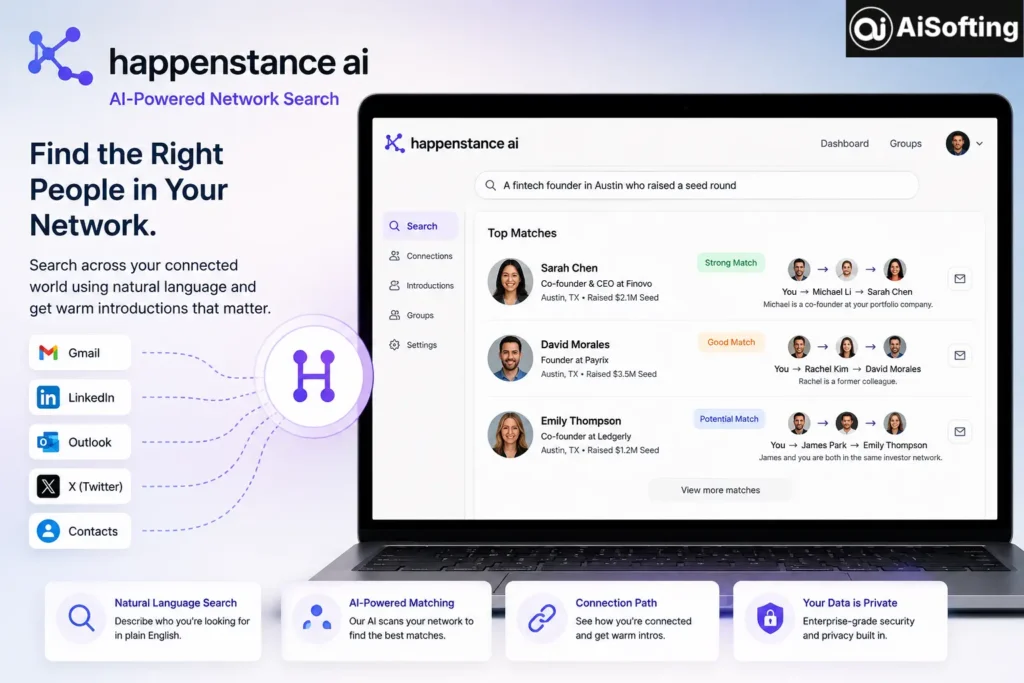
Happenstance is an AI-powered people search platform that turns the professional network you already have — your Gmail contacts, LinkedIn connections, X/Twitter follows, and Outlook contacts — into something you can search using plain, natural language instead of manual scrolling or boolean search strings. Instead of typing exact keywords, you describe who you’re looking for — something like “a fintech founder in Austin who’s raised a seed round” — and Happenstance searches across everyone in your connected network to surface relevant matches, along with an explanation of how you’re connected to them.
The company was founded in 2023, is based in San Francisco, and went through Y Combinator, the same accelerator that helped launch companies like Airbnb, Dropbox, and Stripe. The name itself is a nod to the core idea: meaningful professional connections often feel like pure coincidence, but with the right tool, they can be found on purpose instead of left to chance.
Who Happenstance AI Is Actually Built For
This isn’t a general-purpose networking app for casual users. It’s aimed squarely at people whose work depends on introductions — recruiters sourcing candidates, sales teams looking for warm paths into target accounts, founders fundraising, and business development teams trying to find partners. If your job involves “who do I know who knows this person,” Happenstance is designed around exactly that question.
How Happenstance AI Works
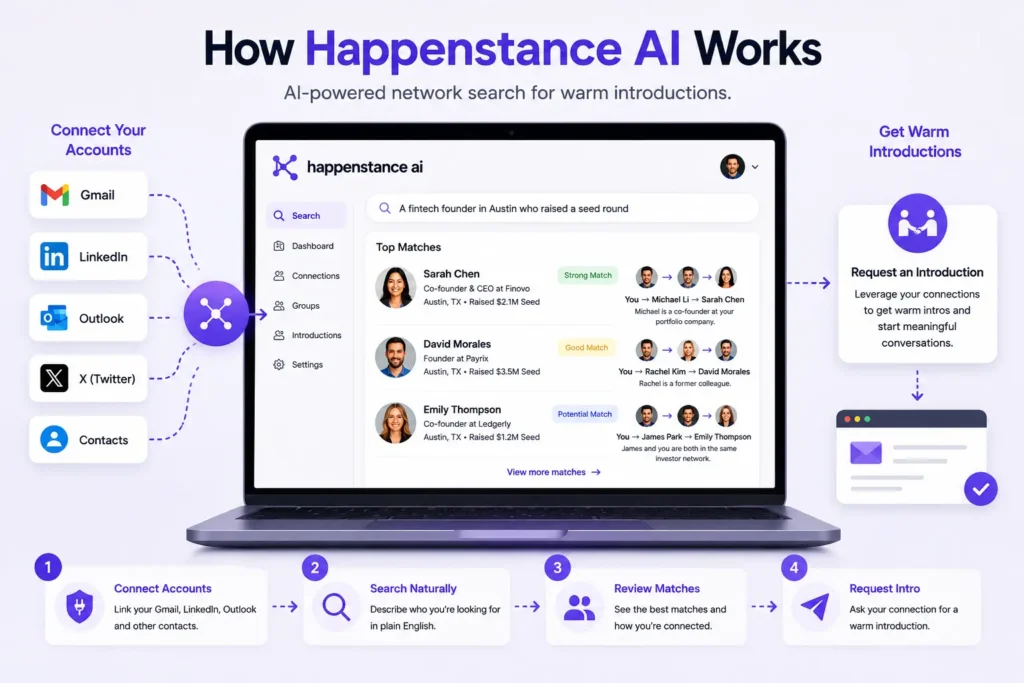
Step 1: Connect Your Accounts
You link the accounts that make up your existing network — commonly Gmail, LinkedIn, X, Outlook, and in some cases Instagram — through OAuth or data import. The platform then maps out your combined social and professional graph.
Step 2: Search With Natural Language
Instead of digging through each platform separately, you type a plain-English description of who you’re trying to find. The system uses large language models and embedding-based search to interpret intent rather than requiring exact keyword matches, then scans your connected network for people who fit.
Step 3: Review Matches With Reasoning
One detail that stands out compared to a basic contact search: results come with an explanation of the connection path, not just a name. You can usually see how you’re linked to that person — a mutual contact, a shared platform connection — which matters a lot when the whole point is asking for a warm introduction rather than a cold outreach.
Step 4: Request or Route the Introduction
From there, the workflow is about turning that match into an actual conversation — typically by asking your mutual connection for an intro, since the tool’s value is in mapping the path, not replacing the human step of actually connecting people.
Optional: Groups and Shared Networks
Happenstance also supports pooling networks within a Group, which is useful for teams — a recruiting team or sales pod can search across everyone’s combined contacts rather than just their own. This is powerful, but it comes with a privacy trade-off worth understanding before you turn it on.
Real-World Use Cases
- Recruiting: A recruiter searching for “a backend engineer who’s worked at an early-stage startup and is open to relocating” across their team’s combined network rather than cold-sourcing from scratch.
- Fundraising: A founder looking for warm paths to investors who’ve backed similar companies, instead of sending cold emails into the void.
- Sales prospecting: A sales rep checking whether anyone on their team has a mutual connection at a target account before reaching out.
- Partnerships and BD: Finding the person two degrees away who can make an intro to a potential partner company.
Benefits of Using Happenstance AI
- Turns dormant contacts into something searchable — most people have far more useful connections buried in their inbox than they realize.
- Plain-language search — no need to learn boolean search syntax the way LinkedIn’s advanced search often requires.
- Shows the connection path, not just a name — this is the difference between a cold lead and an actual warm intro opportunity.
- Free tier available — enough for occasional searches without committing to a paid plan right away.
- Team collaboration via Groups — useful when a whole team’s combined network is more valuable than any one person’s.
Common Mistakes and Limitations to Know
- Assuming it replaces LinkedIn entirely. It doesn’t. LinkedIn still has a far larger, more thoroughly verified employment database. Happenstance is better suited to searching your existing network with natural language and surfacing warm paths, not replacing broad public search.
- Not reviewing the privacy settings before joining a Group. When you join a Group, your network can become pooled with others in that group. It’s worth reading the privacy documentation carefully before opting in, since the access model has been a point of concern for some users.
- Expecting every AI-built profile to be accurate. Profiles are generated from available digital footprints, and thin or sparse public data can lead to a profile that misreads who someone actually is — and there isn’t always a way to correct it if the tool gets a detail wrong.
- Confusing the company with similarly named entities. Because the name is generic enough, some funding figures and details online get misattributed to unrelated companies with similar names. If you’re researching the product, stick to the official happenstance.ai domain to avoid confusion.
Best Practices for Getting Value Out of Happenstance AI
- Connect as many relevant accounts as you’re comfortable with — the tool’s usefulness scales with how much of your real network it can see.
- Use specific, descriptive natural-language queries rather than vague ones; the more context you give, the better the match quality tends to be.
- Treat Group-based network pooling as an opt-in decision, not a default — review who else is in the group first.
- Use it alongside, not instead of, platforms like LinkedIn — each is strong in a different part of the networking workflow.
Personal Experience
I started testing Happenstance while helping a small recruiting team fill a handful of niche technical roles — the kind where posting a job listing and waiting wasn’t going to cut it. The first thing that struck me was how little friction there was in the setup. Connecting Gmail and LinkedIn took a few minutes, and the first search I ran — something like “a product manager with fintech experience who’s open to new roles” — returned a handful of names within seconds, each with a short explanation of how we were connected.
What impressed me most wasn’t the AI matching itself — plenty of tools claim smart search — it was seeing the reasoning behind each result. Knowing that a candidate was two connections away through a specific mutual contact made the outreach conversation completely different from a cold LinkedIn message. That’s the actual value proposition, and in practice, it delivered.
Where I ran into friction was accuracy on thinner profiles. One match came back described in a way that didn’t quite match the person’s actual current role — their digital footprint was sparse, and the AI had clearly filled gaps with reasonable but incorrect assumptions. There wasn’t an obvious way to flag or fix that within the product at the time, which was a bit frustrating when precision mattered for outreach. My takeaway: treat AI-generated profile summaries as a strong starting point, not gospel, and always do a quick manual check before reaching out, especially for anything high-stakes like a recruiting pitch or investor ask.
I also want to flag the Group feature honestly — it’s genuinely useful for team-based search, but I’d encourage anyone protective of their contact list to read the sharing settings closely before joining one. It’s not reckless by design, but pooled-network products always deserve a slower, more deliberate opt-in than a quick click.
FAQs
1. What does Happenstance AI actually do? Happenstance AI lets you search your own professional network — Gmail, LinkedIn, X, and Outlook contacts — using natural language instead of manual searching, and it shows you how you’re connected to each match so you can request a warm introduction.
2. Is Happenstance AI free to use? Yes, there’s a free tier that includes basic search and account connections, though it typically comes with a monthly search cap. Paid tiers unlock higher usage limits.
3. Is Happenstance AI the same as LinkedIn’s search? No. LinkedIn has a much larger public database with verified employment history, while Happenstance focuses specifically on searching your existing personal and professional network using AI-interpreted natural language, which is a different and more targeted use case.
4. Is it safe to connect my Gmail and LinkedIn to Happenstance? Happenstance connects via standard OAuth authorization rather than requiring your passwords directly, but as with any third-party tool accessing personal accounts, it’s worth reviewing their privacy policy and permissions before connecting, especially around Group network-sharing features.
5. Who is Happenstance AI best suited for? It’s most useful for recruiters, sales teams, founders fundraising, and business development professionals — essentially anyone whose work regularly depends on finding the right person through an existing network rather than cold outreach.
6. Can I fix or correct an inaccurate AI-generated profile on Happenstance? Based on user reports, correcting an AI-built profile that misreads someone’s background isn’t always straightforward within the platform, so it’s worth manually verifying key details before relying on a match for something important.
Conclusion
Happenstance AI tackles a genuinely annoying problem — the fact that most of us are sitting on more useful professional connections than we can actually find or remember. By making that network searchable in plain language and showing the path to a warm intro, it fills a real gap between “who do I know” and “who do I know that I’ve forgotten I know.” It’s not without rough edges — profile accuracy on thin data and the privacy nuance of Group sharing are both worth going in aware of — but for recruiting, sales, and fundraising workflows built on introductions, it’s a practical tool rather than just another AI wrapper.
Actionable takeaways:
- Connect the accounts that reflect your real professional network, not just one platform, for the best results.
- Use specific natural-language queries and treat AI-generated profile details as a starting point to verify, not a final answer.
- Review privacy settings carefully before joining or creating a shared Group.
- Keep LinkedIn and other verified databases in your toolkit alongside Happenstance rather than replacing them outright.
If you’re evaluating AI-powered tools like this as part of a bigger growth or outreach strategy, it helps to have the rest of your digital presence working just as hard — see how professional SEO strategy can improve how prospects and partners find you in the first place, and how solid custom web development supports a more credible first impression once they do.
For further reading, see Y Combinator’s overview of its accelerator program and portfolio, LinkedIn’s own guide to using advanced people search, and a broader look at how AI is reshaping professional networking tools.
Disclaimer: This article is for general informational purposes only and does not constitute professional, legal, or investment advice. Product features, pricing, and privacy policies mentioned here may change over time — always verify current details on Happenstance’s official website. This content is not affiliated with or endorsed by Happenstance AI.