Introduction
Anyone who’s worked on a design or game development team knows the specific chaos of asset management gone wrong — a 3D model buried three folders deep on someone’s local drive, a “final_v2_ACTUALFINAL” file nobody trusts, and a Slack thread from six months ago that supposedly has the answer to which version is current. Blueberry AI was built to fix exactly that problem, combining digital asset management with AI-powered search and organization specifically for creative and design-heavy teams.
Quick disambiguation before we go further, because it matters for search accuracy: there are a few different products currently using the “Blueberry AI” name, including an AI-native product development tool and an unrelated blueberry-farming ripeness detection app out of North Carolina State University. This guide focuses specifically on Blueberry AI the digital asset management platform, built for industries like industrial design, game development, and marketing, since that’s the product most commonly meant when people search the term in a business software context.
What Is Blueberry AI?
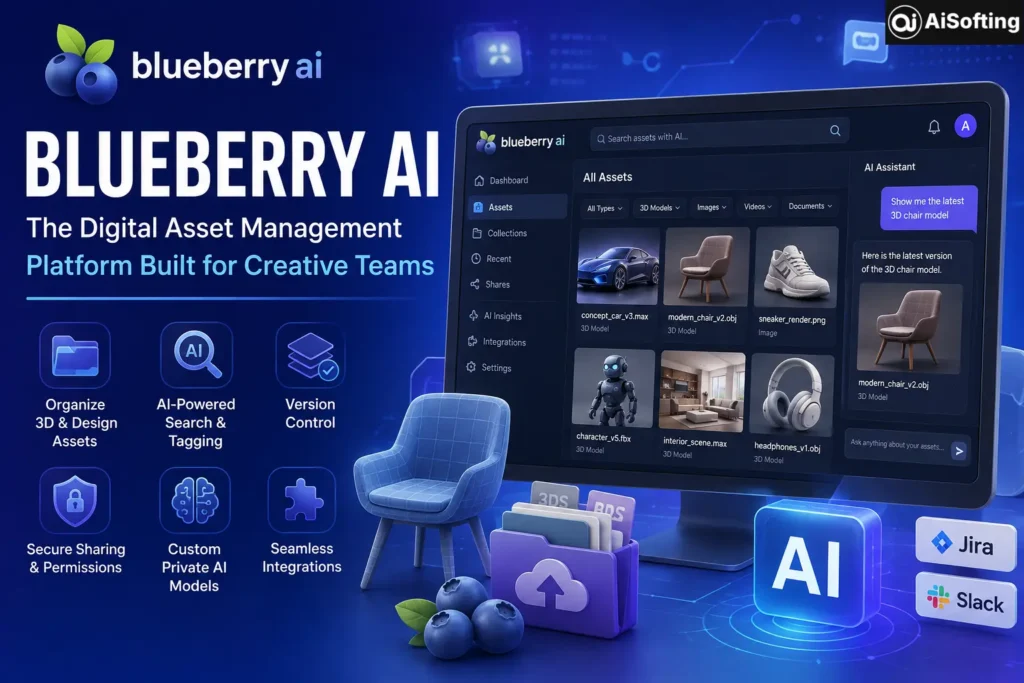
Blueberry AI is a cloud-based digital asset management (DAM) system designed specifically for creatives and designers working across industries like industrial design, marketing, retail, and game development. At its core, it’s a secure, trackable, and collaborative platform for organizing 3D assets, professional design files, and other content that traditional file storage tools handle poorly.
What sets it apart from a generic cloud storage tool is the AI layer built on top of the asset library. Rather than just storing files, Blueberry AI lets teams train private AI models on their own stored content — described by reviewers as similar to having an enterprise-specific version of ChatGPT deployed on the business’s own servers. Those models can then surface real-time insights pulled from the organization’s own data, including things like advertising performance and product data analysis.
Core Features
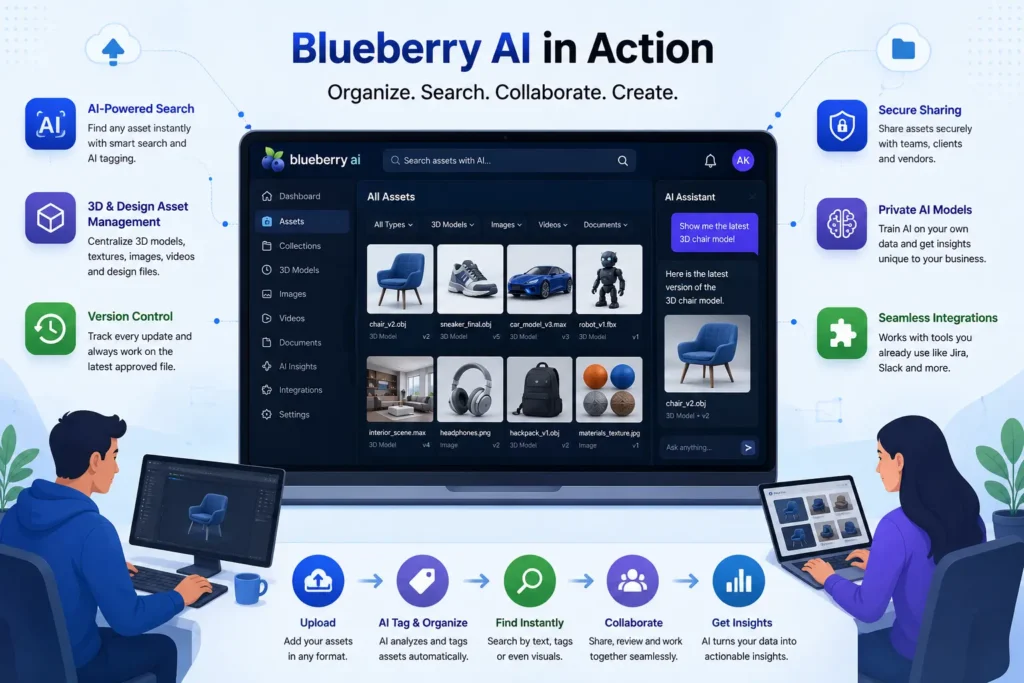
- 3D and design file management — organizing formats like 3ds Max, Maya, OBJ, and Spine files in a centralized, searchable library rather than scattered across local drives.
- AI-powered search and tagging — using AI to make assets instantly discoverable instead of relying on manual folder structures and inconsistent file naming.
- Version control — ensuring teams are always working from the latest approved file, which is a common pain point in fast-moving creative workflows.
- Secure file transfer and sharing — built for handling sensitive design assets and vendor collaboration without relying on ad hoc file-sharing methods.
- Custom private AI models — training AI on a business’s own stored content to surface insights specific to that organization, deployed on the business’s own servers rather than a shared public model.
- Integrations — connecting with collaboration tools like Jira and Slack to fit into existing team workflows.
Who Blueberry AI Is Built For
Blueberry AI’s typical customer base spans small businesses up through large enterprises, with particular strength for organizations managing high volumes of design or 3D content — game studios, industrial design firms, and marketing teams handling large asset libraries. If your team’s biggest daily friction is “where is the current version of this file” or “why does nobody trust our shared drive,” this is squarely the category of problem Blueberry AI is trying to solve.
Digital Asset Management vs. Generic Cloud Storage
It’s worth understanding why a tool like this exists separately from something like Google Drive or Dropbox. Generic cloud storage handles files; a purpose-built DAM platform handles files with metadata, version history, permissions, and search built around how creative teams actually work. For teams juggling hundreds or thousands of 3D assets across multiple projects, that structural difference becomes the entire point.
Real-World Use Cases
- Game development studios — centralizing 3D character models, environment assets, and animation files across a distributed team, with version control preventing artists from overwriting each other’s work.
- Industrial design firms — managing CAD and 3D prototype files across a product development pipeline, with secure sharing for vendor and manufacturing partner collaboration.
- Marketing teams — organizing product images, brand assets, and campaign files, then using the platform’s AI layer to surface insights like ad performance tied to specific creative assets.
- Retail and e-commerce teams — maintaining a consistent, searchable product asset library across multiple sales channels and campaigns.
Benefits of Using Blueberry AI
- Purpose-built for 3D and design files — unlike generic storage tools, it’s structured around the specific file types and workflows creative teams actually use.
- AI-powered discoverability — search and tagging powered by AI meaningfully reduces the time spent hunting for the right asset version.
- Private, enterprise-deployed AI models — training AI on your own organization’s data, kept on your own servers, addresses a real data-privacy concern that public AI tools can’t match.
- Built-in collaboration and vendor workflows — designed around real production pipelines rather than being retrofitted from a general file-sharing tool.
- Scales across company sizes — used by everything from small studios to large enterprises, suggesting reasonable flexibility in how it’s deployed.
Common Mistakes and Things to Watch For
- Confusing it with other “Blueberry AI” products. Given the naming overlap in this space, double-check you’re evaluating the right product for your use case — a digital asset management platform is a very different tool than an AI coding assistant or an unrelated agricultural app sharing a similar name.
- Treating it as generic cloud storage. The real value comes from the AI-powered search, tagging, and custom model training — teams that only use it as a place to dump files without leaning into those features are leaving most of the platform’s value on the table.
- Skipping a proper onboarding or migration plan. Moving years of scattered design assets into a structured DAM system is a real project, not a weekend task — teams that rush the migration often end up with the same disorganization problem inside the new tool.
- Not clarifying pricing upfront. Enterprise-oriented platforms like this commonly use custom or quote-based pricing rather than public flat-rate plans, so it’s worth requesting a detailed pricing breakdown early rather than assuming a standard SaaS price point.
- Underestimating the value of the custom AI model feature. Some teams adopt Blueberry AI purely for asset storage and never build out the private AI model training, missing what reviewers describe as one of its more distinctive capabilities compared to standard DAM competitors.
Best Practices for Getting the Most Out of Blueberry AI
- Invest time in a proper migration and tagging strategy when first moving assets in, rather than a rushed bulk upload.
- Actually build out the custom AI model training on your organization’s data if your use case involves recurring questions about performance, product data, or campaign insights.
- Set clear permission structures early, especially for teams working with external vendors or manufacturing partners.
- Integrate it with tools your team already uses daily, like Slack or Jira, rather than treating it as a separate silo.
Personal Experience
I got a close look at Blueberry AI while consulting for a small industrial design studio that was drowning in scattered CAD files spread across three different cloud drives, a shared server nobody fully trusted, and more than a few personal laptops. The pitch of “AI-powered search across your actual 3D assets” sounded good on paper, but I went in cautious, since a lot of DAM tools promise smart search and deliver something closer to a glorified folder structure.
What actually stood out during evaluation was the specificity around 3D file formats. A lot of general-purpose asset management tools treat a 3D model file the same as a JPEG, which misses a lot of what design teams actually need — version history tied to iterative prototype development, not just a generic “file uploaded” timestamp. Blueberry AI’s structure around formats like 3ds Max and OBJ files felt like it was actually built by people who understood the workflow, rather than a general storage tool with “AI” bolted on afterward.
The friction point, and this is a lesson I’d pass on to anyone evaluating a DAM platform in general, not just this one: migration is genuinely the hard part. We underestimated how long it would take to properly tag and organize years of legacy files rather than just dumping them into the new system. The team that rushed that step ended up with a search experience that wasn’t much better than what they started with, simply because the underlying metadata was inconsistent. Once we slowed down and did a proper tagging pass, the AI-powered search genuinely started paying off — but that was a deliberate, planned effort, not something that happened automatically just by adopting the tool.
The other honest takeaway: because pricing wasn’t publicly listed, getting a clear cost picture took more back-and-forth than I expected for a tool at this scale. If you’re evaluating it for a team, budget time for that conversation rather than assuming you can compare pricing at a glance the way you might with a typical self-serve SaaS product.
FAQs
1. What is Blueberry AI used for?
Blueberry AI is a cloud-based digital asset management platform used to organize, search, and manage 3D assets and design files, with an added layer of AI-powered search, tagging, and custom private AI model training for creative and design-heavy teams.
2. Is Blueberry AI the same as other AI tools with the same name?
No — there are multiple unrelated products currently using variations of the “Blueberry AI” name, including an AI-native product development platform and an unrelated agricultural ripeness-detection app. Make sure you’re evaluating the specific digital asset management product before comparing features or pricing.
3. Who is Blueberry AI designed for?
It’s designed for creative and design-focused teams across industries like industrial design, game development, marketing, and retail — essentially any organization managing large volumes of 3D or professional design files.
4. Does Blueberry AI support integration with other tools?
Yes, it integrates with collaboration tools like Jira and Slack, allowing teams to fit asset management into their existing project workflows rather than working in a separate silo.
5. How does Blueberry AI’s custom AI model feature work?
It allows businesses to train private AI models on their own stored content, deployed on the business’s own servers, functioning similarly to an enterprise-specific version of ChatGPT that can surface insights like advertising performance and product data specific to that organization.
6. Is Blueberry AI pricing public?
Pricing generally isn’t published as a flat, self-serve rate — like many enterprise-oriented platforms, it typically requires requesting a personalized quote based on team size and usage needs.
7. What file types does Blueberry AI support?
It’s built to handle 3D asset formats such as 3ds Max, Maya, OBJ, and Spine files, alongside general professional design files, which sets it apart from generic cloud storage tools not built around 3D workflows.
Conclusion
Blueberry AI fills a real gap for creative and design teams drowning in scattered 3D assets and design files — purpose-built organization, AI-powered search, and the option to train private AI models on your own content, all in one platform. It’s not a casual tool for a small team with a handful of files, and the migration and onboarding process deserves real planning rather than a rushed rollout. But for game studios, industrial design firms, and marketing teams managing serious asset volume, it addresses a workflow problem that generic cloud storage genuinely can’t solve.
Actionable takeaways:
- Confirm you’re looking at the digital asset management Blueberry AI, not a similarly named but unrelated product.
- Plan a deliberate migration and tagging strategy rather than a rushed bulk upload of legacy files.
- Actually build out the custom private AI model feature if your team has recurring reporting or insight needs.
- Budget time for a pricing conversation, since costs are typically quote-based rather than publicly listed.
If your team is investing in better internal tooling like this, it’s worth making sure your external-facing presence is just as strong — see how professional web development services can support the platforms and systems your creative team relies on, and how professional SEO strategy helps the work your team produces actually reach the right audience.
For further reading, see a general industry overview of digital asset management systems from Gartner, Autodesk’s documentation on 3ds Max and Maya file workflows, and an independent comparison of digital asset management software on G2.
Disclaimer: This article is for general informational purposes only and does not constitute professional or purchasing advice. Blueberry AI’s features, pricing, and availability may change over time — always verify current details on the official Blueberry AI website before making a decision. This content is not affiliated with or endorsed by Blueberry AI.