Introduction
Most writing tools fall into one of two camps: the ones that generate entirely new content from a prompt, and the ones that quietly clean up what you’ve already written. Wordtune sits firmly in the second camp, and that’s actually its biggest strength. Instead of asking “what should I write,” Wordtune asks “how can this sentence say what you already meant, more clearly?”
If you’ve been researching Wordtune because you’re stuck rewording an awkward sentence, comparing it to Grammarly or QuillBot, or just trying to figure out whether the paid plan is worth it, this guide covers what the tool actually does, how it’s priced, where it genuinely helps, where it falls short, and what I’ve learned using it in real writing work.
What Is Wordtune?
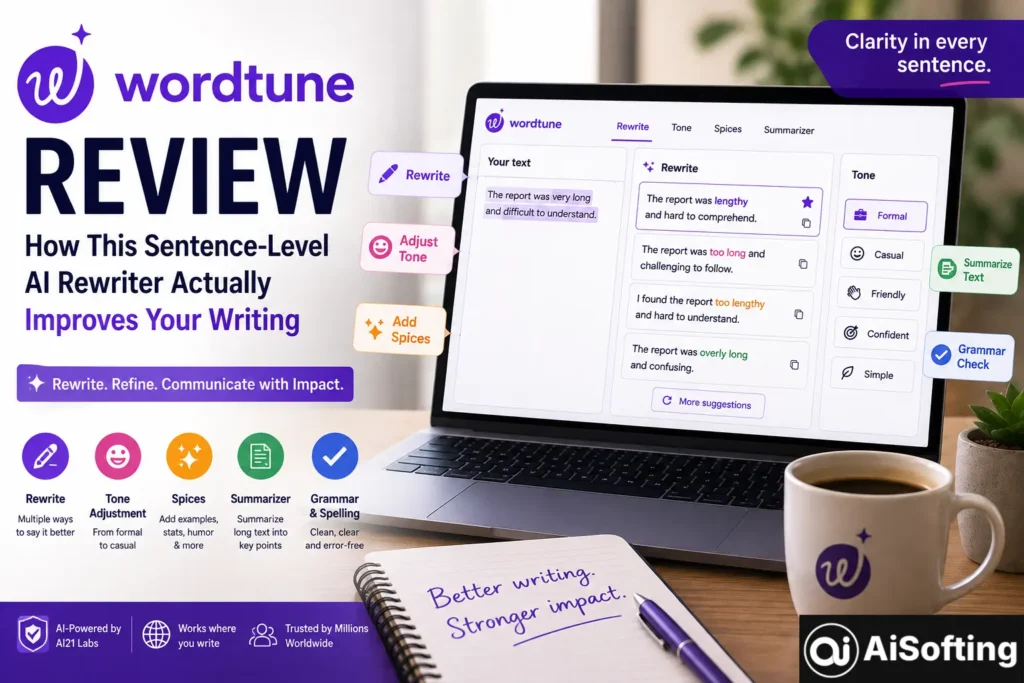
Wordtune is an AI-powered writing assistant made by AI21 Labs, built specifically around sentence-level rewriting, tone shifting, and clarity improvements rather than generating whole documents or articles from scratch. You highlight a sentence or paragraph, and Wordtune offers several alternative phrasings that preserve your original meaning while adjusting for clarity, tone, or length.
That distinction matters a lot when comparing it to other AI writing tools. Tools like Jasper or Copy.ai are built to generate original marketing content from a prompt. Wordtune takes a different approach — it rewrites your existing writing rather than replacing your voice with something entirely new, which is exactly why it’s often described as a rewriting companion rather than a content generator.
Core Features
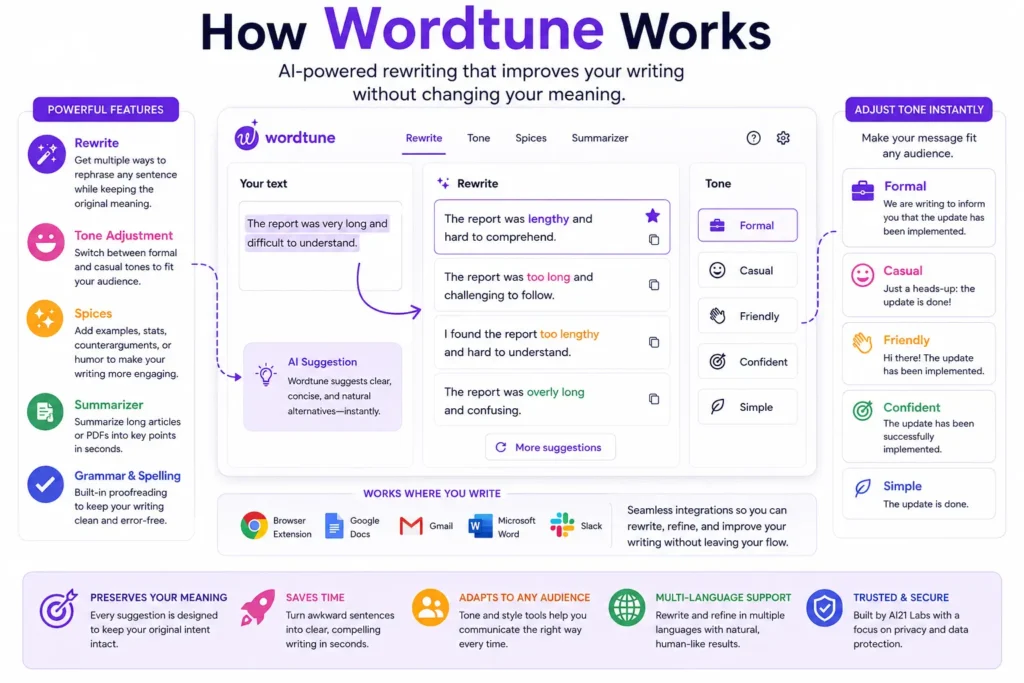
- Rewrite — the flagship feature, offering multiple alternative phrasings for any selected sentence, each preserving your original meaning while adjusting tone or structure.
- Tone adjustment — instantly toggling between formal and casual registers, useful for switching a message from a casual Slack tone to something appropriate for a client email.
- Spices — adds examples, counterarguments, statistics, or a touch of humor to make a passage more engaging, going a step beyond simple rephrasing.
- Summarizer — condenses long articles or PDFs into digestible key points, handy for research or quickly parsing a long document.
- Grammar and spelling correction — basic proofreading built into the same editor.
Where Wordtune Works
Wordtune integrates directly into the places people already write, rather than requiring you to copy and paste text into a separate app. That includes a browser extension plus native integrations with Google Docs, Gmail, Microsoft Word, and Slack, which is a big part of why it fits so easily into an existing workflow.
Wordtune Pricing: What You Actually Get
Pricing in this space shifts fairly often, and different sources report slightly different current numbers, so it’s worth checking Wordtune’s official pricing page for the exact figures at the time you’re reading this. That said, the general structure has stayed fairly consistent:
- Free plan — a limited free tier, typically capped around 10 rewrites and a handful of AI suggestions per day, along with limited summarization.
- Paid tiers — mid-tier plans have generally landed in the single-digit dollars per month range on annual billing, with an “Unlimited” tier for heavier users sitting a bit higher.
The free plan is genuinely useful for testing the tool, but multiple reviewers note that the daily cap becomes the real bottleneck for anyone who edits heavily — if you’re rewriting sentences constantly throughout the day, you’ll hit that limit fast and need to weigh whether the paid tier is worth it for your workflow.
Real-World Use Cases
- Cleaning up a rough first draft — running clunky sentences through Rewrite to see cleaner alternative phrasings before moving on.
- Adjusting tone for the right audience — switching a message from casual to formal before sending it to a client or professor.
- Repurposing content across formats — using Spices and Rewrite to adapt the same core message for an email versus a social post versus a more formal document.
- Quickly digesting long documents — using the Summarizer on a lengthy PDF or article before deciding whether to read the whole thing.
- Non-native English speakers refining phrasing — using Rewrite to check whether a sentence sounds natural, rather than just grammatically correct.
Who Wordtune Is Actually Built For
Wordtune’s sweet spot is writers and professionals who edit heavily, draft long-form content regularly, or need to repurpose the same core message across multiple formats. It caters to students, marketers, executives, and general professionals who want their writing to read more clearly and polished, rather than needing an AI to generate ideas from nothing.
It’s worth being clear about who it’s less suited for: experienced writers with a strong, established personal style sometimes find that heavy reliance on Wordtune’s suggestions can flatten their voice rather than enhance it. If you already write confidently and just need occasional grammar checks, a lighter tool might be a better fit.
Benefits of Using Wordtune
- Preserves your original meaning — unlike full content generators, every rewrite option is built to keep your intent intact, just phrased differently.
- Genuinely useful for writer’s block on a sentence level — when you know roughly what you want to say but can’t quite phrase it, seeing a handful of alternatives can unstick you fast.
- Fits into existing workflows — browser extension plus native integrations mean you’re not copy-pasting between apps constantly.
- Multi-language support — useful for teams or writers working across more than one language.
- Free tier for testing — you can genuinely evaluate whether the tool fits your habits before paying anything.
Common Mistakes People Make
- Over-relying on it instead of developing your own style. Some reviewers flag this directly — using Wordtune as a permanent crutch rather than a tool to sharpen your own instincts over time can quietly stunt your own writing development.
- Not reviewing suggestions carefully on meaning-sensitive text. For longer or more nuanced passages, an AI-suggested rewrite can occasionally shift emphasis or nuance in ways worth double-checking, especially for anything precise like legal or technical writing.
- Expecting full content generation. Wordtune doesn’t create original articles or long-form content from a blank page the way Jasper or Copy.ai do — it strengthens what you’ve already written, and treating it as a full content generator will lead to disappointment.
- Hitting the free-tier limit mid-task and getting frustrated. If your writing workflow involves frequent rewriting throughout the day, the free plan’s daily cap will likely feel restrictive fast — it’s worth testing your actual usage pattern before assuming the free tier is enough long-term.
- Ignoring the tone-adjustment feature. A lot of users default to just using Rewrite for clarity and never touch the formal/casual toggle, missing one of the more genuinely useful features for adapting the same message across different audiences.
Best Practices for Getting the Most Out of Wordtune
- Use it as a second opinion on phrasing, not an automatic replacement for your own editing judgment.
- Lean on the tone toggle specifically when repurposing the same content for different audiences, rather than manually rewriting from scratch each time.
- Double-check AI-suggested rewrites on anything meaning-sensitive, like legal, medical, or technical writing, where a shift in phrasing could change the actual message.
- Track how often you hit the free tier’s daily limit before deciding whether the paid plan is worth it for your specific writing volume.
Personal Experience
I started using Wordtune while working on a batch of client emails that all needed the same core message delivered in slightly different tones — one version for a more formal stakeholder, one for a casual internal update. Manually rewriting the same paragraph three different ways was eating up more time than the actual thinking behind the message, and that’s exactly the kind of repetitive task Wordtune turned out to be genuinely good at.
The Rewrite feature was the standout for me early on. I’d type out a sentence that felt technically fine but slightly clunky, hit Rewrite, and usually find at least one of the alternatives read more naturally than what I’d originally written — often something close to what I would have eventually landed on myself with more editing passes, just faster.
Where I ran into friction, and this matches what a lot of reviewers mention, was the free plan’s daily cap. I hit the ten-rewrite limit faster than expected once I started using it as a default step in my editing process rather than an occasional tool, and that pushed me to actually evaluate the paid tier seriously rather than treating it as optional.
The other honest lesson: I noticed myself leaning on Wordtune a bit too heavily during a stretch where I was writing a lot of similar content back to back. A few passages started to feel slightly generic — technically clean, but missing some of the specific phrasing quirks that usually make my own writing sound like me. That was a useful wake-up call. Now I treat it more as a targeted tool for specific stuck sentences or tone shifts, rather than running every paragraph through it by default. It’s a strong assistant, but it works best when you’re still steering.
FAQs
1. What is Wordtune used for?
Wordtune is used for rewriting and rephrasing existing sentences to improve clarity, adjust tone, or make writing sound more natural, rather than generating brand-new content from a blank prompt.
2. Who makes Wordtune?
Wordtune is developed by AI21 Labs, an AI company known for building large language models and natural language processing tools.
3. Is Wordtune free to use?
Yes, there’s a free plan, though it typically comes with daily limits on rewrites and summaries — often cited around 10 rewrites per day. Paid tiers remove or significantly raise those caps.
4. How is Wordtune different from Grammarly?
Grammarly focuses primarily on grammar, spelling, and mechanical correctness across a full document, while Wordtune focuses more on sentence-level rephrasing, tone shifting, and stylistic alternatives. Many users actually use both tools for different purposes.
5. Can Wordtune write an entire article or blog post for me?
No. Wordtune is built for improving and rephrasing existing text, not generating full long-form content from scratch. Tools like Jasper or Copy.ai are better suited for that kind of full content generation.
6. Does Wordtune work inside Google Docs and Microsoft Word?
Yes, Wordtune offers a browser extension along with native integrations for Google Docs, Gmail, Microsoft Word, and Slack, so it can be used directly inside the tools people already write in.
7. Is Wordtune worth paying for?
It depends on how often you rewrite or edit text. Heavy users who regularly hit the free tier’s daily limit tend to find the paid plan worthwhile, while occasional writers may find the free version sufficient for their needs.
Conclusion
Wordtune fills a specific, genuinely useful niche in the AI writing space: sentence-level rewriting and tone control rather than full content generation. It won’t write your article for you, and it’s not a replacement for a strong grammar checker on longer documents, but for cleaning up awkward phrasing, adjusting tone for different audiences, and getting unstuck on a specific sentence, it does its job well. The main things to watch for are the free tier’s daily limits and the risk of leaning on it so heavily that it starts flattening your own voice.
Actionable takeaways:
- Use Wordtune for targeted rewriting and tone adjustments, not as a full content generator.
- Test your actual daily usage against the free tier’s limits before committing to a paid plan.
- Double-check AI-suggested rewrites on anything meaning-sensitive before sending or publishing.
- Balance AI-assisted rewriting with your own editing instincts so your voice stays intact over time.
If you’re refining your writing as part of a larger content or marketing strategy, it helps to have the rest of your online presence working just as hard — see how professional SEO strategy can help your polished content actually get found, and how professional web development services support a site that presents that content well once readers arrive.
For further reading, see AI21 Labs’ overview of its language model research, Purdue OWL’s general guide to improving writing clarity, and a broader comparison of AI writing assistants from PCMag.
Disclaimer: This article is for general informational purposes only and does not constitute professional or purchasing advice. Wordtune’s features, pricing, and plan limits may change over time — always verify current details on Wordtune’s official website before subscribing. This content is not affiliated with or endorsed by AI21 Labs.