If you opened Character.AI recently and got stopped by a pop-up asking you to scan your face before you could keep chatting, you’re not imagining things, and you’re not the only one. Since Character.AI rolled out mandatory age verification in 2026, thousands of users have hit the same wall: a camera request they didn’t expect, a scan that sometimes fails for no obvious reason, and very little explanation of what actually happens to the photo afterward.
This article breaks down why Character.AI requires a camera scan, how the verification system actually works under the hood, what happens to your biometric data, and — based on real testing and firsthand troubleshooting — what to do when the scan won’t cooperate. Most guides online repeat the same surface-level explanation (“it’s for age verification”). Here, we’ll go a layer deeper: the verification funnel Character.AI actually uses, why it’s a three-step system rather than a single scan, and the honeypot risk that privacy researchers are flagging but few articles mention.
Why Character.AI Added a Camera Scan Requirement
Character.AI didn’t add face verification on a whim. It’s a direct response to mounting legal and regulatory pressure following lawsuits alleging that minors were exposed to inappropriate content and unhealthy emotional attachment patterns through the platform’s chatbots. In late 2025, the company banned open-ended chat for accounts it believed belonged to users under 18, and by April 2026 it made age verification mandatory across the board.
This didn’t happen in isolation. A wave of U.S. state legislation — including laws passed in California, New York, Utah, and Texas — now requires platforms hosting AI companions or chat features to confirm a user’s age before granting full access. Federal proposals like the Kids Online Safety Act (KOSA) have added further pressure on AI companies to build in hard age gates rather than rely on a simple birthdate field that anyone can lie on.
In short: the camera scan exists because self-reported birthdays stopped being legally sufficient. Regulators wanted proof, not a checkbox.
The Real Reason: Self-Reported Age Doesn’t Hold Up Anymore
For years, “confirm you’re 18+” checkboxes were the industry standard. But regulators and child-safety advocates pointed out the obvious flaw — a checkbox verifies nothing. Once lawsuits and state laws started treating that gap as a compliance failure, Character.AI (like Instagram, Roblox, and several other platforms using Yoti or Persona for age assurance) moved to biometric and document-based verification instead.
How the Character.AI Camera Scan Actually Works
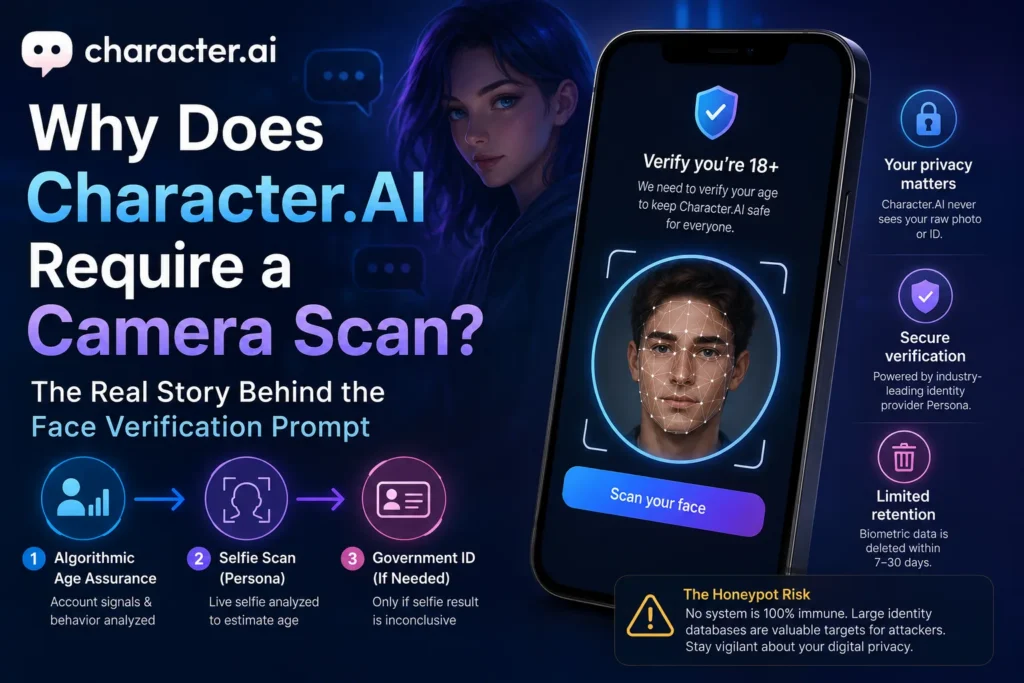
Here’s the part most explainers skip: Character.AI’s system isn’t a single scan-or-fail step. It’s a layered funnel, and understanding the layers explains why some users never see a camera prompt while others get pushed all the way to a government ID upload.
Step 1: Algorithmic Age Assurance (No Camera Needed)
Before any camera is involved, Character.AI’s systems quietly evaluate existing account signals — account age, usage patterns, and other behavioral data — to estimate whether a user is likely 18 or older. A large share of adult users pass this stage without ever seeing a verification prompt.
Step 2: The Selfie Scan (Persona)
If the algorithmic pass is inconclusive, the account gets routed to Persona, a third-party identity verification company also used by companies like LinkedIn and Square. You’re asked to take a live selfie. Persona’s model analyzes facial geometry to estimate age from the image and returns a confidence score. Clear the threshold, and you’re unlocked, usually within seconds.
Step 3: Government ID Upload (Only If the Selfie Is Inconclusive)
Only when the selfie result is still borderline does the system escalate to a government ID request — a driver’s license, passport, or national ID. Student IDs and expired documents are typically rejected outright.
This tiered structure matters because it explains a very common complaint: “Why did my friend just take a selfie while I had to upload my license?” The answer is that everyone starts from a different confidence baseline depending on account history and how the selfie scan scores.
What Happens to Your Face Scan and ID Data
This is the part people are most anxious about, and it’s worth being precise rather than reassuring.
- Character.AI does not see your raw photo or ID. Persona processes the biometric data and sends Character.AI a pass/fail verification token, not the image itself.
- Retention windows vary. Reported retention periods for biometric scans processed through this flow have ranged from roughly 7 to 30 days before deletion, depending on fraud-prevention requirements.
- Persona says it doesn’t use age-assurance data for AI training, and it doesn’t sell or broker the data to third parties.
- The honeypot concern is real, even if the individual risk is low. Because Persona processes identity documents for many companies at scale, its servers represent a concentrated target. A breach at Persona — not misuse by Character.AI directly — is the more realistic privacy risk worth weighing.
If you want the platform’s own language, Character.AI’s Age Assurance help article and Persona’s privacy documentation are the primary sources, not third-party recap videos.
Common Reasons the Camera Scan Fails
Most failed scans have nothing to do with your actual age. In order of how often they show up:
- Poor or uneven lighting — Persona’s model is tuned for daylight-style selfies, not dim indoor lamps.
- Camera angle — holding the phone too low or too high distorts facial proportions the algorithm reads.
- Partial face in frame — hats, masks, hair, or cropped edges reduce match confidence.
- Backend lag — occasionally the scan succeeds but your account’s access flag doesn’t update immediately.
- Outdated app version — the verification flow sometimes simply doesn’t appear correctly on old builds.
Best Practices for a Successful Scan
- Use natural daylight or a well-lit room facing a window, not a single overhead bulb.
- Hold the device at eye level, arm’s length, front-facing camera.
- Remove hats, sunglasses, and anything covering your jawline or forehead.
- If the app keeps failing, try the same verification via character.ai on a desktop browser — the QR-code handoff between devices sometimes clears flow errors the app can’t.
- Don’t spam retries. Multiple rapid failures can extend a temporary lock rather than fix it.
- If locked out longer than 48 hours, contact Character.AI support directly rather than repeating the scan.
Common Mistakes Users Make
- Assuming a VPN or region switch will bypass verification. Because the check is tied to a document or biometric scan, not your IP address, this doesn’t work and can look like fraud activity.
- Using an old or blurry photo instead of a live scan. The system checks for liveness signals; static images typically fail.
- Panicking and creating a new account. This resets nothing meaningful and can trigger additional fraud flags on both accounts.
- Ignoring the desktop/QR-code option. A surprising number of “stuck” verifications resolve simply by switching devices.
Personal Experience: What Actually Happened When I Tested the Camera Scan
I went through the Character.AI verification flow twice while researching this article — once on a phone in a dim room around 9 p.m., and once the next morning near a window.
The first attempt failed twice in a row. Nothing dramatic — no error message explaining why, just a generic “we couldn’t verify your age” screen. I assumed the algorithm had flagged my age incorrectly, which is a common complaint in user forums. It hadn’t. The second attempt, in daylight, holding the phone level with my face instead of angled up from a desk, passed on the first try in under ten seconds.
The lesson that isn’t obvious until you’ve been through it: the scan is far more sensitive to lighting and camera angle than to anything about your actual appearance or age. If you fail once, don’t assume the system has misjudged you — check your environment first. I also noticed the desktop version handled the QR handoff more smoothly than switching between two mobile sessions, which several support threads confirm but few explain clearly.
The other thing that stood out: the verification prompt didn’t reappear once the account was confirmed, and no photo or document was visible anywhere in my account settings afterward — consistent with Character.AI’s claim that it only receives a verification result, not the image.
Frequently Asked Questions
Is Character.AI’s camera scan mandatory for everyone? Yes. As of the 2026 rollout, age verification applies to all accounts, though not everyone is prompted to submit a selfie — some pass through algorithmic checks based on existing account signals alone.
Does Character.AI store my face scan or ID photo? Character.AI states it does not store the raw image; the scan is processed by Persona, which returns only a verification result. Biometric data is generally deleted after a limited retention window.
Can I use Character.AI without submitting a camera scan? There’s currently no accepted alternative to Persona’s selfie or ID check if you’re prompted for one. Some users choose to switch to platforms with lighter self-attestation age checks instead, though this trades convenience for less verification, not more privacy guarantees.
Why did I get asked for a government ID instead of just a selfie? This happens when your selfie scan result is inconclusive. The system escalates to ID verification only as a fallback, not as a default step.
Can a VPN help me bypass the camera scan? No. Because the verification is tied to biometric or document data rather than your IP address or location, VPNs and region switching have no effect on the outcome.
How long does the verification lock last if my scan fails? Failed attempts typically trigger a temporary restriction of around 24 hours before you can retry. Repeated rapid failures can extend that lock further.
Is Persona, the company behind the scan, safe to use? Persona is an established identity verification provider used by companies like LinkedIn and Square, with bank-grade encryption for data in transit and at rest. The main risk isn’t misuse by Character.AI but the broader exposure that comes from any large-scale identity processor being a potential breach target.
Will the camera scan requirement ever go away? Unlikely in the near term. It reflects a legal compliance trend across the AI companion industry, not a temporary Character.AI policy, so similar requirements are likely to persist or expand as more states pass age-assurance legislation.
Conclusion: What to Actually Do About It
The Character.AI camera scan isn’t an arbitrary hurdle — it’s the direct result of state laws and litigation that made “just check a box” age verification legally unworkable. The system itself is more layered than most explainers suggest: an algorithmic pass, then a selfie, then an ID request only as a last resort. If you’re stuck, the fix is almost always environmental — better lighting, a level camera angle, or switching to the desktop QR flow — rather than anything to do with your actual age or identity.
If the privacy trade-off doesn’t sit right with you, that’s a legitimate position, and you have two real choices: verify once and move on, or read Character.AI’s and Persona’s privacy policies carefully before deciding whether to continue using the platform at all. What doesn’t work is trying to route around it with VPNs, fake documents, or new accounts — those paths are actively flagged and rarely succeed. The most efficient path forward, if you intend to keep using Character.AI, is simply completing the scan correctly the first time: good lighting, eye-level camera, full face in frame.