Introduction
Type “broken keyboard grok answer” into Google and something odd happens within the first three results: nobody seems to agree on what question is actually being asked. Some pages walk you through Python code. Others tell you to clear your browser cache. One or two try to do both in the same paragraph, which usually means neither answer is much good.
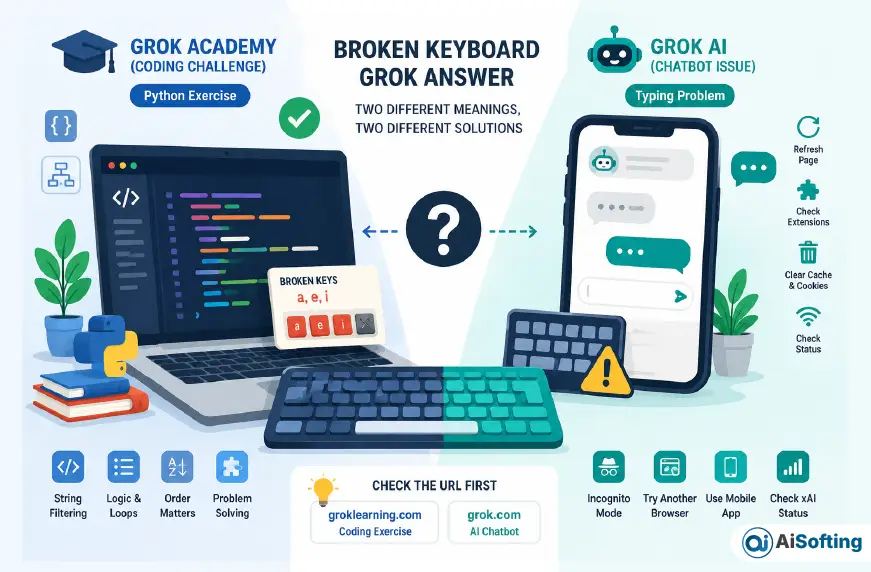
Here’s what’s actually going on. “Broken Keyboard” is the name of a real coding exercise inside Grok Academy’s Introduction to Programming course — it teaches string filtering in Python and has nothing to do with a physical keyboard breaking. Separately, “Grok” is also the name of xAI’s AI chatbot, and a smaller but real group of people search this exact phrase because their typing genuinely isn’t registering inside that chat window. Two unrelated products happen to share a name, and search engines — and now AI answer engines — are stuck serving one confusing search term to two completely different audiences.
This guide sorts out both meanings properly, instead of mashing them into one vague article the way most of what currently ranks for this term does. If you’re stuck on the Grok Academy exercise, you’ll get the actual logic behind it, not just a block of code to paste and forget. If Grok AI won’t take your input, you’ll get a troubleshooting order that reflects what genuinely tends to work. And if you’re not sure which camp you’re in, the next section settles that in under a minute.
What “Broken Keyboard Grok Answer” Actually Means
Before fixing anything, it’s worth being upfront about why this phrase is confusing: it’s genuinely two different searches wearing the same four words.
Meaning #1: The Grok Academy Python Challenge
Grok Academy, formerly known as Grok Learning, is an Australian computing education organization that grew out of a University of Sydney program called the NCSS Challenge, originally built as a self-paced programming course for high school students. Its Introduction to Programming (Python) course includes a module on manipulating strings, and one exercise in that module is literally titled “Broken Keyboard.”
The setup: imagine someone typed a message on a keyboard where a few specific keys don’t work. Your program receives the text they meant to type and a list of which keys are broken, and it has to output what would have actually appeared on screen — every character that isn’t a broken key, kept in its original order.
Meaning #2: A Real Typing Problem in the Grok AI Chatbot
Grok is also the name of the AI chatbot built by xAI, Elon Musk’s AI company, available at grok.com and through its mobile apps. Some people searching “broken keyboard grok answer” aren’t thinking about Python at all — their keyboard input simply isn’t landing in the chat box. They click into the text field, type, and nothing appears, or only some keystrokes register.
These are two unrelated products that happen to share a name, and the mix-up is easy to fall into, since both get shortened to “Grok” in casual conversation.
The 10-Second Way to Tell Which One You Have
Check your browser’s address bar.
- groklearning.com → you’re doing a coding exercise, and this is a Python problem.
- grok.com, or the Grok app on your phone → you’re using xAI’s chatbot, and this is an input or technical problem.
That single check resolves almost every case of confusion, and it’s the fastest way to jump straight to the section that actually applies to you.
Grok Academy’s Broken Keyboard Challenge, Properly Explained
Where It Sits in the Course
The Broken Keyboard exercise sits in the string-manipulation module of Grok Academy’s Introduction to Programming (Python) course, alongside similar exercises like counting vowels, checking for palindromes, and building a simple cipher. That placement isn’t a coincidence, and it matters more than most guides on this topic mention.
What the Challenge Is Really Testing
It looks like a simple filtering task, but it’s actually the first time a lot of students meet three ideas at once:
- Strings can’t be edited in place. Python strings are immutable, so you don’t “remove” characters from the original string — you build an entirely new one. Python’s official documentation covers this if you want the formal version.
- Order has to survive the filtering. You can’t sort or group characters; whatever passes the filter has to come out in the same sequence it went in.
- Every character gets its own decision. There’s no shortcut that skips checking each one individually.
Most students who fail this exercise aren’t failing at logic — they’re failing because they’re trying to modify the original string instead of building a new one, or because their filtering condition is backwards.
The Thinking Framework (Not Just the Code)
Here’s the mental model that makes this exercise — and the several that follow it — click:
- Start with an empty result.
- Go through the input string one character at a time.
- For each character, ask exactly one question: is this character in the “broken” list?
- If no, add it to the result. If yes, skip it.
- Once every character has been checked, output the result.
That five-step pattern is the actual skeleton of the challenge. Once it’s internalized, it shows up again almost immediately in the exercises that follow.
A Worked Example (Different Data, Same Pattern)
To avoid handing over something that could be pasted directly into the real challenge, here’s the identical pattern applied to a different problem — filtering a messy string down to just its letters:
python
raw_text = "h3ll0, w0rld!"
result = ""

for character in raw_text:
    if character.isalpha():
        result += character

print(result)
Notice the shape: empty result, loop, one condition per character, build as you go. Swap character.isalpha() for a check against your specific broken-keys string, and you’re looking at the real challenge’s logic — but you’ll get far more out of writing that line yourself than out of copying it.
Common Mistakes That Trigger the Red Cross
- Checking the condition backwards (keeping the broken keys instead of removing them)
- Trying to modify the original string instead of building a new one
- Assuming the exercise ignores capitalization when the version you’re doing doesn’t
- Forgetting that a “broken key” might not even appear in the message — that’s fine, and the code shouldn’t need a special case for it
- Reaching for a clever one-line solution before understanding why the plain version works
Should You Just Copy an Answer From GitHub?
Public answer repositories for Grok Learning’s courses do exist, and it’s tempting to go looking for one when you’re stuck at 11 p.m. before something is due. Worth knowing: even people who upload these repos tend to caveat them with some version of “use this if you’re stuck, not to cheat” — which is genuinely good advice. This exercise’s exact pattern repeats through most of the rest of the module. Copy the answer once, and you’ll likely stall again on the very next one; understand it once, and the rest of the module noticeably speeds up.
When It’s Really a Grok AI (xAI) Keyboard Problem
The Symptoms People Actually Report
If your issue is with grok.com or the Grok app rather than a coding course, it usually looks like one of these:
- The text box doesn’t respond at all when you click into it and type
- Some keystrokes register and others don’t
- Text appears with a delay, or in the wrong order
- You can type fine, but hitting enter doesn’t send the message
The Fix Order That Actually Works
Work through these roughly in order — most people resolve it within the first two or three steps:
- Check xAI’s status page. Grok has had documented outages and slowdowns before, and a server-side issue can look exactly like a broken keyboard from your side. xAI’s status page will tell you whether it’s not you at all.
- Hard refresh the page (Ctrl+Shift+R on Windows, Cmd+Shift+R on Mac) instead of a normal refresh, which can reload from a cached, broken state.
- Open an incognito or private window and try grok.com there. If typing works fine in a private window but not your regular one, a browser extension is very likely interfering with the page.
- Try a different browser, or the mobile app, to isolate whether the problem is specific to one setup.
- Clear cookies and cached data for grok.com if none of the above helps — a corrupted local session can cause exactly this kind of input glitch.
When It’s Not Your Keyboard At All
It’s worth separating two different problems that both get described as “Grok isn’t working”: input not registering at all (what this section covers) versus Grok receiving your message but failing to generate a reply. The second one is almost always a service-side issue rather than a local keyboard problem, and the right move is simply to wait a few minutes or check the status page rather than troubleshoot your own device.
Why This One Search Term Is So Confusing (And What It Says About Search Right Now)
This is the part most articles on this topic skip entirely, and it’s worth spelling out because it’s useful well beyond this one search term.
“Broken keyboard grok answer” is what search practitioners sometimes call a colliding-intent keyword: two unrelated audiences searching for two unrelated things, converging on identical wording purely by coincidence. Grok Academy’s exercise has presumably existed under that name for years without much fuss. It only turned into a confusing search term after xAI’s Grok chatbot became a mainstream product with its own “isn’t working” search volume — at which point content sites noticed the combined traffic opportunity and started publishing pages that try to catch both audiences at once, often by blending or misattributing details from one meaning into the other.
You can see this happening if you compare a handful of pages currently ranking for the phrase: some assume “Grok” always means the AI chatbot and awkwardly graft generic keyboard-troubleshooting advice onto that assumption; others use “grok answer” loosely as a stand-in for describing how any AI handles messy prompts, unrelated to either the coding exercise or a chatbot bug. None of it is malicious — it mostly reads like content built for search engines first and readers second — but it’s a useful reminder that a confident-sounding article isn’t automatically an accurate one. That’s just as true when an AI answer engine is summarizing search results as it is when a person is reading them directly.
The practical takeaway: when a search term feels oddly split between two unrelated topics, that’s usually a sign of a shared name, not a shared subject. Checking the source — in this case, your own URL bar — resolves it faster than reading five more articles.
Personal Experience: What Untangling This Topic Actually Taught Me
Researching this properly, rather than skimming the first result and running with it, turned out to be more revealing than expected. The first thing that stood out was how little the two “camps” of content acknowledge each other. Pages written for Python students don’t mention the chatbot at all. Pages written for chatbot troubleshooting don’t seem aware that a coding exercise shares the name. Read side by side, it’s obvious they were built for two completely different readers, but neither says so directly — you’re just expected to figure out which one you landed on.
The second thing that stood out is that the actual Python exercise is a lot more instructive than “filter out some characters” makes it sound. Looking at how this specific problem type gets discussed across student forums and course walkthroughs, the pattern is consistent: almost nobody genuinely struggles with the concept once it’s framed as “build a new string, one character at a time.” What trips people up is smaller and more mechanical — an inverted condition, an assumption about capitalization that the problem never actually stated, or an attempt to edit the original string instead of building a fresh one. That’s a very ordinary, very fixable category of mistake, and it’s the same category that shows up again in the next several exercises in that module, which is exactly why getting it right here pays off almost immediately afterward.
On the Grok AI side, the pattern in reported fixes was almost boringly consistent. It’s rarely the keyboard itself. It’s a stuck browser tab, an extension quietly intercepting keystrokes, or a page that loaded into a broken state and just needs a hard refresh. How often people land on “I tried it in an incognito window and it worked” is a decent signal that exotic explanations are rarely the right ones here.
If there’s one lesson worth taking from all of this, it’s the same one from the disambiguation section earlier: check where you actually are before you start debugging what you think is wrong. It sounds almost too simple to count as advice, but it’s the single step that would have shortcut most of the confused threads and comment sections that turned up while researching this.
Frequently Asked Questions
What does “broken keyboard grok answer” actually mean?
It refers to two unrelated things that happen to share a name. Most commonly, it’s the “Broken Keyboard” coding exercise in Grok Academy’s Introduction to Programming (Python) course, where you write code to filter non-working keys out of typed text. Less commonly, it refers to real typing or input problems inside the Grok AI chatbot at grok.com.
Is Grok Learning the same company as Grok AI?
No. Grok Academy (formerly Grok Learning) is an Australian computing education organization that grew out of a University of Sydney program. Grok AI is a separate chatbot built by xAI, Elon Musk’s AI company. They’re unrelated organizations that happen to share the word “Grok.”
Where does the Broken Keyboard challenge appear in Grok Academy’s course?
It’s part of the string-manipulation module inside the Introduction to Programming (Python) course, near similar exercises like vowel counting and simple cipher problems.
What Python concept is the Broken Keyboard challenge really testing?
Mainly string immutability and character-by-character filtering — building a brand-new string by looping through the original one character at a time, rather than editing the original string directly.
Is it cheating to copy the Grok Learning broken keyboard answer from GitHub?
If the exercise is being used as graded schoolwork, copying a solution without understanding it generally counts as academic dishonesty, and most answer repositories say as much themselves. Even outside a graded context, copying tends to backfire quickly, since the same filtering pattern reappears in the next several exercises in the module.
Why is my keyboard not working on grok.com?
It’s rarely the physical keyboard. The most common causes are a browser extension interfering with the page, a cached page that loaded in a broken state, or a temporary issue on xAI’s end. A hard refresh followed by an incognito-window test usually identifies which one it is.
How do I check if Grok AI is down right now?
Check xAI’s official status page before assuming the problem is on your device. A known outage or degraded performance affecting chat explains input or response issues without any troubleshooting needed on your end.
Does clearing my browser cache fix Grok AI typing problems?
It can, particularly if the page loaded into a stale or partially broken state. A hard refresh solves this in most cases without a full cache clear, but clearing cookies and cached data for the site is a reasonable next step if a hard refresh doesn’t help.
What’s the fastest way to tell which “Grok” I’m dealing with?
Look at your browser’s address bar. groklearning.com means you’re in a Python course. grok.com, or the Grok mobile app, means you’re using xAI’s chatbot.
Are there other Grok Academy challenges that use the same logic as Broken Keyboard?
Yes. The same “loop through the string, filter one character at a time, build a new string” pattern shows up again in nearby exercises like vowel counting, character-frequency counting, and simple cipher challenges — which is exactly why understanding the logic here, rather than just passing the test cases, pays off almost immediately.
Conclusion
“Broken keyboard grok answer” turns out to be a good example of how one search phrase can hide two completely different problems, and how much time gets wasted when nobody bothers to separate them. Once you know which “Grok” you’re actually dealing with, the rest is straightforward: a logic problem worth thinking through carefully if you’re working through Grok Academy’s Python course, or a short, unglamorous troubleshooting checklist if you’re fighting with the Grok AI chatbot’s input field.
A few things worth carrying away from this:
- Check your URL before you check your code or your settings. It settles the confusion in seconds.
- If you’re on the Python challenge, learn the “build a new string, one character at a time” pattern properly. It reappears constantly through the rest of the module.
- If you’re on Grok AI, try the boring fixes first. A hard refresh and an incognito-window test resolve the large majority of reported cases.
- Be a little skeptical of any single article that answers both problems at once without telling you they’re different. That’s usually a sign of a generic explanation, not a specific one.
Visit: Aisofting