There’s a moment every content creator hits — you’ve got a great idea, a solid script, maybe even a vision for how the finished video should look and sound, but the tools to bring it to life cost a fortune or demand skills you simply don’t have. That’s precisely the gap A2E AI is stepping into, and from what I’ve seen over the past several months of using it, it’s doing a genuinely impressive job filling it.
Whether you’re a solo YouTuber, a digital marketer running campaigns for clients, or a developer looking to integrate AI-generated media into your app, A2E AI has carved out a position that’s hard to ignore. In this in-depth guide, I’ll walk you through everything — features, pricing, real-world use cases, honest limitations, and the lessons I’ve learned using it firsthand.
What Is A2E AI?
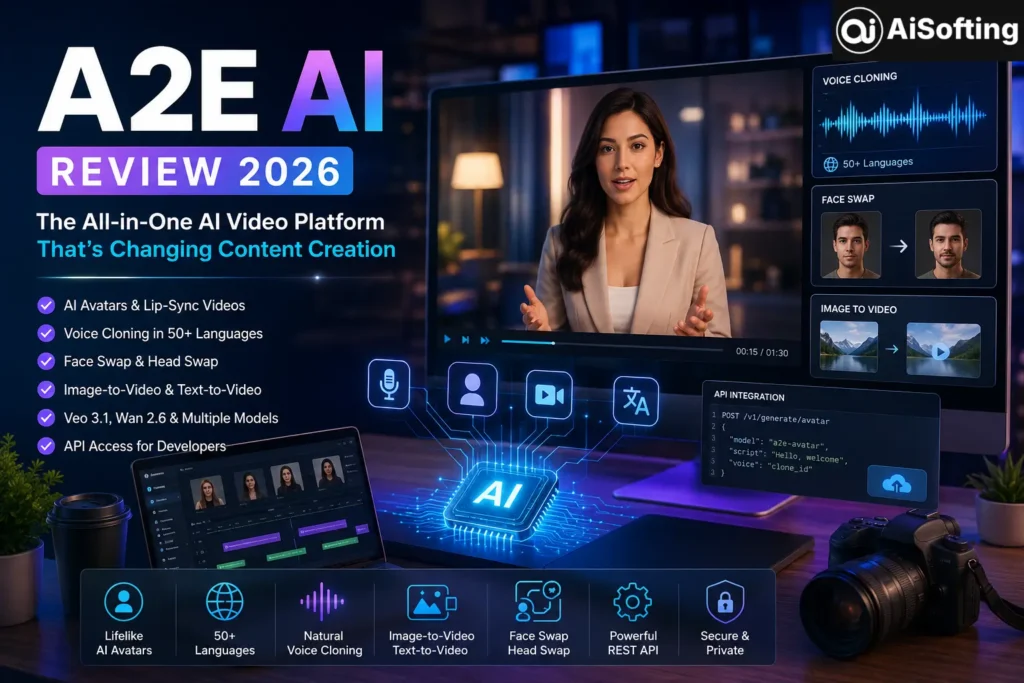
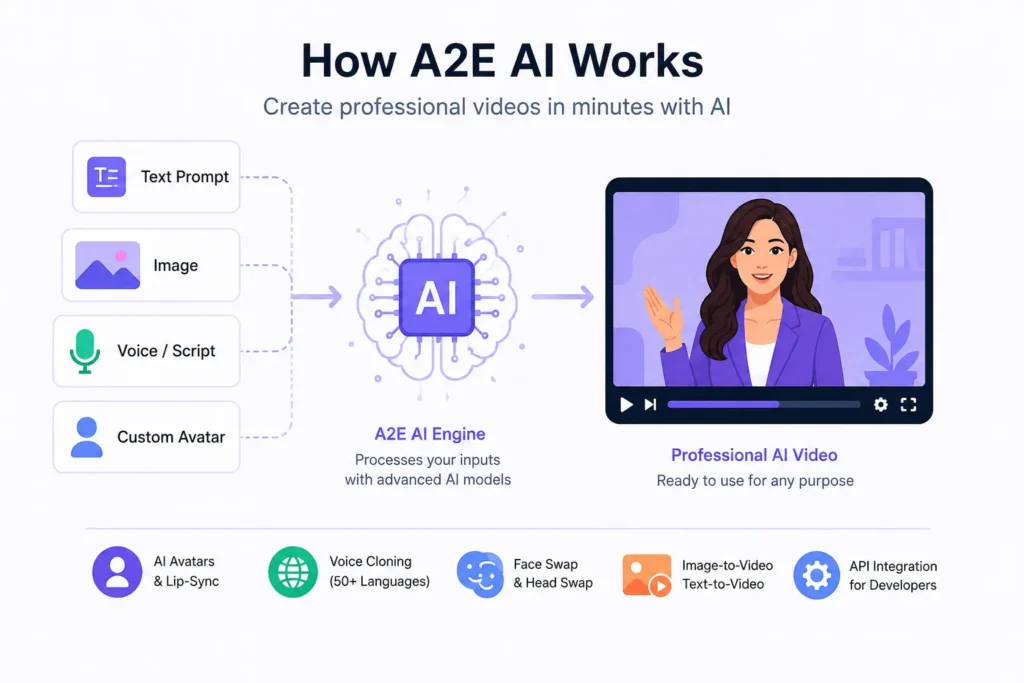
A2E AI is an all-in-one AI-powered video and image creation platform developed to simplify the production of professional-quality digital content without the need for cameras, microphones, or actors. The platform bundles together a suite of tools that would normally require multiple separate subscriptions — and in many cases, significant technical know-how.
A2E is an AI-powered platform offering a suite of tools designed to generate and manipulate multimedia content, including AI avatars, voice cloning, face swapping, and image-to-video transformations.
What makes A2E interesting isn’t just what it does — it’s how accessible it makes advanced AI video generation to everyday users. You don’t need a film crew. You don’t need a recording studio. You don’t even need to appear on camera yourself.
A2E AI has seen explosive growth — search volume surged from 30 searches per month in January 2025 to over 49,500 monthly searches by December 2025. That’s not accidental. It reflects a genuine hunger in the creator market for tools that actually deliver results without gatekeeping them behind enterprise pricing or technical complexity.
Core Features of A2E AI
AI Avatar Generation
A2E lets you create lifelike avatars with accurate lip-syncing and natural body movements. This is arguably the platform’s most impressive feature. You upload a single photo — a headshot, a character design, or even a selfie — and A2E generates a speaking, animated avatar that can deliver your script in a natural, human-like way.
This has enormous practical value for businesses that want to produce training videos, product walkthroughs, or explainer content without paying actors or building a video studio.
Voice Cloning Across 50+ Languages
The voice cloning feature lets you clone voices in over 50 languages, enabling cross-language support for translations. For content creators targeting international audiences, this is genuinely transformative. Record a script once in English, and A2E can produce your video in Spanish, Hindi, French, or Mandarin — with your cloned voice — in a fraction of the time traditional dubbing would take.
Voice cloning itself is free of charge on A2E; you only pay for the length of the content generated. That’s a refreshingly fair pricing model that makes experimentation low-risk.
Face Swap and Head Swap
The face swap feature lets you replace faces in images and videos seamlessly, maintaining high consistency and realism. A2E goes a step further than most platforms by also offering head swap — replacing the entire head, including hair and neck — which opens up creative possibilities that simple face swapping doesn’t.
Image-to-Video and Text-to-Video
The image-to-video tool transforms static images into dynamic videos, enhancing visual engagement. Combined with the text-to-image generator, this creates a powerful end-to-end workflow: describe what you want in words, generate the image, and then animate it into a video. It’s the kind of workflow that used to require a small creative team.
The platform offers multiple video models including Veo 3.1, Wan 2.6, and Kling — giving users the flexibility to choose the engine that best fits their project’s style and requirements.
Veo 3.1 and Wan 2.6 Integration
Google DeepMind’s Veo 3.1 became available to creators on A2E starting September 2025. You can start generating Veo 3.1 videos immediately — no waitlist, no Google Cloud account, and no API key needed. That’s significant, because accessing Google’s video models directly typically requires navigating complex cloud infrastructure.
Wan 2.6 is an advanced multimodal AI generation platform that functions as an all-in-one virtual studio. It unifies text, image, video, and audio inputs into a single creative workflow, allowing users to generate high-fidelity content with remarkable consistency.
A2E AI Pricing: What Does It Actually Cost?
Understanding A2E’s pricing requires understanding its credit system. AI avatar video (lip-sync) costs 1 credit per second — so a 1-minute video costs 60 credits. Image-to-video generation costs 30 credits per 5-second video. Face swap video also costs 1 credit per second for video, and 1 credit per image for static face swaps.
Here’s how the plans break down:
Free Plan The free plan provides 30 bonus credits per day, access to 10 custom avatars, and 1 voice clone slot. Videos are watermarked and limited to 720p resolution.
Pro Plan At $8.25 per month billed annually, users receive 60 bonus credits per day, 50 custom avatars, and unlimited voice clone slots. Videos are watermark-free and support up to 4K resolution.
Max Plan Priced at $39.90 per month billed annually, this plan offers 90 bonus credits per day, 200 custom avatars, and unlimited app usage. It includes all Pro Plan features and additional tools like Lipsync Video and AI Avatar from Images.
API & Business Starting free with usage-based pricing, this plan is tailored for developers and commercial use, providing access to API features such as TTS & Voice Clone, Lipsync Video, and Custom AI Avatar.
For small creators and marketers, the Pro plan at roughly $8/month is a compelling entry point into professional-grade AI video generation. For context, hiring a freelance video editor for even a single short video often costs more than a full month’s A2E subscription.
Who Is A2E AI Best For?
The platform is designed for developers, marketers, educators, and content creators who want to produce engaging videos, training materials, or marketing content efficiently.
Let’s break that down practically:
Content Creators who produce YouTube videos, TikToks, or Instagram Reels will find A2E’s avatar and lip-sync features incredibly useful for producing consistent content without appearing on camera every single time. You can build a branded AI presenter and deploy it across dozens of videos in a week.
Digital Marketers running campaigns for multiple clients can use A2E to localize ads, create product demos, and A/B test creative concepts without expensive production budgets.
Educators and Corporate Trainers can use A2E to produce multilingual training materials. Imagine creating an onboarding video once and delivering it to employees in 10 different languages — automatically.
Developers get access to a well-documented REST API that integrates avatar generation, voice cloning, and image tools directly into their own products. New users automatically get 100 free credits for initial API testing, with no setup complexity required beyond signing up.
Practical Examples: A2E AI in the Real World
Example 1: Multilingual Product Explainer
A SaaS company wants to launch their product in Southeast Asia. Instead of hiring voice actors in five countries, they record one English script, use A2E’s voice cloning to create localized versions in Thai, Vietnamese, Indonesian, and Tagalog, and sync those voices to an AI avatar of their spokesperson. Total time: a few hours. Total cost: a fraction of traditional production.
Example 2: Social Media Content at Scale
A lifestyle brand wants to post daily AI-generated video content across Instagram and TikTok. Using A2E’s image-to-video and talking photo features, they animate product shots and lifestyle images into short, engaging clips. The brand maintains a consistent visual identity without ever setting up a camera.
Example 3: Developer Integration
A startup building a language learning app wants to add AI-generated conversation partners. They use the A2E API to create custom avatars that respond to users in real time, with cloned voices in the target language. The whole integration takes a few days of development work rather than months.
For a deeper look at how tools like A2E fit into the broader AI content landscape, Google DeepMind’s overview of Veo is worth reading — it gives useful context for why these video models are such a leap forward.
My Personal Experience With A2E AI
I started using A2E AI about six months ago, initially skeptical. I’d tried several AI video tools before and found most of them impressive in demo videos but frustrating in practice — the lip-sync was always slightly off, the avatar movements were robotic, or the voice cloning sounded unmistakably synthetic.
A2E genuinely surprised me. The lip-sync quality on the AI avatars, even on the free plan, was noticeably better than competitors I’d tested at similar price points. I uploaded a photo of a custom character design I’d had illustrated for a project, added a script, and had a talking avatar video in under five minutes. The result wasn’t perfect — there was a subtle stiffness in the neck movement — but it was well above what I expected.
The voice cloning took a bit more iteration. My first clone sounded reasonable but had occasional strange emphasis patterns. After recording a cleaner sample with better microphone isolation, the second attempt was dramatically more natural. The lesson: audio quality of your source recording directly impacts the quality of your voice clone. This seems obvious in hindsight, but it’s a step many users skip.
The credit system also took me a while to internalize. I burned through my free daily credits faster than expected in the first week, mostly because I was generating long-form avatar videos without thinking about the per-second cost. Once I started planning my sessions — batching shorter clips and reserving longer generations for paid credits — the platform became much more cost-efficient.
Lessons I’d pass on to new users:
- Start with the free plan before committing to a subscription — the daily credits are enough to evaluate the core features thoroughly.
- Keep your voice clone recording samples clean and consistent.
- Plan your credit usage around your most important projects rather than experimenting freely on long videos.
- Test multiple video models (Veo 3.1 vs Wan 2.6) for the same prompt — the results can be surprisingly different, and one may suit your style much better.
Common Mistakes to Avoid
Using low-quality source images for avatars. A blurry or poorly lit photo produces a poor-quality avatar. Use high-resolution, well-lit headshots for the best results.
Ignoring the credit cost per second. New users often don’t realize how quickly credits accumulate on longer videos. Always check the credit cost before generating, especially for avatar videos.
Skipping the voice clone sample quality check. As mentioned above, the quality of your input directly limits the quality of your output.
Not testing multiple models. A2E gives you access to several underlying video models. Sticking with the default without testing alternatives means you’re likely leaving quality on the table.
A2E AI vs. Competitors
Top alternatives to A2E AI include Wondershare Filmora, InVideo, and Synthesia for lower-volume or specialized video needs.
Synthesia is the stronger choice if your primary need is polished corporate training videos with pre-built professional avatars. InVideo is better for template-driven social content. But for the combination of pricing flexibility, model variety, API access, and advanced features like head swap and multilingual voice cloning, A2E holds a genuinely competitive position.
For an independent overview of the AI video generation landscape, MIT Technology Review’s coverage of generative video provides useful context on where the technology is heading.
Best Practices for Getting the Most Out of A2E AI
- Write tight scripts. Shorter, punchy scripts produce better avatar videos than long, rambling ones.
- Use the Studio Avatar option for videos where lip-sync quality is critical — it costs more credits but delivers noticeably better results.
- Leverage the Eye Contact feature for avatar videos where you want the presenter to appear engaged and direct. This feature, which refines the eye gaze direction of a video avatar, costs 100 credits per avatar.
- Batch your generations — plan several videos at once so you can make efficient use of your daily bonus credits.
- Review A2E’s API documentation if you’re a developer. The REST API is well-structured, and with flexible API integration and a user-friendly interface, A2E fits seamlessly into both individual and enterprise-level creative processes.
Also worth exploring is Anthropic’s perspective on responsible AI use — as AI-generated media becomes more capable and widespread, understanding the ethical dimensions of the technology matters for anyone building seriously on these platforms.
FAQs About A2E AI
Q1: Is A2E AI free to use?
Yes. A2E offers a genuinely functional free plan that includes 30 bonus credits per day, access to 10 custom avatars, and 1 voice clone slot. Videos on the free plan are watermarked and capped at 720p, but it’s more than enough to evaluate the platform thoroughly before upgrading.
Q2: What video models does A2E AI support?
A2E currently supports multiple AI video generation models including Google DeepMind’s Veo 3.1, Wan 2.6, and Kling. Each model has different strengths, and users can choose the one that best fits their project.
Q3: How realistic is A2E’s voice cloning?
Voice cloning quality varies based on the quality of your source recording. With a clean, high-quality sample, A2E’s voice clones are highly natural-sounding and support over 50 languages. Cloning itself is free — you only pay for the length of content generated using the cloned voice.
Q4: Can I use A2E AI videos commercially?
Yes, on paid plans. Generated images and videos can be used for commercial purposes including ads, e-commerce, social media, and client deliverables. A2E recommends reviewing their Terms of Service for specific usage details.
Q5: How does A2E handle privacy and data security?
A2E AI processes all uploaded content securely and deletes it periodically after completion, ensuring that facial data or voice samples are not stored beyond their intended use.
Q6: Is A2E AI suitable for developers?
Absolutely. A2E exposes a full REST API covering avatar generation, voice cloning, face swap, text-to-image, and more. New developer accounts receive 100 free credits to test integrations.
Q7: What’s the difference between face swap and head swap on A2E?
Face swap replaces only the facial features while retaining the original head and hair. Head swap replaces the entire head — including hair, ears, and neck — which is useful for more dramatic transformations and consistent character creation across multiple videos.
Q8: How does A2E AI compare to Synthesia?
Synthesia is typically better for formal corporate training videos with a polished, professional look. A2E offers broader model variety, lower pricing, developer API access, and more advanced features like head swap and multilingual voice cloning — making it more versatile for diverse creative workflows.
Q9: Can I create videos without appearing on camera using A2E?
Yes, entirely. You can use an AI-generated avatar (created from any photo) as your on-screen presenter, pair it with a cloned voice, and produce complete professional videos without ever recording yourself.
Q10: What happens to my credits if I don’t use them?
Daily bonus credits do not carry over — they reset each day. However, additionally purchased top-up credits do not expire and remain valid indefinitely.
Conclusion: Is A2E AI Worth It?
A2E AI sits in a compelling sweet spot that few platforms have managed to occupy: it’s genuinely powerful, relatively affordable, and accessible enough for non-technical creators while deep enough for developers who need API-level control.
AIChief’s editorial team notes that A2E AI sets a new standard in accessible, professional AI video generation — and from my own experience, that assessment holds up.
If you’re a content creator tired of being limited by production budgets, a marketer trying to scale video output without scaling headcount, or a developer looking to embed AI media generation into your product, A2E is worth a serious look. Start with the free plan, run a few tests, and you’ll quickly develop a sense of where it fits in your workflow.
The AI video space is moving fast — faster than most people realize. Getting comfortable with platforms like A2E AI now means you’ll be building on a solid foundation as the technology continues to evolve.
For more in-depth reviews of AI tools, platform comparisons, and practical guides for content creators and marketers, visit Aisofting.
Disclaimer: This article is intended for informational purposes only. Pricing, features, and plan details are subject to change — always verify current information directly on A2E AI’s official website before making purchasing decisions. The personal experience section reflects individual observations and results may vary based on use case and technical setup.